Turn on suggestions
Auto-suggest helps you quickly narrow down your search results by suggesting possible matches as you type.
- Canon Community
- Discussions & Help
- Printer
- Professional Photo Printers
- Re: Print Studio Pro
Options
- Subscribe to RSS Feed
- Mark Topic as New
- Mark Topic as Read
- Float this Topic for Current User
- Bookmark
- Subscribe
- Mute
- Printer Friendly Page
Print Studio Pro

Options
- Mark as New
- Bookmark
- Subscribe
- Mute
- Subscribe to RSS Feed
- Permalink
- Report Inappropriate Content
08-04-2019 03:23 PM
Hi All,
I had an incident yesterday where I updated Print Studio Pro to what I believe is the latest version, 2.2.3 (filename - psp_-win-2_2_3-ea10_3) in an effort to fix an issue with the plug-ins not showing up after an Adobe Photoshop CC update. After figuring out (with help) to copy the \PSP folder from CC2018 to CC2019 the plug-ins did appear again however, just when I thought I had everything in the right place and up to date, on loading Print Studio Pro via the plug-in it would give an error message and not load.
Short story after a full day of effort is, I had to revert to an older version of Print Studio Pro ver. 2.1.0 (filename - psp_-win-2_1_0-ea10_3) to finally get printing back. I don’t know what functionality I’m not getting with the older version but, at least I can print using PSP.
Running:
WIN10-64 sub up to date,
Adobe Photoshop CC2019 20.0.5 rel. sub up to date,
Print Studio Pro ver. 2.1.0
Canon how about a current version of PSP that works with CC2019?
6 REPLIES 6


Options
- Mark as New
- Bookmark
- Subscribe
- Mute
- Subscribe to RSS Feed
- Permalink
- Report Inappropriate Content
08-05-2019 07:39 AM
Hello. I have the same configuration you are describing and PSP 2.2.3 works fine for me.
What error message are you getting?
John Hoffman
Conway, NH
R6 Mark III, M200 (converted to infrared), RF lenses, Pixma PRO-100, Pixma TR8620a, Lr Classic
Conway, NH
R6 Mark III, M200 (converted to infrared), RF lenses, Pixma PRO-100, Pixma TR8620a, Lr Classic
Options
- Mark as New
- Bookmark
- Subscribe
- Mute
- Subscribe to RSS Feed
- Permalink
- Report Inappropriate Content
08-06-2019 07:29 PM
The error message is simply and as you can see doesn't say much to help.
An error has occured.
Exiting Print Studio Pro.
I Installed the next version up from psp_-win-2_1_0-ea10_3, (psp_-win-2_1_1-ea10_3), and ran some tests and had no problem. I then installed ver psp_-win-2_2_3-ea10_3 and got the error right off. Went back to psp_-win-2_1_1-ea10_3.
The printer is a PRO-1. I'm running with the PRO-1 series XPS Printer Driver Ver.5.86 (Windows).
Options
- Mark as New
- Bookmark
- Subscribe
- Mute
- Subscribe to RSS Feed
- Permalink
- Report Inappropriate Content
08-06-2019 07:54 PM - edited 08-06-2019 07:55 PM
Hello. I have a Pro-100, but that shouldn't matter.
Here is where my PSP plug is installed (in the Plug-ins folder)

John Hoffman
Conway, NH
R6 Mark III, M200 (converted to infrared), RF lenses, Pixma PRO-100, Pixma TR8620a, Lr Classic
Conway, NH
R6 Mark III, M200 (converted to infrared), RF lenses, Pixma PRO-100, Pixma TR8620a, Lr Classic
Options
- Mark as New
- Bookmark
- Subscribe
- Mute
- Subscribe to RSS Feed
- Permalink
- Report Inappropriate Content
08-06-2019 08:25 PM
Mine are in, C:\Program Files\Adobe\Adobe Photoshop CC 2019\Plug-ins\PSP
The Plug-ins are being found and show up in the PS dropdown menu.
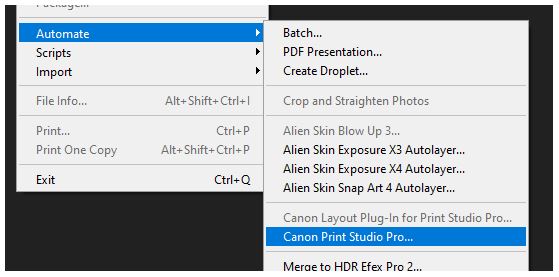
I copied them from C:\Program Files\Adobe\Adobe Photoshop CC 2018\Plug-ins\PSP. They're working OK with the older PSP version.
Options
- Mark as New
- Bookmark
- Subscribe
- Mute
- Subscribe to RSS Feed
- Permalink
- Report Inappropriate Content
08-06-2019 09:03 PM
Just for S&G I moved the plug-ins from the PSP folder in CC2019 and ran the PSP Plug-in Install utility just to make sure the copied files were not the problem. Installed PSP 2.2.3 and ran a test with CC2019. Plug-ins were listed in the menu OK but I did get the error.
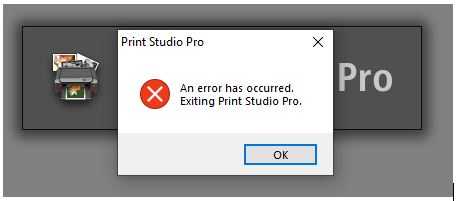
I also ran my old CC2018 and also got the error.
Reloaded PSP 2.1.1 and things run OK.
Options
- Mark as New
- Bookmark
- Subscribe
- Mute
- Subscribe to RSS Feed
- Permalink
- Report Inappropriate Content
08-06-2019 09:09 PM
Can’t explain, since it works OK for me.
You could contact Canon at 1-800-OK-CANON, but since you have a working setup it’s probably not worth it.
John Hoffman
Conway, NH
R6 Mark III, M200 (converted to infrared), RF lenses, Pixma PRO-100, Pixma TR8620a, Lr Classic
Conway, NH
R6 Mark III, M200 (converted to infrared), RF lenses, Pixma PRO-100, Pixma TR8620a, Lr Classic


Announcements
07/22/2026: New firmware updates are available.
EOS R6 Mark III - Version 1.1.0
05/13/2026: New firmware updates are available.
EOS R5 Mark II - Version 1.3.0
EOS R6 Mark II - Version 1.7.0
04/28/2026: Service Notice: Caution Concerning use of Lithium Batteries
03/17/2026: New firmware updates are available.
SELPHY CP1500 - Version 1.0.7.0
02/23/2026: New firmware update is available for EOS C50- Version 1.0.3.1
01/23/2026: New firmware update is available for RF 24-105mm F4 IS USM- Version 2.0.7
01/20/2026: New firmware updates are available.
10/21/2025: Service Notice: To Users of the Compact Digital Camera PowerShot V1
10/15/2025: New firmware updates are available.
Speedlite EL-5 - Version 1.2.0
Speedlite EL-1 - Version 1.1.0
Speedlite Transmitter ST-E10 - Version 1.2.0
07/28/2025: Notice of Free Repair Service for the Mirrorless Camera EOS R50 (Black)
05/21/2025: New firmware update available for EOS C500 Mark II - Version 1.1.5.1
Related Content
- Selphy 1300 unable to connect to my iPhone and iPad in Mobile & Compact Printers
- Print Studio Pro for Mac gone? in Printer Software & Networking
- Canon Pixma G3430 slow printing in Desktop Inkjet Printers
- How to switch PIXMA Print Plan to a new printer in Desktop Inkjet Printers
- MF Toolbox can't connect to scanner over the network, but printing works: registry fix MF210 in Printer Software & Networking

Ⓒ 2026
Canon U.S.A Inc. All Rights Reserved. Reproduction in whole or part without permission is prohibited.
