Turn on suggestions
Auto-suggest helps you quickly narrow down your search results by suggesting possible matches as you type.
- Canon Community
- Discussions & Help
- Printer
- Professional Photo Printers
- Re: Pixma pro9000 mark2 replacement?
Options
- Subscribe to RSS Feed
- Mark Topic as New
- Mark Topic as Read
- Float this Topic for Current User
- Bookmark
- Subscribe
- Mute
- Printer Friendly Page

Options
- Mark as New
- Bookmark
- Subscribe
- Mute
- Subscribe to RSS Feed
- Permalink
- Report Inappropriate Content
01-19-2022 04:07 PM
Hi, I have been wanting to upgrade my iOS to Monterey but I see that my Pixma pro9000 mark 2 is not compatible. Sigh. It is working just fine so I hate to replace it, but if I do can anyone recommend which printer is similar in price and quality of print? I print a lot of art prints but I can't afford something too fancy. Thanks
Solved! Go to Solution.
1 ACCEPTED SOLUTION
Accepted Solutions


Options
- Mark as New
- Bookmark
- Subscribe
- Mute
- Subscribe to RSS Feed
- Permalink
- Report Inappropriate Content
01-19-2022 04:20 PM
The Pixma Pro-200 is the current equivalent (i.e. 13 inch quality dye ink photo printer.)
It's $600. You would need to balance the benefits you see from Monterey against the cost of a new printer.
John Hoffman
Conway, NH
R6 Mark III, M200 (converted to infrared), RF lenses, Pixma PRO-100, Pixma TR8620a, Lr Classic
Conway, NH
R6 Mark III, M200 (converted to infrared), RF lenses, Pixma PRO-100, Pixma TR8620a, Lr Classic
9 REPLIES 9
Options
- Mark as New
- Bookmark
- Subscribe
- Mute
- Subscribe to RSS Feed
- Permalink
- Report Inappropriate Content
01-19-2022 04:20 PM
The Pixma Pro-200 is the current equivalent (i.e. 13 inch quality dye ink photo printer.)
It's $600. You would need to balance the benefits you see from Monterey against the cost of a new printer.
John Hoffman
Conway, NH
R6 Mark III, M200 (converted to infrared), RF lenses, Pixma PRO-100, Pixma TR8620a, Lr Classic
Conway, NH
R6 Mark III, M200 (converted to infrared), RF lenses, Pixma PRO-100, Pixma TR8620a, Lr Classic
Options
- Mark as New
- Bookmark
- Subscribe
- Mute
- Subscribe to RSS Feed
- Permalink
- Report Inappropriate Content
01-20-2022 10:34 AM
Thank you, John! Yes, it's all a balance, isn't it? I appreciate your answering so quickly.

Options
- Mark as New
- Bookmark
- Subscribe
- Mute
- Subscribe to RSS Feed
- Permalink
- Report Inappropriate Content
07-17-2022 06:28 PM
I am sure I am late to this thread Slugwork but I have my Pro9000 (Mk1) working with Monterey. It's possible.
Options
- Mark as New
- Bookmark
- Subscribe
- Mute
- Subscribe to RSS Feed
- Permalink
- Report Inappropriate Content
07-17-2022 08:55 PM
@Carbon14 wrote:I am sure I am late to this thread Slugwork but I have my Pro9000 (Mk1) working with Monterey. It's possible.
It would be helpful to the Community if you shared how you did it, and also exactly how it is working (i.e. able to print quality photo prints like the original before Monterey?).
John Hoffman
Conway, NH
R6 Mark III, M200 (converted to infrared), RF lenses, Pixma PRO-100, Pixma TR8620a, Lr Classic
Conway, NH
R6 Mark III, M200 (converted to infrared), RF lenses, Pixma PRO-100, Pixma TR8620a, Lr Classic
Options
- Mark as New
- Bookmark
- Subscribe
- Mute
- Subscribe to RSS Feed
- Permalink
- Report Inappropriate Content
07-18-2022 11:59 AM
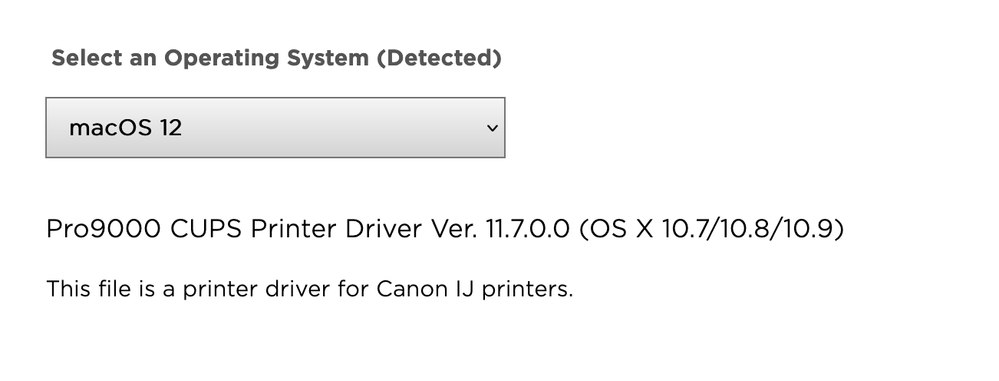
How I did it? Yeah, sure.
- I went to https://canoncanada.custhelp.com/app/browse/a_status/published/channelRecordID/DRIVERS_AND_SOFTWARE/...
- I downloaded the driver
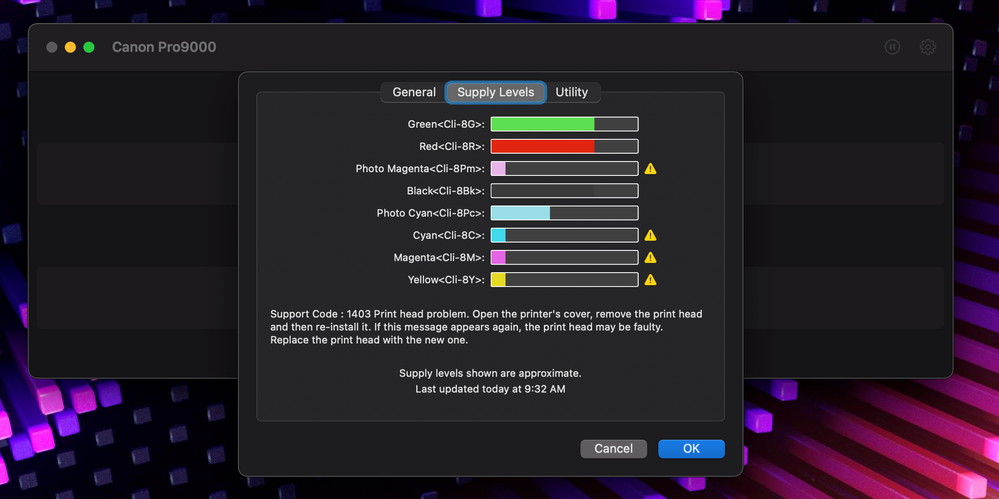
- I installed the driver. Works like a charm. (need more ink tho)
Options
- Mark as New
- Bookmark
- Subscribe
- Mute
- Subscribe to RSS Feed
- Permalink
- Report Inappropriate Content
08-05-2022 01:36 PM
Thank you! I've been going in circles to get my printer working again. This totally worked for me.
Options
- Mark as New
- Bookmark
- Subscribe
- Mute
- Subscribe to RSS Feed
- Permalink
- Report Inappropriate Content
08-05-2022 04:52 PM
Huh! The US support page says there is no driver for OS 12, but there is in Canada? That is very strange. Does it work in a printer bought in the US, do you suppose?
Thanks for posting!
Options
- Mark as New
- Bookmark
- Subscribe
- Mute
- Subscribe to RSS Feed
- Permalink
- Report Inappropriate Content
08-05-2022 04:58 PM - edited 08-05-2022 05:05 PM
I don't think its a driver for Monterey (you'll in the screen grab Canon identifies macOS 10.7/10.8/10.9), but it works in Monterey.
FWIW, I actually bought the printer in the States.
It will take you <60s to see if it works for you or not.
Best of luck. 😉
Options
- Mark as New
- Bookmark
- Subscribe
- Mute
- Subscribe to RSS Feed
- Permalink
- Report Inappropriate Content
08-06-2022 11:23 AM
Great, thank you so much for your help! I will give it a try 🙂


Announcements
07/22/2026: New firmware updates are available.
EOS R6 Mark III - Version 1.1.0
05/13/2026: New firmware updates are available.
EOS R5 Mark II - Version 1.3.0
EOS R6 Mark II - Version 1.7.0
04/28/2026: Service Notice: Caution Concerning use of Lithium Batteries
03/17/2026: New firmware updates are available.
SELPHY CP1500 - Version 1.0.7.0
02/23/2026: New firmware update is available for EOS C50- Version 1.0.3.1
01/23/2026: New firmware update is available for RF 24-105mm F4 IS USM- Version 2.0.7
01/20/2026: New firmware updates are available.
10/21/2025: Service Notice: To Users of the Compact Digital Camera PowerShot V1
10/15/2025: New firmware updates are available.
Speedlite EL-5 - Version 1.2.0
Speedlite EL-1 - Version 1.1.0
Speedlite Transmitter ST-E10 - Version 1.2.0
07/28/2025: Notice of Free Repair Service for the Mirrorless Camera EOS R50 (Black)
05/21/2025: New firmware update available for EOS C500 Mark II - Version 1.1.5.1
Related Content

Ⓒ 2026
Canon U.S.A Inc. All Rights Reserved. Reproduction in whole or part without permission is prohibited.
