- Meet Our Illuminaries
- Discussions & Help
- Gallery
- Learn With Canon
- About Our Community
- Discussions & Help
- Gallery
- Learn With Canon
- About Our Community
Turn on suggestions
Auto-suggest helps you quickly narrow down your search results by suggesting possible matches as you type.
- Canon Community
- Discussions & Help
- Printer
- Professional Photo Printers
- Pixma Pro 100 Printing Issues with macOS Big Sur
Options
- Subscribe to RSS Feed
- Mark Topic as New
- Mark Topic as Read
- Float this Topic for Current User
- Bookmark
- Subscribe
- Mute
- Printer Friendly Page
Pixma Pro 100 Printing Issues with macOS Big Sur

Options
- Mark as New
- Bookmark
- Subscribe
- Mute
- Subscribe to RSS Feed
- Permalink
- Report Inappropriate Content
01-26-2021 09:09 AM
I've been using my Pixma Pro 100 for 5+ years with a PC with no issues. I switched to macOS Big Sur, and now I'm getting blurred/hazy prints. I've tried printing through PhotoShop, Gimp and ColorSync. Here are the other things I tried with no success:
- Deleted all printers/reset printers in Apple settings and readded Pro 100 with Canon IJ using latest drivers downloaded from Canon (did not use AirPrint or Bonjour to add the printer)
- Tried Canon’s plugin Print Studio Pro in Photoshop
- Hooked the computer directly up to printer with USB cable and tried to print
- Updated the printer’s firmware to the latest version
- Cleaned printer multiple times using Utility
- Cleaned print heads manually
After all this, I hooked up my PC again, and it printed perfectly. Any advice?
40 REPLIES 40


Options
- Mark as New
- Bookmark
- Subscribe
- Mute
- Subscribe to RSS Feed
- Permalink
- Report Inappropriate Content
01-26-2021 10:02 AM
Welcome to the forum.
That is strange. I have a Pro-100 connected by USB to my Windows PC and via WiFi to a MacBook Air and iMac.
Prints are the same regardless of which I print from.
Can you post a screenshot of the prints from each computer? Are you using the latest driver (16 50 version)? Do you have a Canon camera (so you could try printing from Canon DPP)? Can you post the print setting dialog box?
John Hoffman
Conway, NH
R6 Mark III, M200 (converted to infrared), RF lenses, Pixma PRO-100, Pixma TR8620a, Lr Classic
Conway, NH
R6 Mark III, M200 (converted to infrared), RF lenses, Pixma PRO-100, Pixma TR8620a, Lr Classic
Options
- Mark as New
- Bookmark
- Subscribe
- Mute
- Subscribe to RSS Feed
- Permalink
- Report Inappropriate Content
01-28-2021 12:12 PM
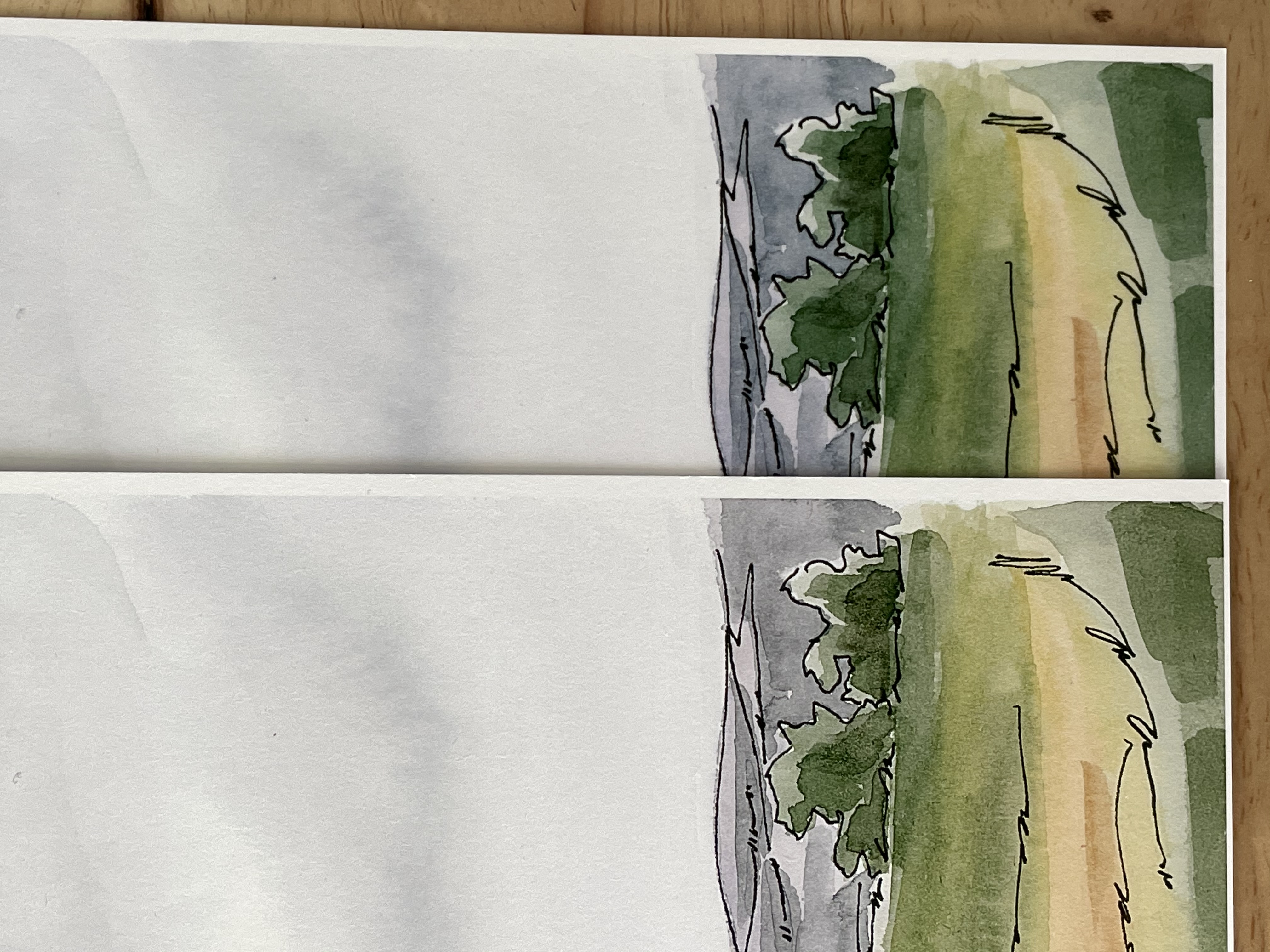
Attached is a photo of the artwork I'm attempting to print (left: good print with PC; right: bad blurry/hazy print with mac).
- Using the latest driver
- No Canon camera
- I'll post the print setting dialog box later tonight
- Also tried printing with AirPrint last night. No luck.
Any suggestions are MOST appreciated!
Options
- Mark as New
- Bookmark
- Subscribe
- Mute
- Subscribe to RSS Feed
- Permalink
- Report Inappropriate Content
01-28-2021 12:18 PM
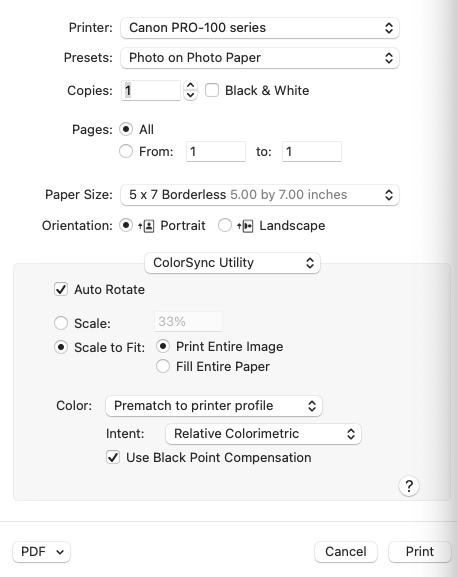
Here's a screenshot of print dialogue box.
Options
- Mark as New
- Bookmark
- Subscribe
- Mute
- Subscribe to RSS Feed
- Permalink
- Report Inappropriate Content
01-28-2021 12:24 PM
@katiegarrison wrote:Here's a screenshot of print dialogue box.
What software is this from?
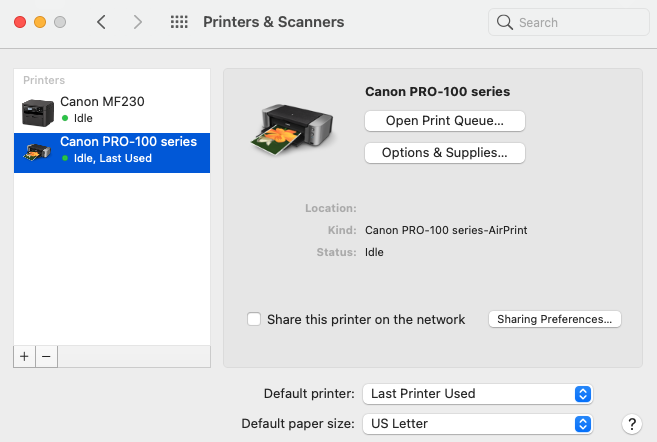
Can you post a screenshot of your Printers & Scanners info?
John Hoffman
Conway, NH
R6 Mark III, M200 (converted to infrared), RF lenses, Pixma PRO-100, Pixma TR8620a, Lr Classic
Conway, NH
R6 Mark III, M200 (converted to infrared), RF lenses, Pixma PRO-100, Pixma TR8620a, Lr Classic
Options
- Mark as New
- Bookmark
- Subscribe
- Mute
- Subscribe to RSS Feed
- Permalink
- Report Inappropriate Content
01-28-2021 12:27 PM
I'm using ColorSync. So far, this software is giving the best results. And here's a screenshot. Let me know if you need something else!
Options
- Mark as New
- Bookmark
- Subscribe
- Mute
- Subscribe to RSS Feed
- Permalink
- Report Inappropriate Content
01-28-2021 12:30 PM
You are using the AirPrint version of the printer. It is an Apple driver that doesn't access any of the features of the Pro-100.
Click the "+" icon to add a printer and wait a few minutes for the Canon version to appear.
John Hoffman
Conway, NH
R6 Mark III, M200 (converted to infrared), RF lenses, Pixma PRO-100, Pixma TR8620a, Lr Classic
Conway, NH
R6 Mark III, M200 (converted to infrared), RF lenses, Pixma PRO-100, Pixma TR8620a, Lr Classic
Options
- Mark as New
- Bookmark
- Subscribe
- Mute
- Subscribe to RSS Feed
- Permalink
- Report Inappropriate Content
01-28-2021 12:35 PM
I just swtiched it back to Canon from AirPrint. AirPrint was a final "Hail Mary" attempt yesterday.
Options
- Mark as New
- Bookmark
- Subscribe
- Mute
- Subscribe to RSS Feed
- Permalink
- Report Inappropriate Content
01-28-2021 12:41 PM - edited 01-28-2021 12:42 PM
I'm confused.
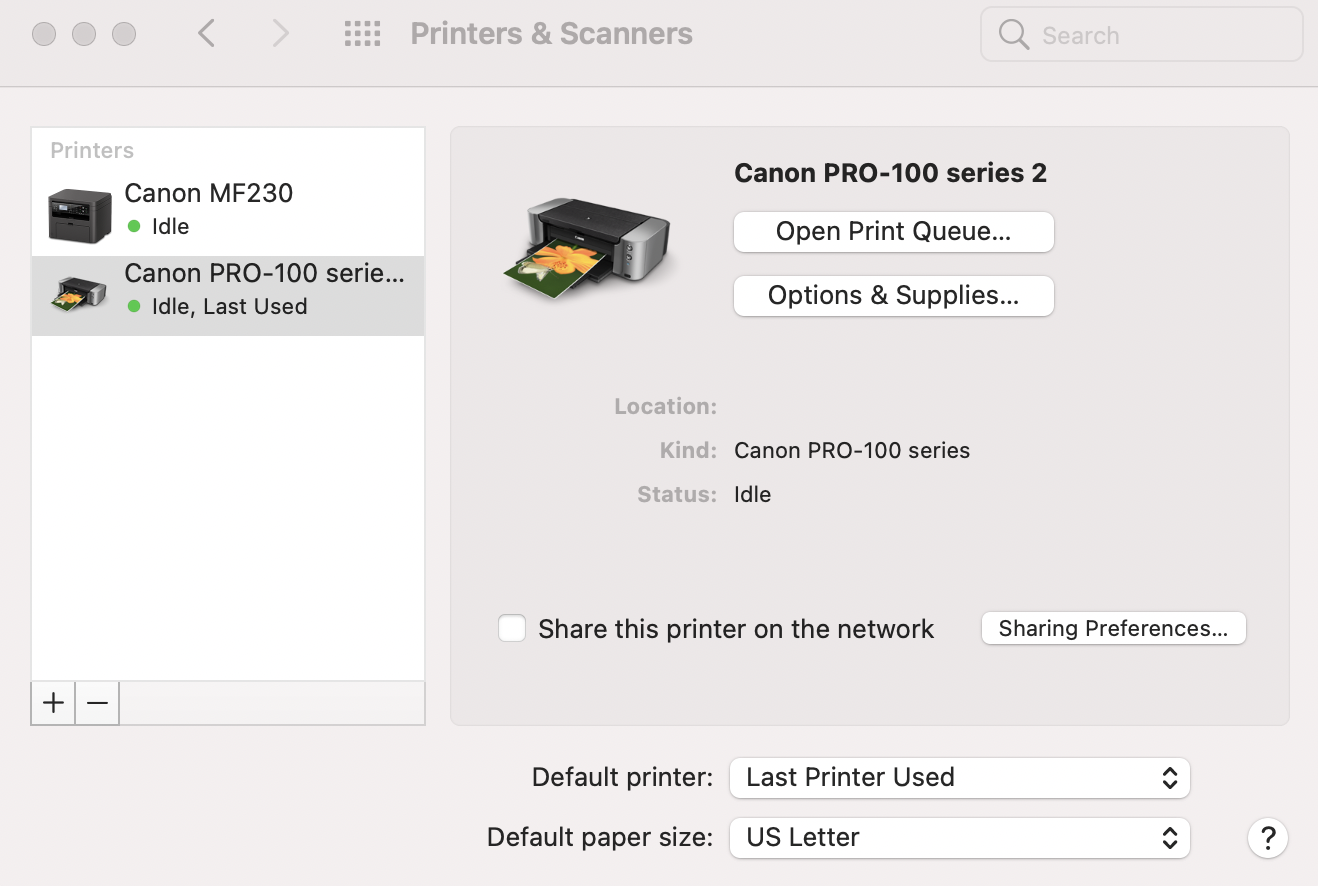
I only see the AirPrint version in Printers & Scanners.
Click Options and Supplies and post what you see.
John Hoffman
Conway, NH
R6 Mark III, M200 (converted to infrared), RF lenses, Pixma PRO-100, Pixma TR8620a, Lr Classic
Conway, NH
R6 Mark III, M200 (converted to infrared), RF lenses, Pixma PRO-100, Pixma TR8620a, Lr Classic
Options
- Mark as New
- Bookmark
- Subscribe
- Mute
- Subscribe to RSS Feed
- Permalink
- Report Inappropriate Content
01-28-2021 12:42 PM

Announcements
07/22/2026: New firmware updates are available.
EOS R6 Mark III - Version 1.1.0
05/13/2026: New firmware updates are available.
EOS R5 Mark II - Version 1.3.0
EOS R6 Mark II - Version 1.7.0
04/28/2026: Service Notice: Caution Concerning use of Lithium Batteries
03/17/2026: New firmware updates are available.
SELPHY CP1500 - Version 1.0.7.0
02/23/2026: New firmware update is available for EOS C50- Version 1.0.3.1
01/23/2026: New firmware update is available for RF 24-105mm F4 IS USM- Version 2.0.7
01/20/2026: New firmware updates are available.
10/21/2025: Service Notice: To Users of the Compact Digital Camera PowerShot V1
10/15/2025: New firmware updates are available.
Speedlite EL-5 - Version 1.2.0
Speedlite EL-1 - Version 1.1.0
Speedlite Transmitter ST-E10 - Version 1.2.0
07/28/2025: Notice of Free Repair Service for the Mirrorless Camera EOS R50 (Black)
05/21/2025: New firmware update available for EOS C500 Mark II - Version 1.1.5.1
Related Content
- Bug Report: macOS Driver Conflict – Booklet Printing on Legal Paper (iR ADV DX C5840i / Finisher-AB1 in Production Printing
- Driver PIXMA G5010 & G6010 for macOS 26 in Desktop Inkjet Printers
- Trouble connecting imageCLASS D570 to Wi-Fi again in Printer Software & Networking
- PRO-300 IP address hardcoded into various files for drivers/apps in Printer Software & Networking
- Error with Canon MF Port Monitor preventing printing and scanning in Printer Software & Networking

Ⓒ 2026
Canon U.S.A Inc. All Rights Reserved. Reproduction in whole or part without permission is prohibited.
