- Meet Our Illuminaries
- Discussions & Help
- Gallery
- Learn With Canon
- About Our Community
- Meet Our Illuminaries
- Discussions & Help
- Gallery
- Learn With Canon
- About Our Community
Turn on suggestions
Auto-suggest helps you quickly narrow down your search results by suggesting possible matches as you type.
- Canon Community
- Discussions & Help
- Printer
- Professional Photo Printers
- Re: I can't disable airprint using Canon Pro-200
Options
- Subscribe to RSS Feed
- Mark Topic as New
- Mark Topic as Read
- Float this Topic for Current User
- Bookmark
- Subscribe
- Mute
- Printer Friendly Page
I can't disable airprint using Canon Pro-200

Options
- Mark as New
- Bookmark
- Subscribe
- Mute
- Subscribe to RSS Feed
- Permalink
- Report Inappropriate Content
02-04-2023 04:19 PM
Hi there, I have a Canon pixma pro-200 and am trying to test print some illustrations to check colors. I'm printing through Photoshop using a macstudio. When I try to print using Photoshop settings, it tells me to make sure to disable the printer's color management in print settings but I do not see any settings there to allow me to disable. I checked my printer's settings in preferences and saw that it is using Canon Pro-200 series-Airprint. I removed the printer and added it again using Canon Pro-200 series in the 'use' dropdown. But when I go back to check it, the Canon Pro-200 series - Airprint with driver verwsion 3.0 is listed again.
Not sure how to solve this issue but if anyone has any suggestions, I'd be greatful!
Thank you,
Janeen
7 REPLIES 7


Options
- Mark as New
- Bookmark
- Subscribe
- Mute
- Subscribe to RSS Feed
- Permalink
- Report Inappropriate Content
02-07-2023 01:23 PM
Hi,
When you add the printer back in Printers and Scanners, do you get both AirPrint and Pro-200 IJ Network?
We look forward to your reply.
Options
- Mark as New
- Bookmark
- Subscribe
- Mute
- Subscribe to RSS Feed
- Permalink
- Report Inappropriate Content
11-17-2023 03:28 AM
I am having above issue i keep deleting and installing and when I go to add orinters I only see a single option for canon pro 200 series I dont see anything at all mention air print of IJ. If I choose other software dropdown all i see are other printers like HP/Epson. I am unable to complete orders because i have no color dialogue. This is in Mac sonoma 14 OS


Options
- Mark as New
- Bookmark
- Subscribe
- Mute
- Subscribe to RSS Feed
- Permalink
- Report Inappropriate Content
11-17-2023 01:47 PM
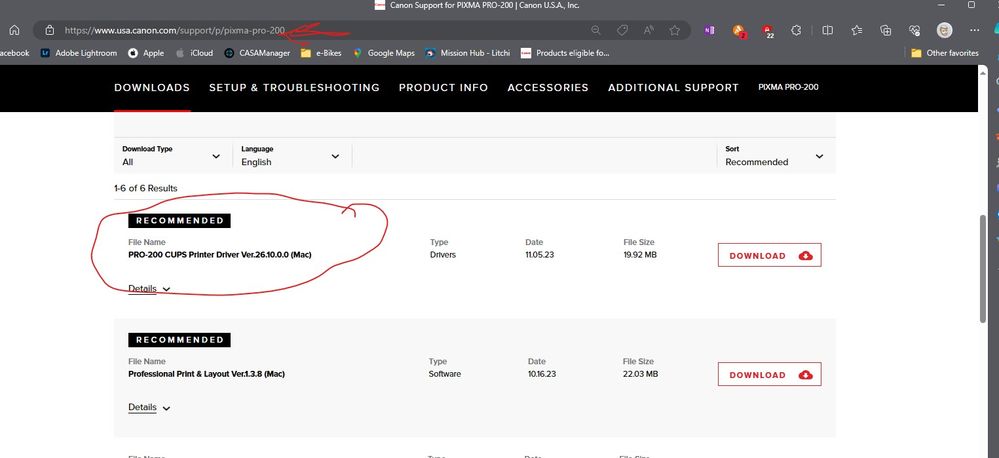
Did you install this driver from the Canon support page?
John Hoffman
Conway, NH
R6 Mark III, M200 (converted to infrared), RF lenses, Pixma PRO-100, Pixma TR8620a, Lr Classic
Conway, NH
R6 Mark III, M200 (converted to infrared), RF lenses, Pixma PRO-100, Pixma TR8620a, Lr Classic

Options
- Mark as New
- Bookmark
- Subscribe
- Mute
- Subscribe to RSS Feed
- Permalink
- Report Inappropriate Content
04-22-2024 07:48 AM
Hi John
I'm having the same issue (running same operating systems). I have tried to install the CUPS driver to solve it- I'm able to go through the whole process and it says successfully installed. However then when I get to step 3 in the setup, I'm shown this error message that says I need to install the canon driver first.
Unsure where to go from here, just want to be able to print from the driver instead of AirPrint so I'm able to use the utility tab to make changes. Came here from trying to implement these fixes shown on this other community page here.
Thank you for any insight you can offer!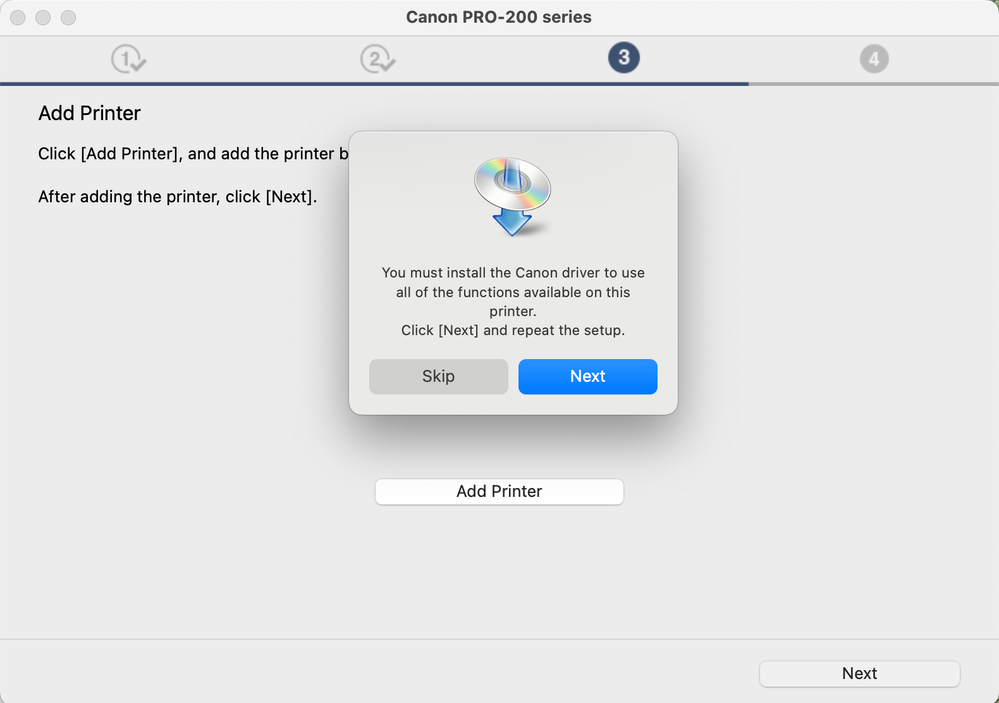
Options
- Mark as New
- Bookmark
- Subscribe
- Mute
- Subscribe to RSS Feed
- Permalink
- Report Inappropriate Content
04-22-2024 08:23 AM
Hi. I have never gotten that error message, so cannot help. You should register your product and contact Canon for support.
John Hoffman
Conway, NH
R6 Mark III, M200 (converted to infrared), RF lenses, Pixma PRO-100, Pixma TR8620a, Lr Classic
Conway, NH
R6 Mark III, M200 (converted to infrared), RF lenses, Pixma PRO-100, Pixma TR8620a, Lr Classic
Options
- Mark as New
- Bookmark
- Subscribe
- Mute
- Subscribe to RSS Feed
- Permalink
- Report Inappropriate Content
05-13-2025 10:38 AM
Hi, wondering if anyone has been able to solve this problem?
I am facing the exact same issues and cannot get the printer driver to install and the printer continues to default to AirPrint. I've added and removed my printer (Pixma Pro 200) multiple times and nothing seems to be working.
Any help is much appreciated!
Options
- Mark as New
- Bookmark
- Subscribe
- Mute
- Subscribe to RSS Feed
- Permalink
- Report Inappropriate Content
05-13-2025 10:53 AM
Give Canon support a call at 1-800-OK-CANON.
John Hoffman
Conway, NH
R6 Mark III, M200 (converted to infrared), RF lenses, Pixma PRO-100, Pixma TR8620a, Lr Classic
Conway, NH
R6 Mark III, M200 (converted to infrared), RF lenses, Pixma PRO-100, Pixma TR8620a, Lr Classic

Announcements
07/22/2026: New firmware updates are available.
EOS R6 Mark III - Version 1.1.0
05/13/2026: New firmware updates are available.
EOS R5 Mark II - Version 1.3.0
EOS R6 Mark II - Version 1.7.0
04/28/2026: Service Notice: Caution Concerning use of Lithium Batteries
03/17/2026: New firmware updates are available.
SELPHY CP1500 - Version 1.0.7.0
02/23/2026: New firmware update is available for EOS C50- Version 1.0.3.1
01/23/2026: New firmware update is available for RF 24-105mm F4 IS USM- Version 2.0.7
01/20/2026: New firmware updates are available.
10/21/2025: Service Notice: To Users of the Compact Digital Camera PowerShot V1
10/15/2025: New firmware updates are available.
Speedlite EL-5 - Version 1.2.0
Speedlite EL-1 - Version 1.1.0
Speedlite Transmitter ST-E10 - Version 1.2.0
07/28/2025: Notice of Free Repair Service for the Mirrorless Camera EOS R50 (Black)
05/21/2025: New firmware update available for EOS C500 Mark II - Version 1.1.5.1
Related Content
- Media Options not available on Mac for PIXMA G6020 in Printer Software & Networking
- Mobile App and Computer can't see PIXMA TR8620a - Solved: Asus Router Setting in Printer Software & Networking
- I can't disable airprint using Canon Pro-200 in Professional Photo Printers
- imageCLASS MF462Cdw Error 853 in Office Printers
- ts9521c on Mac color management in Desktop Inkjet Printers

Ⓒ 2026
Canon U.S.A Inc. All Rights Reserved. Reproduction in whole or part without permission is prohibited.
