Turn on suggestions
Auto-suggest helps you quickly narrow down your search results by suggesting possible matches as you type.
- Canon Community
- Discussions & Help
- Printer
- Professional Photo Printers
- Re: How to configure the printer driver to use ICC...
Options
- Subscribe to RSS Feed
- Mark Topic as New
- Mark Topic as Read
- Float this Topic for Current User
- Bookmark
- Subscribe
- Mute
- Printer Friendly Page
How to configure the printer driver to use ICC profile with a Pixma Pro-100 on Mac 10.14 and more?

Options
- Mark as New
- Bookmark
- Subscribe
- Mute
- Subscribe to RSS Feed
- Permalink
- Report Inappropriate Content
03-11-2020 10:42 PM
Hi,
I use a MacBook Pro with macOS 10.14 and a Canon Pixma Pro-100.
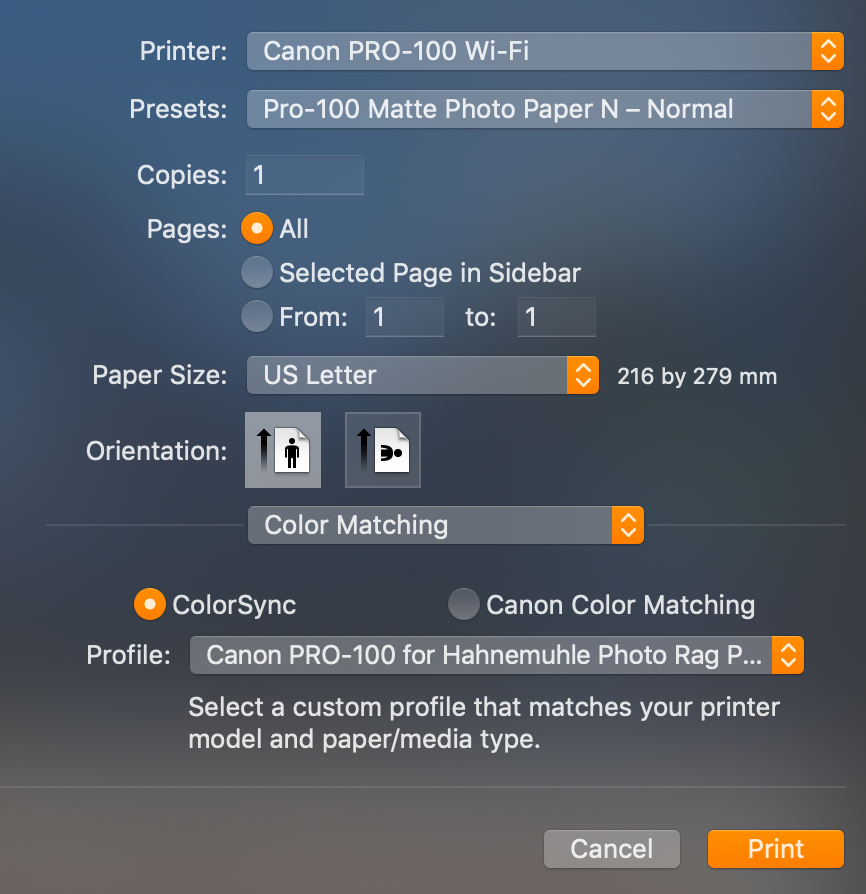
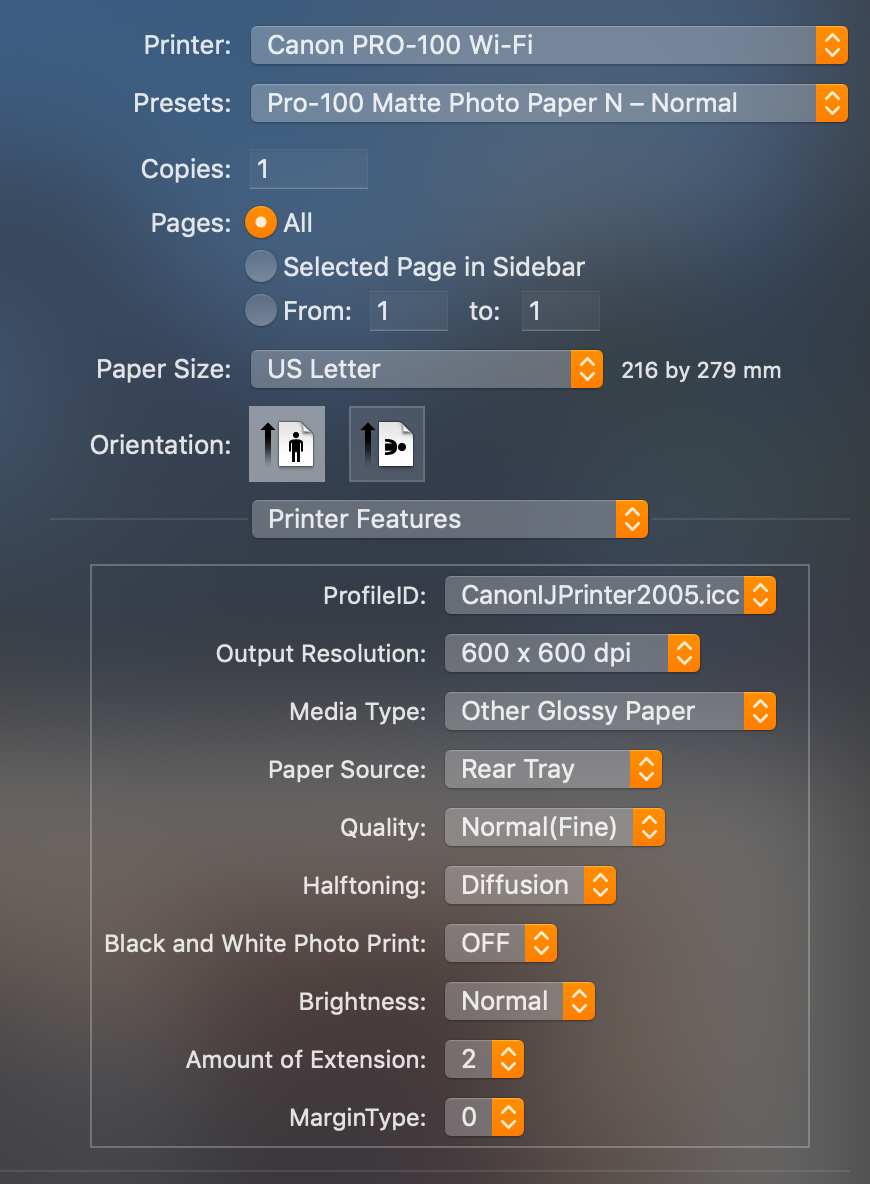
I bought a sample pack from Hahnemühle and I installed the ICC profiles to test the paper, but I don't know how to configure the driver to use the profile because the Canon documentation is too old.
Here my questions :
- I use Apple Photos to print my pictures. Do I need to select the profile in Color Matching > ColorSync?
- There some ICC profile for Hahnemühle papers on the Canon web site and others on the Hahnemühle web site : which one I must use (the Canon ones or the Hahnemühle ones) ?
- How I must configure the Printer Features section? I don't see the Hahnemühle ICC profiles in ProfileID and I'm not sure how configure other elements.
Thanks!
14 REPLIES 14


Options
- Mark as New
- Bookmark
- Subscribe
- Mute
- Subscribe to RSS Feed
- Permalink
- Report Inappropriate Content
03-14-2020 11:40 PM
No. I will post my screenshots tomorrow.
John Hoffman
Conway, NH
R6 Mark III, M200 (converted to infrared), RF lenses, Pixma PRO-100, Pixma TR8620a, Lr Classic
Conway, NH
R6 Mark III, M200 (converted to infrared), RF lenses, Pixma PRO-100, Pixma TR8620a, Lr Classic
Options
- Mark as New
- Bookmark
- Subscribe
- Mute
- Subscribe to RSS Feed
- Permalink
- Report Inappropriate Content
03-14-2020 11:52 PM
OK, thanks!
I did a test with the demo of QImage and the result is good (no magenta cast).
Options
- Mark as New
- Bookmark
- Subscribe
- Mute
- Subscribe to RSS Feed
- Permalink
- Report Inappropriate Content
03-15-2020 06:03 AM - edited 03-15-2020 07:39 AM
I use Lightroom and Qimage with great results.
Since its seems to be working for you that is the way to go.
Perhaps Photos doesn't allow third party paper profiles.
John Hoffman
Conway, NH
R6 Mark III, M200 (converted to infrared), RF lenses, Pixma PRO-100, Pixma TR8620a, Lr Classic
Conway, NH
R6 Mark III, M200 (converted to infrared), RF lenses, Pixma PRO-100, Pixma TR8620a, Lr Classic
Options
- Mark as New
- Bookmark
- Subscribe
- Mute
- Subscribe to RSS Feed
- Permalink
- Report Inappropriate Content
03-15-2020 07:51 AM
See this link.
http://www.colourphil.co.uk/printing-canon-mac.shtml
Read the paragraph above green Canon Printer Driver text.
John Hoffman
Conway, NH
R6 Mark III, M200 (converted to infrared), RF lenses, Pixma PRO-100, Pixma TR8620a, Lr Classic
Conway, NH
R6 Mark III, M200 (converted to infrared), RF lenses, Pixma PRO-100, Pixma TR8620a, Lr Classic
Options
- Mark as New
- Bookmark
- Subscribe
- Mute
- Subscribe to RSS Feed
- Permalink
- Report Inappropriate Content
03-15-2020 08:39 AM
Thank you very much!
I will buy QImage. The user interface is not really good, but the product work!

- « Previous
-
- 1
- 2
- Next »
- « Previous
-
- 1
- 2
- Next »

Announcements
05/13/2026: New firmware updates are available.
EOS R5 Mark II - Version 1.3.0
EOS R6 Mark II - Version 1.7.0
04/28/2026: Service Notice: Caution Concerning use of Lithium Batteries
03/17/2026: New firmware updates are available.
SELPHY CP1500 - Version 1.0.7.0
02/23/2026: New firmware update is available for EOS C50- Version 1.0.3.1
01/23/2026: New firmware update is available for RF 24-105mm F4 IS USM- Version 2.0.7
01/20/2026: New firmware updates are available.
12/22/2025: New firmware update is available for EOS R6 Mark III- Version 1.0.2
10/21/2025: Service Notice: To Users of the Compact Digital Camera PowerShot V1
10/15/2025: New firmware updates are available.
Speedlite EL-5 - Version 1.2.0
Speedlite EL-1 - Version 1.1.0
Speedlite Transmitter ST-E10 - Version 1.2.0
07/28/2025: Notice of Free Repair Service for the Mirrorless Camera EOS R50 (Black)
05/21/2025: New firmware update available for EOS C500 Mark II - Version 1.1.5.1
Related Content
- PIXMA G6050 colors washed out in Desktop Inkjet Printers
- GX2020 Stopped duplex printing in Office Printers
- Unable to use Professional Print & Layout, "Check operation panel/remote UI" error in Printer Software & Networking
- PIXMA PRO-200S profiles: Who's in Control - Printer or Software in Professional Photo Printers
- SELPHY CP1500 Best settings for borderless printing in Lightroom Classic in Mobile & Compact Printers

Ⓒ 2026
Canon U.S.A Inc. All Rights Reserved. Reproduction in whole or part without permission is prohibited.
