Turn on suggestions
Auto-suggest helps you quickly narrow down your search results by suggesting possible matches as you type.
- Canon Community
- Discussions & Help
- Printer
- Professional Photo Printers
- Re: Canon Pro-100 Skuffing the backside of Matte p...
Options
- Subscribe to RSS Feed
- Mark Topic as New
- Mark Topic as Read
- Float this Topic for Current User
- Bookmark
- Subscribe
- Mute
- Printer Friendly Page
Canon Pro-100 Skuffing the backside of Matte prints

Options
- Mark as New
- Bookmark
- Subscribe
- Mute
- Subscribe to RSS Feed
- Permalink
- Report Inappropriate Content
10-21-2015 01:10 PM
We're printing an 11x14 portrait orientation book.
The prints look great! But it seems like the paper feed is grabbing the backside and leaving a terrible scuff on the backside print, making it completely unacceptable.
We let the prints dry for almost 4 day's before printing the reverse side too! 
Are there any tips/ adjustments we can make to ensure the quality on both sides?!
Thanks in advance for any insight you might have into the issue.
2 REPLIES 2
Options
- Mark as New
- Bookmark
- Subscribe
- Mute
- Subscribe to RSS Feed
- Permalink
- Report Inappropriate Content
10-21-2015 02:07 PM
After talking to customer support, here's some pointers they gave me. We'll see if it works 🙂
Go to your printer utility, select custom settings, and make sure prevent paper abrasion is selected.
They also suggest using manual feed, since that loads the paper from a less extreme angle, and seems to be more gentle on the paper.
Hope this helps someone else who ends up in my position 🙂
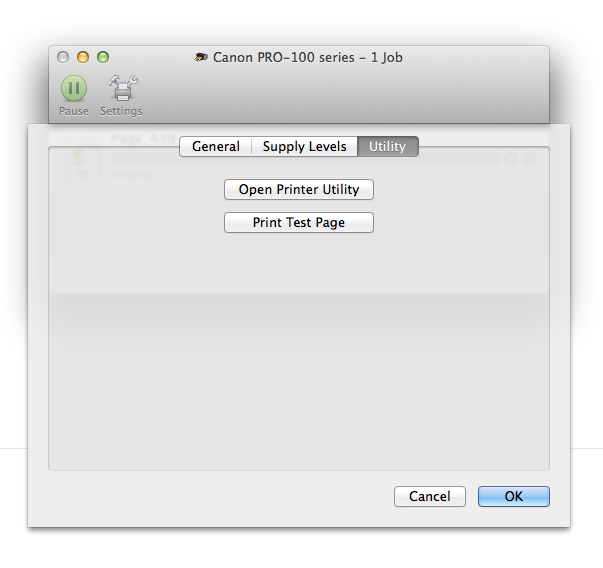
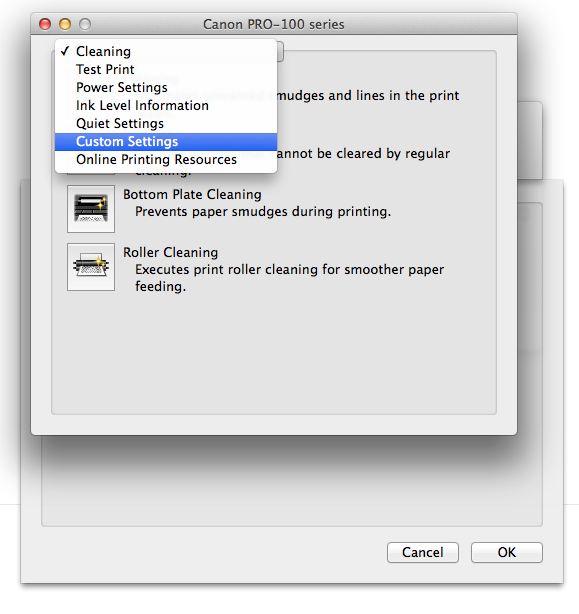
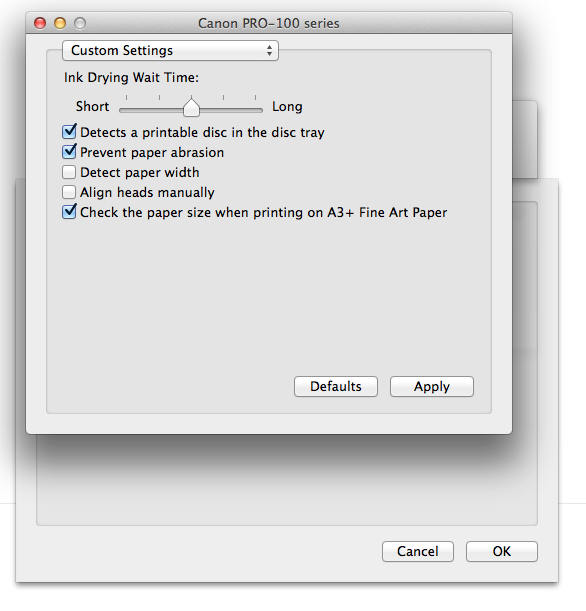

Options
- Mark as New
- Bookmark
- Subscribe
- Mute
- Subscribe to RSS Feed
- Permalink
- Report Inappropriate Content
10-22-2015 09:59 AM
Did you try cleaning your rollers that grab the paper. If not in the manual, you should be able to get the proper directions on how to do that by calling customer service

Announcements
07/22/2026: New firmware updates are available.
EOS R6 Mark III - Version 1.1.0
05/13/2026: New firmware updates are available.
EOS R5 Mark II - Version 1.3.0
EOS R6 Mark II - Version 1.7.0
04/28/2026: Service Notice: Caution Concerning use of Lithium Batteries
03/17/2026: New firmware updates are available.
SELPHY CP1500 - Version 1.0.7.0
02/23/2026: New firmware update is available for EOS C50- Version 1.0.3.1
01/23/2026: New firmware update is available for RF 24-105mm F4 IS USM- Version 2.0.7
01/20/2026: New firmware updates are available.
10/21/2025: Service Notice: To Users of the Compact Digital Camera PowerShot V1
10/15/2025: New firmware updates are available.
Speedlite EL-5 - Version 1.2.0
Speedlite EL-1 - Version 1.1.0
Speedlite Transmitter ST-E10 - Version 1.2.0
07/28/2025: Notice of Free Repair Service for the Mirrorless Camera EOS R50 (Black)
05/21/2025: New firmware update available for EOS C500 Mark II - Version 1.1.5.1
Related Content
- imageCLASS MF654Cdw - printing back page upside down in Office Printers
- Help needed: Ink marks on backside of prints on Pro-1000 printer in Professional Photo Printers
- Printer prints black ink spots and lines on the backside of cardstock paper in Professional Photo Printers
- Canon Pro-100 Skuffing the backside of Matte prints in Professional Photo Printers

Ⓒ 2026
Canon U.S.A Inc. All Rights Reserved. Reproduction in whole or part without permission is prohibited.
