Turn on suggestions
Auto-suggest helps you quickly narrow down your search results by suggesting possible matches as you type.
- Canon Community
- Discussions & Help
- Printer
- Production Printing
- Re: Removing this message from scanning
Options
- Subscribe to RSS Feed
- Mark Topic as New
- Mark Topic as Read
- Float this Topic for Current User
- Bookmark
- Subscribe
- Mute
- Printer Friendly Page
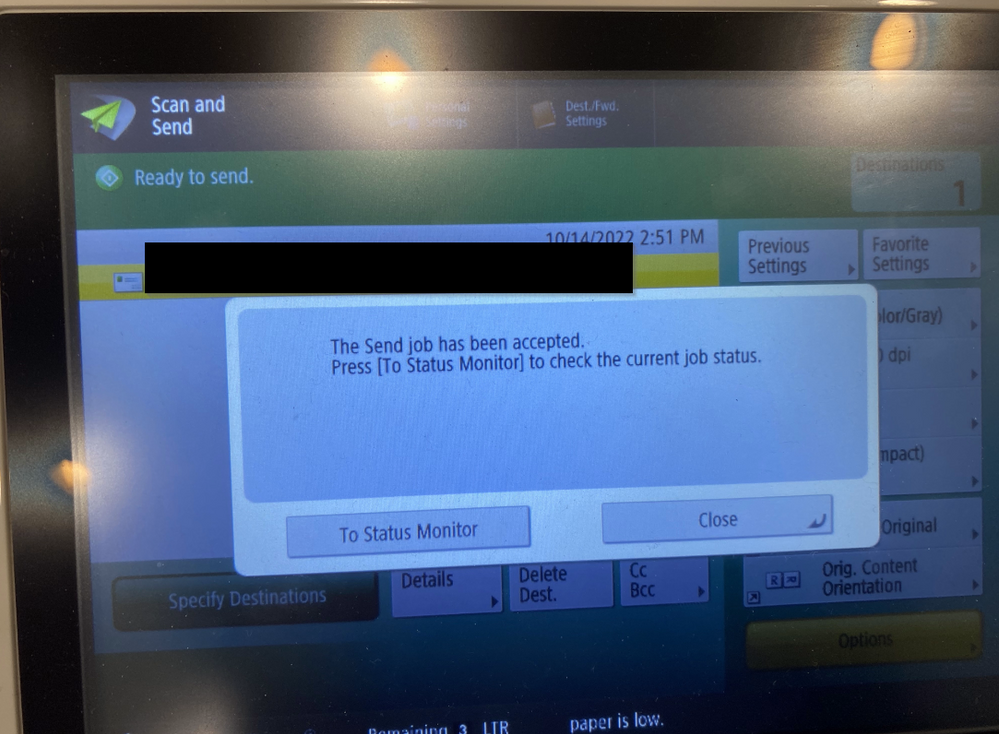
imageRUNNER ADVANCE DX C357iF - Removing "The Send job has been accepted" message from scanning

Options
- Mark as New
- Bookmark
- Subscribe
- Mute
- Subscribe to RSS Feed
- Permalink
- Report Inappropriate Content
10-14-2022
03:00 PM
- last edited on
10-15-2022
09:28 AM
by
 Danny
Danny
This message is a real annoyance, is there any way to remove it after you scan with onetouch? I've looked through every setting and cannot find any option to remove this message that takes 30 seconds to go away.
Model is iR-ADV C357.
2 REPLIES 2

Options
- Mark as New
- Bookmark
- Subscribe
- Mute
- Subscribe to RSS Feed
- Permalink
- Report Inappropriate Content
10-14-2022 03:12 PM
Thanks for posting!
While our Forum Community members are welcome to chime in, Canon does not provide direct support for imageRUNNER series products, but your dealer will be able to help you!
If you don't have a dealer, please call us at 1-800-OK-CANON (1-800-652-2666) and we will be happy to provide you with the names of dealers who are in your area! Or you can visit our "Find a Dealer" option on our website HERE.
Options
- Mark as New
- Bookmark
- Subscribe
- Mute
- Subscribe to RSS Feed
- Permalink
- Report Inappropriate Content
10-17-2022 11:06 AM - edited 10-17-2022 11:06 AM
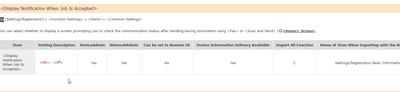
I found the fix for this. The setting doesn't seem to exist in the webgui but in the screen settings it does.

Announcements
07/22/2026: New firmware updates are available.
EOS R6 Mark III - Version 1.1.0
05/13/2026: New firmware updates are available.
EOS R5 Mark II - Version 1.3.0
EOS R6 Mark II - Version 1.7.0
04/28/2026: Service Notice: Caution Concerning use of Lithium Batteries
03/17/2026: New firmware updates are available.
SELPHY CP1500 - Version 1.0.7.0
02/23/2026: New firmware update is available for EOS C50- Version 1.0.3.1
01/23/2026: New firmware update is available for RF 24-105mm F4 IS USM- Version 2.0.7
01/20/2026: New firmware updates are available.
10/21/2025: Service Notice: To Users of the Compact Digital Camera PowerShot V1
10/15/2025: New firmware updates are available.
Speedlite EL-5 - Version 1.2.0
Speedlite EL-1 - Version 1.1.0
Speedlite Transmitter ST-E10 - Version 1.2.0
07/28/2025: Notice of Free Repair Service for the Mirrorless Camera EOS R50 (Black)
05/21/2025: New firmware update available for EOS C500 Mark II - Version 1.1.5.1
Related Content
- Error with Canon MF Port Monitor preventing printing and scanning in Printer Software & Networking
- Imageclass #MF665Cdw scan FROM machine gets "Connect Computer" in Office Printers
- PIXMA TR8620a - will not connect to my computer to scan. in Desktop Inkjet Printers
- PIXMA TR8520 prints OK but when attempting to scan get can't connect message in Desktop Inkjet Printers
- TR8620A, TS8320, MAcOS Tahoe and NO scanning possible in Printer Software & Networking

Ⓒ 2026
Canon U.S.A Inc. All Rights Reserved. Reproduction in whole or part without permission is prohibited.
