Turn on suggestions
Auto-suggest helps you quickly narrow down your search results by suggesting possible matches as you type.
- Canon Community
- Discussions & Help
- Printer
- Printer Software & Networking
- Re: imagePROGRAF TA-20 Not Recognized by IJ Networ...
Options
- Subscribe to RSS Feed
- Mark Topic as New
- Mark Topic as Read
- Float this Topic for Current User
- Bookmark
- Subscribe
- Mute
- Printer Friendly Page
imagePROGRAF TA-20 Not Recognized by IJ Network tool

Options
- Mark as New
- Bookmark
- Subscribe
- Mute
- Subscribe to RSS Feed
- Permalink
- Report Inappropriate Content
12-07-2020 10:20 AM - edited 12-07-2020 10:24 AM
I have a imagePROGRAF TA-20 connected to my wireless router. I'm running macos 10.15.1 and cannot get the Canon IJ Network tool to find the printer.
I have removed and re-downloaded the printer driver and the network tool. My firmware is up-to-date. I have connected via USB and Direct Connect in addition to WiFi and still cannot get the Network tool to recognize the printer.
I have another Canon printer (iX6800) that it picks up just fine.
2 REPLIES 2


Options
- Mark as New
- Bookmark
- Subscribe
- Mute
- Subscribe to RSS Feed
- Permalink
- Report Inappropriate Content
12-09-2020 08:51 AM
Hi jessicab29,
The IJ Network Tool that your PIXMA iX6820 uses is not compatbile with the imagePROGRAF TA-20.
Have you downloaded and installed the CUPS Printer Drievr? If not, is it available for download here:
Once the CUPS Printer Driver has been downloaded and installed, you can add the printer:
1. Click on the Apple in the upper left hand corner and then System Preferences.
2. Click on Printers & Scanners.
3. Click the [+] in the lower left and then click on Add printer or scanner. The Add window will appear.
4. Click 1 time on the imagePROGRAF TA-20 when it appears.
5. At the bottom, next to "Use", please select imagePROGRAF TA-20, not Airprint or Secure Airprint.
6. Click the Add button.
Your imagePROGRAF TA-20 will install.
If you continue to have difficulties, please contact our support group. There is NO charge for this call. Please dial 1-800-423-2366, Monday-Friday 8:00 am to 8:00 pm Eastern Time, excluding holidays. A Technical Support Representative will assist you with your imagePROGRAF TA-20 via phone.
Options
- Mark as New
- Bookmark
- Subscribe
- Mute
- Subscribe to RSS Feed
- Permalink
- Report Inappropriate Content
12-12-2020 10:15 AM
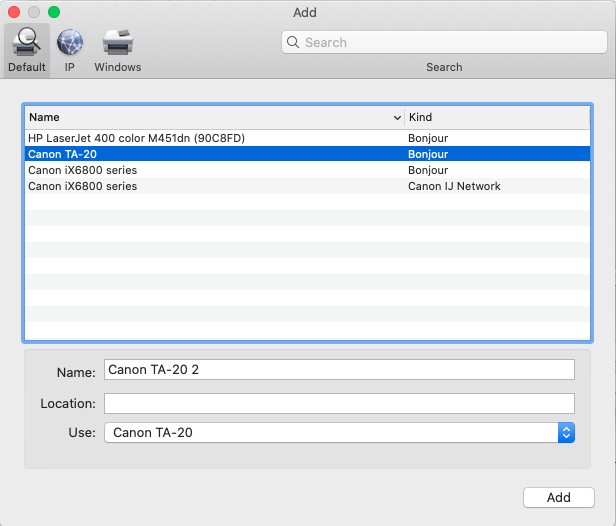
Thank you for the information. I've done as you describe below and can add the printer—and yes, I'm using the CUPS Driver. But my only option in adding the printer is the Bonjour connection. Is it not possible to connect to this printer via IJ Network (see photo 1)?
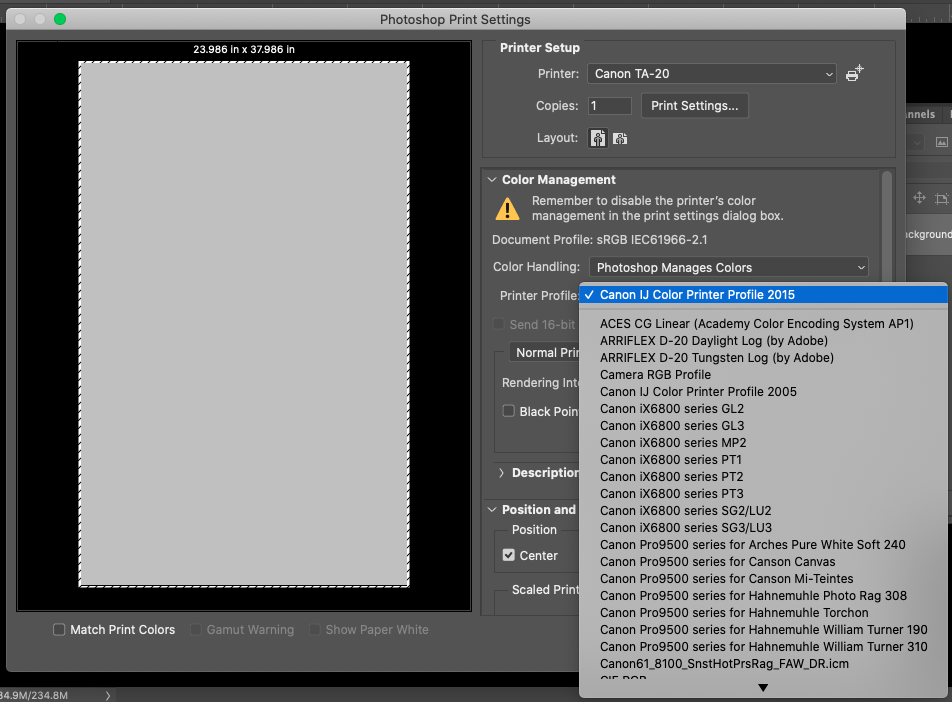
I ask because this is a known issue with printers like the Pro-10, I don't think the driver is actually installing the ICC profiles for Canon paper when I connect this way. Here is a list of the profiles I see in Photoshop (photo 2 below). As you can see I have other Canon profiles, but none for the TA-20. I was hoping that connecting via IJ network would install the printer correctly and allow me to print with Photoshop managing the colors, but this doens't seem possible if I can't access the canon paper ICC profiles.


Announcements
07/22/2026: New firmware updates are available.
EOS R6 Mark III - Version 1.1.0
05/13/2026: New firmware updates are available.
EOS R5 Mark II - Version 1.3.0
EOS R6 Mark II - Version 1.7.0
04/28/2026: Service Notice: Caution Concerning use of Lithium Batteries
03/17/2026: New firmware updates are available.
SELPHY CP1500 - Version 1.0.7.0
02/23/2026: New firmware update is available for EOS C50- Version 1.0.3.1
01/23/2026: New firmware update is available for RF 24-105mm F4 IS USM- Version 2.0.7
01/20/2026: New firmware updates are available.
10/21/2025: Service Notice: To Users of the Compact Digital Camera PowerShot V1
10/15/2025: New firmware updates are available.
Speedlite EL-5 - Version 1.2.0
Speedlite EL-1 - Version 1.1.0
Speedlite Transmitter ST-E10 - Version 1.2.0
07/28/2025: Notice of Free Repair Service for the Mirrorless Camera EOS R50 (Black)
05/21/2025: New firmware update available for EOS C500 Mark II - Version 1.1.5.1
Related Content
- imagePROGRAF TM-200 won't recognize MBK or BK inks in Production Printing
- ScanApp Lei v1.5 disconnecting after every scan in Printer Software & Networking
- Canon imgagePROGRAF PRO-4600 - How to Set Admin Password & Find Site Certificate in Production Printing
- Imageprograf Pro 1100 set up issue-ink cartridge not recognized by printer in Professional Photo Printers
- Pixma Print Plan TS6520 unable to register in Printer Software & Networking

Ⓒ 2026
Canon U.S.A Inc. All Rights Reserved. Reproduction in whole or part without permission is prohibited.
