Turn on suggestions
Auto-suggest helps you quickly narrow down your search results by suggesting possible matches as you type.
- Canon Community
- Discussions & Help
- Printer
- Printer Software & Networking
- Re: Print Studio Pro with MAC Ventura 13.3.1 and C...
Options
- Subscribe to RSS Feed
- Mark Topic as New
- Mark Topic as Read
- Float this Topic for Current User
- Bookmark
- Subscribe
- Mute
- Printer Friendly Page
Options
- Mark as New
- Bookmark
- Subscribe
- Mute
- Subscribe to RSS Feed
- Permalink
- Report Inappropriate Content
04-12-2023 03:28 PM
An anomaly, it seems. After many months of not being able to use PSP with Ventura, I was able to make it work on one computer but not another with similar operating system. The change came after I found that Canon has upgraded to Print Studio Pro 2.2.6. The early version 2.2.5 did not work with the PSP and Ventura. Of course, I still cannot understand why the printing software works on an M1 laptop but not on the iMac; PSP does not show under Automation Tools on the desktop. Would like to know why that's happening. Anyone have a similar issue? Thanks.
Solved! Go to Solution.
1 ACCEPTED SOLUTION
Accepted Solutions
Options
- Mark as New
- Bookmark
- Subscribe
- Mute
- Subscribe to RSS Feed
- Permalink
- Report Inappropriate Content
04-16-2023 07:04 PM
I found a solution. I made sure that the Print Studio Pro folders appear in the Plug-Ins file and in the PSElements file. I copied the file from the Elements area and put the copy into the Plug-Ins area. That enabled me to use PSP.
6 REPLIES 6
Options
- Mark as New
- Bookmark
- Subscribe
- Mute
- Subscribe to RSS Feed
- Permalink
- Report Inappropriate Content
04-14-2023 01:35 PM
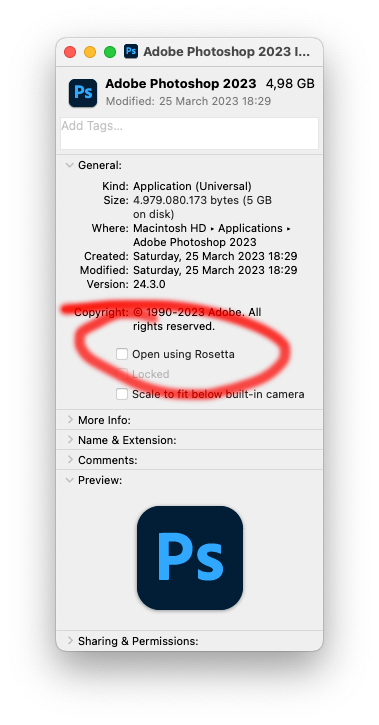
You may need to open Ps using Rosetta..... it works
Options
- Mark as New
- Bookmark
- Subscribe
- Mute
- Subscribe to RSS Feed
- Permalink
- Report Inappropriate Content
04-14-2023 03:58 PM
Eduardo,
I thought that Rosetta would open by itself when it was needed. How to I open Rosetta? Thanks.
Options
- Mark as New
- Bookmark
- Subscribe
- Mute
- Subscribe to RSS Feed
- Permalink
- Report Inappropriate Content
04-15-2023 05:04 AM
Go to Applications folder / Adobe Photoshop. Command + i on the app / check the box
Options
- Mark as New
- Bookmark
- Subscribe
- Mute
- Subscribe to RSS Feed
- Permalink
- Report Inappropriate Content
04-16-2023 03:09 PM
Rosetta feature not available with Elements.
Options
- Mark as New
- Bookmark
- Subscribe
- Mute
- Subscribe to RSS Feed
- Permalink
- Report Inappropriate Content
04-16-2023 07:04 PM
I found a solution. I made sure that the Print Studio Pro folders appear in the Plug-Ins file and in the PSElements file. I copied the file from the Elements area and put the copy into the Plug-Ins area. That enabled me to use PSP.

Options
- Mark as New
- Bookmark
- Subscribe
- Mute
- Subscribe to RSS Feed
- Permalink
- Report Inappropriate Content
04-28-2023 01:10 PM
Yes it does but it greyed the Print and Layout plugin so no switching between the two as of yet. This was with Ventura 13.3.1 running on a M2 Pro chip, 24.4.1 Photoshop release.

Announcements
07/22/2026: New firmware updates are available.
EOS R6 Mark III - Version 1.1.0
05/13/2026: New firmware updates are available.
EOS R5 Mark II - Version 1.3.0
EOS R6 Mark II - Version 1.7.0
04/28/2026: Service Notice: Caution Concerning use of Lithium Batteries
03/17/2026: New firmware updates are available.
SELPHY CP1500 - Version 1.0.7.0
02/23/2026: New firmware update is available for EOS C50- Version 1.0.3.1
01/23/2026: New firmware update is available for RF 24-105mm F4 IS USM- Version 2.0.7
01/20/2026: New firmware updates are available.
10/21/2025: Service Notice: To Users of the Compact Digital Camera PowerShot V1
10/15/2025: New firmware updates are available.
Speedlite EL-5 - Version 1.2.0
Speedlite EL-1 - Version 1.1.0
Speedlite Transmitter ST-E10 - Version 1.2.0
07/28/2025: Notice of Free Repair Service for the Mirrorless Camera EOS R50 (Black)
05/21/2025: New firmware update available for EOS C500 Mark II - Version 1.1.5.1
Related Content
- Print Studio Pro will not work with Adobe Photoshop 2025, can't use my Pro-100s in Printer Software & Networking
- Update Stored Settings with Professional Print & Layout in Printer Software & Networking
- Print Studio Pro Not working after upgrade to MacOS Ventura 14.2.1 in Printer Software & Networking
- Missing printer driver for os ventura pro 9000 mark2 in Printer Software & Networking
- pro 4000 printer driver error with ventura in Production Printing

Ⓒ 2026
Canon U.S.A Inc. All Rights Reserved. Reproduction in whole or part without permission is prohibited.
