Turn on suggestions
Auto-suggest helps you quickly narrow down your search results by suggesting possible matches as you type.
- Canon Community
- Discussions & Help
- Printer
- Printer Software & Networking
- Re: Print Studio Pro Plugin for Lightroom no longe...
Options
- Subscribe to RSS Feed
- Mark Topic as New
- Mark Topic as Read
- Float this Topic for Current User
- Bookmark
- Subscribe
- Mute
- Printer Friendly Page
Print Studio Pro Plugin for Lightroom no longer working when macOS Ventura was installed

Options
- Mark as New
- Bookmark
- Subscribe
- Mute
- Subscribe to RSS Feed
- Permalink
- Report Inappropriate Content
11-08-2022 02:54 PM
Printer - Pixma Pro 100. Print Studio Pro V2.2.5 installed. Lightroom V12.01. Everything worked fine with macOS 12 Monterey. Just upgraded to macOS 13 Ventura and I now get the following error message when I select a photo in Lightroom and run the plugin for Print Studio Pro (and Print Studio Pro opens) : AN ERROR HAS OCCURRED. EXITING PRINT STUDIO PRO. An exhaustive search of the internet yielded no results. Anyone else having this problem? Many thanks for any help.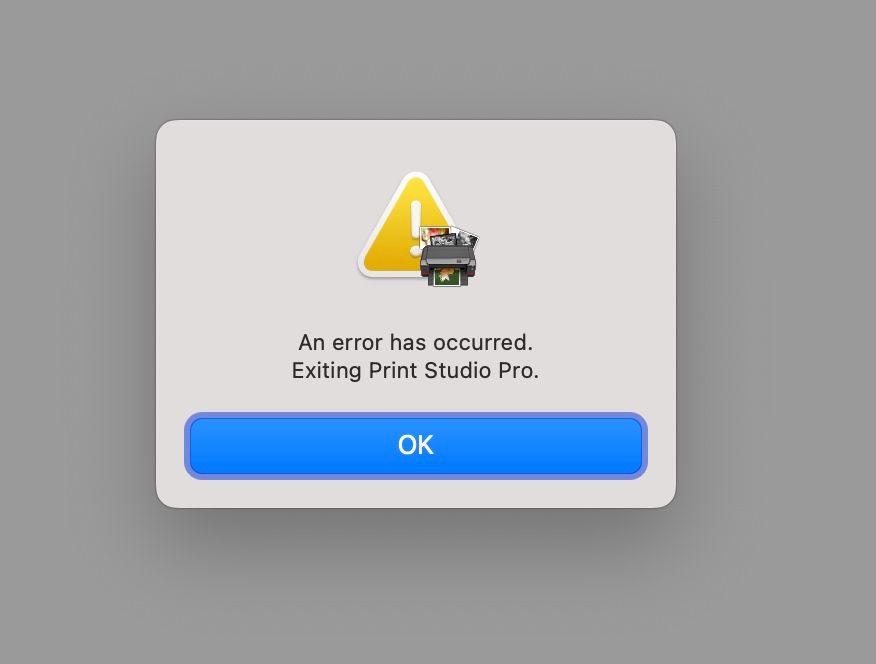
15 REPLIES 15
Options
- Mark as New
- Bookmark
- Subscribe
- Mute
- Subscribe to RSS Feed
- Permalink
- Report Inappropriate Content
11-09-2022 04:33 AM
Try Canon Professional Print & Layout instead. It worked for me.
Options
- Mark as New
- Bookmark
- Subscribe
- Mute
- Subscribe to RSS Feed
- Permalink
- Report Inappropriate Content
11-09-2022 06:59 AM
Thank you Eduardo. I am not familiar with this software. I will check it out.

Options
- Mark as New
- Bookmark
- Subscribe
- Mute
- Subscribe to RSS Feed
- Permalink
- Report Inappropriate Content
11-09-2022 07:51 AM
I don’t believe PP&L is available for the Pro-100.
John Hoffman
Conway, NH
R6 Mark III, M200 (converted to infrared), RF lenses, Pixma PRO-100, Pixma TR8620a, Lr Classic
Conway, NH
R6 Mark III, M200 (converted to infrared), RF lenses, Pixma PRO-100, Pixma TR8620a, Lr Classic
Options
- Mark as New
- Bookmark
- Subscribe
- Mute
- Subscribe to RSS Feed
- Permalink
- Report Inappropriate Content
11-15-2022 01:52 AM
Yeah over in the uk with the same setup and getting the exact same error. Shame because I like PSP and find it much easier to use than the lightroom print module. Looks like canon have not update yet.
wolfy
Options
- Mark as New
- Bookmark
- Subscribe
- Mute
- Subscribe to RSS Feed
- Permalink
- Report Inappropriate Content
11-16-2022 10:42 AM
Well that’s not good.
Options
- Mark as New
- Bookmark
- Subscribe
- Mute
- Subscribe to RSS Feed
- Permalink
- Report Inappropriate Content
11-16-2022 10:43 AM
Canon and Apple need to get their act together. Not fun having a professional printer and not be able to use it.

Options
- Mark as New
- Bookmark
- Subscribe
- Mute
- Subscribe to RSS Feed
- Permalink
- Report Inappropriate Content
11-16-2022 10:54 AM
Neither PSP or PP&L are required to use the printer.
John Hoffman
Conway, NH
R6 Mark III, M200 (converted to infrared), RF lenses, Pixma PRO-100, Pixma TR8620a, Lr Classic
Conway, NH
R6 Mark III, M200 (converted to infrared), RF lenses, Pixma PRO-100, Pixma TR8620a, Lr Classic
Options
- Mark as New
- Bookmark
- Subscribe
- Mute
- Subscribe to RSS Feed
- Permalink
- Report Inappropriate Content
11-28-2022 05:38 PM
What is working best for you? Do you mind sharing your Lightroom workflow, for example?
Options
- Mark as New
- Bookmark
- Subscribe
- Mute
- Subscribe to RSS Feed
- Permalink
- Report Inappropriate Content
11-28-2022 06:34 PM
For Windows:

I configure LrC to have Lightroom manage color. Pick the ICC profile in LrC and the media type in the Canon printer driver. Then I can choose Canon papers or third-party papers as I wish.
For Canon papers the ICC Profile and the media type are the same. For third party papers use their ICC profile and the media type they recommend.
If you need macOS let me know.
John Hoffman
Conway, NH
R6 Mark III, M200 (converted to infrared), RF lenses, Pixma PRO-100, Pixma TR8620a, Lr Classic
Conway, NH
R6 Mark III, M200 (converted to infrared), RF lenses, Pixma PRO-100, Pixma TR8620a, Lr Classic

Announcements
07/22/2026: New firmware updates are available.
EOS R6 Mark III - Version 1.1.0
05/13/2026: New firmware updates are available.
EOS R5 Mark II - Version 1.3.0
EOS R6 Mark II - Version 1.7.0
04/28/2026: Service Notice: Caution Concerning use of Lithium Batteries
03/17/2026: New firmware updates are available.
SELPHY CP1500 - Version 1.0.7.0
02/23/2026: New firmware update is available for EOS C50- Version 1.0.3.1
01/23/2026: New firmware update is available for RF 24-105mm F4 IS USM- Version 2.0.7
01/20/2026: New firmware updates are available.
10/21/2025: Service Notice: To Users of the Compact Digital Camera PowerShot V1
10/15/2025: New firmware updates are available.
Speedlite EL-5 - Version 1.2.0
Speedlite EL-1 - Version 1.1.0
Speedlite Transmitter ST-E10 - Version 1.2.0
07/28/2025: Notice of Free Repair Service for the Mirrorless Camera EOS R50 (Black)
05/21/2025: New firmware update available for EOS C500 Mark II - Version 1.1.5.1
Related Content
- PIXMA PRO-100 Reds and oranges are off, prints are a bit muddy in Professional Photo Printers
- imagePROGRAF PRO-1000 Colour issues on glossy paper, OK on matte in Professional Photo Printers
- Can't print from Pro Print & Layout, no problems from Lightroom and Photoshop in Printer Software & Networking
- PIXMA PRO-100 Color management issues after upgrading to macOS Tahoe in Professional Photo Printers
- imagePROGRAF PRO-1100 not changing paper size in Professional Photo Printers

Ⓒ 2026
Canon U.S.A Inc. All Rights Reserved. Reproduction in whole or part without permission is prohibited.
