Turn on suggestions
Auto-suggest helps you quickly narrow down your search results by suggesting possible matches as you type.
- Canon Community
- Discussions & Help
- Printer
- Printer Software & Networking
- Re: PIXMA PRO-100S not printing to specified margi...
Options
- Subscribe to RSS Feed
- Mark Topic as New
- Mark Topic as Read
- Float this Topic for Current User
- Bookmark
- Subscribe
- Mute
- Printer Friendly Page
PIXMA PRO-100S not printing to specified margins in Lightroom

Options
- Mark as New
- Bookmark
- Subscribe
- Mute
- Subscribe to RSS Feed
- Permalink
- Report Inappropriate Content
01-30-2024
08:16 AM
- last edited on
01-30-2024
08:37 AM
by
 Danny
Danny
Hello everyone,
anyone holding canon pixma pro 100-s and printing using Lightroom classic, photoshop or software of canon ,
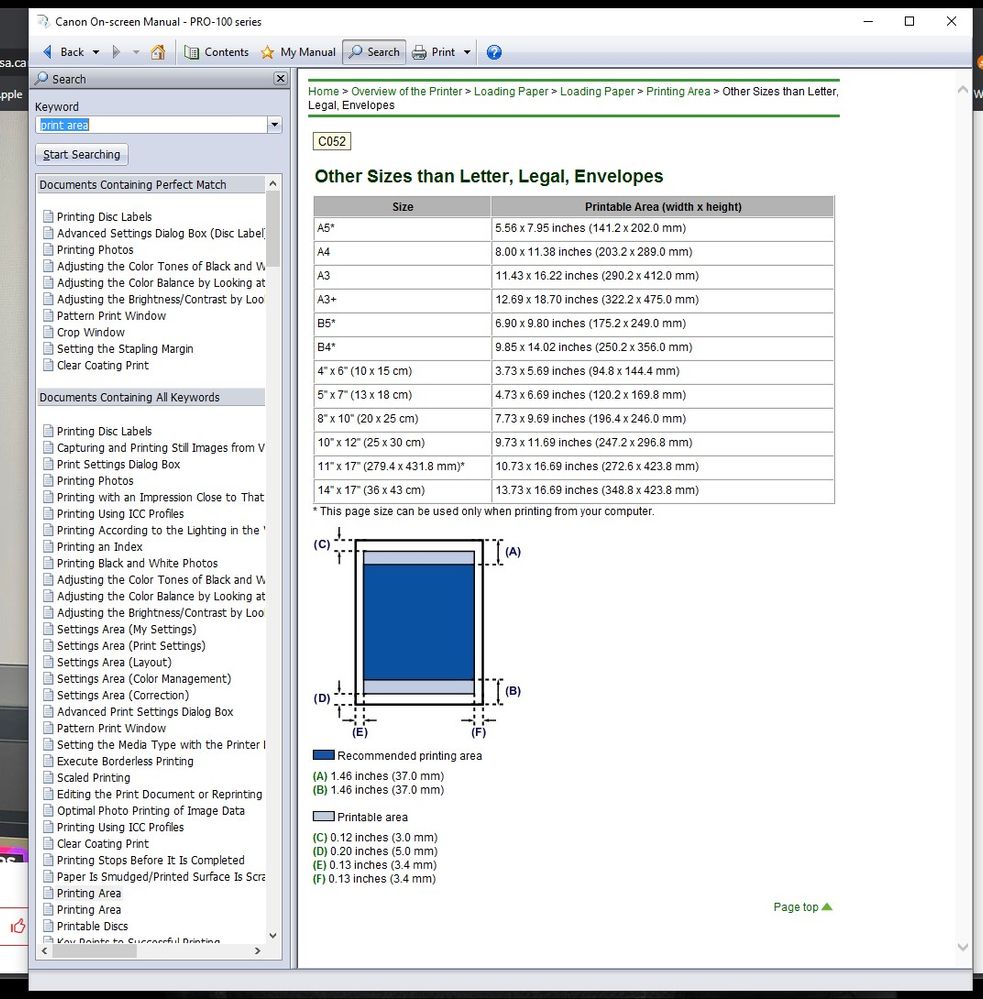
well, I want to print A3+ (33x48cm) with 2 cm margins (each side)
Despite properly imposing the margins (2x2= 4) it will be ( 29x44 cm ) in preview I see the measurements correctly but in print the margins are different do you have any solution?
13 REPLIES 13
Options
- Mark as New
- Bookmark
- Subscribe
- Mute
- Subscribe to RSS Feed
- Permalink
- Report Inappropriate Content
01-31-2024 07:15 AM
No it’s generic glossy Photo paper


Options
- Mark as New
- Bookmark
- Subscribe
- Mute
- Subscribe to RSS Feed
- Permalink
- Report Inappropriate Content
01-31-2024 07:25 AM
@hera62 wrote:it’s already done what should I do .. is it related to printable area ?
Looks like you are within the printable area. What are the exact measurements of the margins you are getting?
Is your paper measuring correctly for A3+?
John Hoffman
Conway, NH
R6 Mark III, M200 (converted to infrared), RF lenses, Pixma PRO-100, Pixma TR8620a, Lr Classic
Conway, NH
R6 Mark III, M200 (converted to infrared), RF lenses, Pixma PRO-100, Pixma TR8620a, Lr Classic
Options
- Mark as New
- Bookmark
- Subscribe
- Mute
- Subscribe to RSS Feed
- Permalink
- Report Inappropriate Content
01-31-2024 09:40 AM
yes I cut exactly 33 cm x 48 cm paper
Example of dimension A4 ( 21x29.7 cm ) 2cm margin I get 1,8 cm right , 1,8 left 1,8 bottom and 1,5 on top
example of a3+ I get 2cm right , 2.2 cm left , 2cm top and 1,2 cm bottom (there is always one side with slim margin top or bottom )
Options
- Mark as New
- Bookmark
- Subscribe
- Mute
- Subscribe to RSS Feed
- Permalink
- Report Inappropriate Content
01-31-2024 09:43 AM
Maybe try creating a custom paper size in the printer driver with those dimensions.
John Hoffman
Conway, NH
R6 Mark III, M200 (converted to infrared), RF lenses, Pixma PRO-100, Pixma TR8620a, Lr Classic
Conway, NH
R6 Mark III, M200 (converted to infrared), RF lenses, Pixma PRO-100, Pixma TR8620a, Lr Classic

- « Previous
-
- 1
- 2
- Next »
- « Previous
-
- 1
- 2
- Next »

Announcements
07/22/2026: New firmware updates are available.
EOS R6 Mark III - Version 1.1.0
05/13/2026: New firmware updates are available.
EOS R5 Mark II - Version 1.3.0
EOS R6 Mark II - Version 1.7.0
04/28/2026: Service Notice: Caution Concerning use of Lithium Batteries
03/17/2026: New firmware updates are available.
SELPHY CP1500 - Version 1.0.7.0
02/23/2026: New firmware update is available for EOS C50- Version 1.0.3.1
01/23/2026: New firmware update is available for RF 24-105mm F4 IS USM- Version 2.0.7
01/20/2026: New firmware updates are available.
10/21/2025: Service Notice: To Users of the Compact Digital Camera PowerShot V1
10/15/2025: New firmware updates are available.
Speedlite EL-5 - Version 1.2.0
Speedlite EL-1 - Version 1.1.0
Speedlite Transmitter ST-E10 - Version 1.2.0
07/28/2025: Notice of Free Repair Service for the Mirrorless Camera EOS R50 (Black)
05/21/2025: New firmware update available for EOS C500 Mark II - Version 1.1.5.1
Related Content
- Canon G3200 3 blinking orange light error in Office Printers
- PIXMA TS3400 Can’t print on photo paper in Desktop Inkjet Printers
- Prograf PRO 1100 - Professional Print and Layout Error in Printer Software & Networking
- LBP6230dw spits out extra blank page in Office Printers
- Pixma pro 100s green cast on prints in Professional Photo Printers

Ⓒ 2026
Canon U.S.A Inc. All Rights Reserved. Reproduction in whole or part without permission is prohibited.
