Turn on suggestions
Auto-suggest helps you quickly narrow down your search results by suggesting possible matches as you type.
- Canon Community
- Discussions & Help
- Camera
- Point & Shoot Digital Cameras
- Re: PowerShot G7 X Mark II firmware update menu it...
Options
- Subscribe to RSS Feed
- Mark Topic as New
- Mark Topic as Read
- Float this Topic for Current User
- Bookmark
- Subscribe
- Mute
- Printer Friendly Page
PowerShot G7 X Mark II firmware update menu item missing

Options
- Mark as New
- Bookmark
- Subscribe
- Mute
- Subscribe to RSS Feed
- Permalink
- Report Inappropriate Content
12-30-2022
02:47 PM
- last edited on
01-03-2023
08:29 AM
by
 Danny
Danny
I am trying to download new firmware, but the menu item seems to be missing.
Is there a way I can direct connect camera to computer to do the firmware update.
5 REPLIES 5

Options
- Mark as New
- Bookmark
- Subscribe
- Mute
- Subscribe to RSS Feed
- Permalink
- Report Inappropriate Content
01-03-2023 04:37 PM
Hello corncrop,
In order to access all menu items, make sure that you set the camera to one of the Creative modes such as, P, Av, Tv, or M. I would suggest setting the camera to the P mode for doing the firmware update.
Options
- Mark as New
- Bookmark
- Subscribe
- Mute
- Subscribe to RSS Feed
- Permalink
- Report Inappropriate Content
09-17-2023 03:32 AM
It's still not working for me.

Options
- Mark as New
- Bookmark
- Subscribe
- Mute
- Subscribe to RSS Feed
- Permalink
- Report Inappropriate Content
09-17-2023 12:37 PM - edited 09-17-2023 03:26 PM
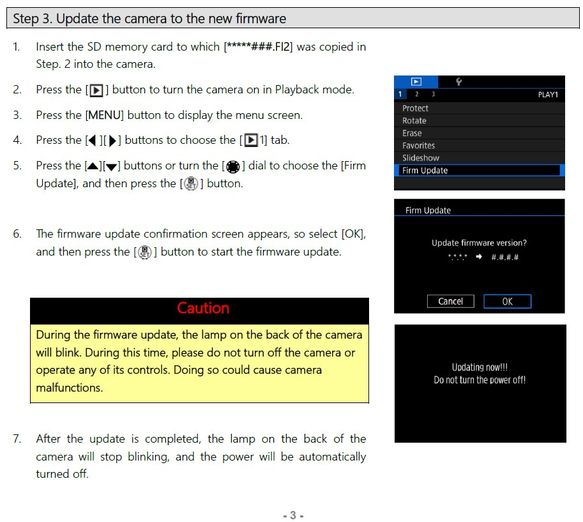
Have you downloaded the firmware update file and read the directions to install on the camera? If so, what is not working for you? Follow these instructions exactly. Do not use the power button to turn on the camera, use the playback button (triangle) to turn the camera on. The firmware update menu will appear if you do it this way.
Options
- Mark as New
- Bookmark
- Subscribe
- Mute
- Subscribe to RSS Feed
- Permalink
- Report Inappropriate Content
11-22-2023 03:07 PM
I had the same problem and fixed it by following the advice on this post https://chdk.fandom.com/wiki/FAQ/Mac#You_may_have_issues_with_permissions.
I copied the firmware update to the SD card on a Mac, and per this post the file had an extended attribute which was preventing the G7X from picking it up. Running the xattr command on the .FI2 file to remove the attribute fixed the issue for me.

Options
- Mark as New
- Bookmark
- Subscribe
- Mute
- Subscribe to RSS Feed
- Permalink
- Report Inappropriate Content
03-06-2024 02:33 PM
I'm having the same problem. Pulled out my camera after not using it for quite a while. Cannot connect with my phone etc.. Says that I need a Firmware update. I have no idea what version that I have. I have done what is suggested above.
I downloaded: PowerShot G7 X Mark III Firmware Update, Version 1.3.2 [Windows]
Put the SD card in my camera.
Turned it on using the playback button that is directed above. Did this using several different modes as suggest by someone above.
My menu is different. Only 2 tabs and not 3 like the one above.
Any other help would be appreciated. Maybe I need to go back and get some other updates first?

Announcements
07/22/2026: New firmware updates are available.
EOS R6 Mark III - Version 1.1.0
05/13/2026: New firmware updates are available.
EOS R5 Mark II - Version 1.3.0
EOS R6 Mark II - Version 1.7.0
04/28/2026: Service Notice: Caution Concerning use of Lithium Batteries
03/17/2026: New firmware updates are available.
SELPHY CP1500 - Version 1.0.7.0
02/23/2026: New firmware update is available for EOS C50- Version 1.0.3.1
01/23/2026: New firmware update is available for RF 24-105mm F4 IS USM- Version 2.0.7
01/20/2026: New firmware updates are available.
10/21/2025: Service Notice: To Users of the Compact Digital Camera PowerShot V1
10/15/2025: New firmware updates are available.
Speedlite EL-5 - Version 1.2.0
Speedlite EL-1 - Version 1.1.0
Speedlite Transmitter ST-E10 - Version 1.2.0
07/28/2025: Notice of Free Repair Service for the Mirrorless Camera EOS R50 (Black)
05/21/2025: New firmware update available for EOS C500 Mark II - Version 1.1.5.1
Related Content
- EOS R6 MARK II no choice to connect to wireless remote in EOS DSLR & Mirrorless Cameras
- HDR PQ greyed out on the EOS R50 in EOS DSLR & Mirrorless Cameras
- Powershot SX530 HS video stops randomly in Point & Shoot Digital Cameras
- PowerShot SX740 HS has firmware v1.4.4 but website says v1.4.3 is the latest in Point & Shoot Digital Cameras
- Update Firmware on Powershot V1 with a blank screen? in Point & Shoot Digital Cameras

Ⓒ 2026
Canon U.S.A Inc. All Rights Reserved. Reproduction in whole or part without permission is prohibited.
