Turn on suggestions
Auto-suggest helps you quickly narrow down your search results by suggesting possible matches as you type.
- Canon Community
- Discussions & Help
- Camera
- Point & Shoot Digital Cameras
- Re: Customizing Display Information: Logic of Acti...
Options
- Subscribe to RSS Feed
- Mark Topic as New
- Mark Topic as Read
- Float this Topic for Current User
- Bookmark
- Subscribe
- Mute
- Printer Friendly Page

Options
- Mark as New
- Bookmark
- Subscribe
- Mute
- Subscribe to RSS Feed
- Permalink
- Report Inappropriate Content
02-16-2019 01:50 AM - edited 02-16-2019 02:43 AM
I’m attempting to understand the Logic and value of On and Off of these. Could somebody clarify what’s happening or the value of Selecting each of these four, please?
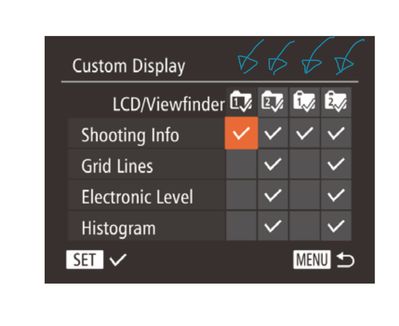
I’ve annotated those 1 and 2 on a BLACK Background and then 1 and 2 on a WHITE Background. I’d dearly love to hear any explanation for the differences. I can’t appreciate these nuances and I would truly like to. 🤔
Solved! Go to Solution.
12 REPLIES 12
Options
- Mark as New
- Bookmark
- Subscribe
- Mute
- Subscribe to RSS Feed
- Permalink
- Report Inappropriate Content
02-16-2019 11:09 PM
Ahah! And NOW I have what I want! I have a Button that will remove everything I don’t wish to crowd my framing and prevent from the actual work AND on a SINGLE Push, brings it all back.
OK, some NBs:
NB1: As I very rarely use the EVF I’ve deselected BOTH options in Menu. This has the fortunate result of the Display Button 19 acting as a ON/OFF Button for the Icons. So I’ve repurposed or turned the “cycling” option into an ON/OFF Button instead. Marvellous!
NB2: These Settings DO NOT get retained in my C1 and C2 options. I have to save these NEW LCD Settings to them too. No biggie, but I just checked and, yes, they aren’t activated UNTIL I save them too. Also, switching between modes, MOVIE, C1 or C2. This makes logical sense and indicates Canon’s appreciation of the need to keep the cascade of functionality “honest”.
So, John, job done. Thank you. It’s been fun. 📸✅

Options
- Mark as New
- Bookmark
- Subscribe
- Mute
- Subscribe to RSS Feed
- Permalink
- Report Inappropriate Content
02-17-2019 12:31 PM
My pleasure Grazie! Sounds like you are all set!!


Options
- Mark as New
- Bookmark
- Subscribe
- Mute
- Subscribe to RSS Feed
- Permalink
- Report Inappropriate Content
02-19-2019 10:40 AM - edited 02-19-2019 11:24 AM
@Grazie wrote:Yes, on closer inspection of the grapics it is as plain as a pike staff:..
And thanks for introducing me to the expression "plain as a pike staff". These sayings always catch my ear and I had to do a bit of research to translate this one. I'll have to file that one away for future reference. Seems to be the equivalent of the American English expression "plain as the nose on your face".

- « Previous
-
- 1
- 2
- Next »
- « Previous
-
- 1
- 2
- Next »
Announcements
07/22/2026: New firmware updates are available.
EOS R6 Mark III - Version 1.1.0
05/13/2026: New firmware updates are available.
EOS R5 Mark II - Version 1.3.0
EOS R6 Mark II - Version 1.7.0
04/28/2026: Service Notice: Caution Concerning use of Lithium Batteries
03/17/2026: New firmware updates are available.
SELPHY CP1500 - Version 1.0.7.0
02/23/2026: New firmware update is available for EOS C50- Version 1.0.3.1
01/23/2026: New firmware update is available for RF 24-105mm F4 IS USM- Version 2.0.7
01/20/2026: New firmware updates are available.
10/21/2025: Service Notice: To Users of the Compact Digital Camera PowerShot V1
10/15/2025: New firmware updates are available.
Speedlite EL-5 - Version 1.2.0
Speedlite EL-1 - Version 1.1.0
Speedlite Transmitter ST-E10 - Version 1.2.0
07/28/2025: Notice of Free Repair Service for the Mirrorless Camera EOS R50 (Black)
05/21/2025: New firmware update available for EOS C500 Mark II - Version 1.1.5.1
Related Content
- Picture Style settings and In-Camera Sharpening in Camera Software
- Camera Connect won't connect to PowerShot SX720 HS after app update in Camera Software
- Need a Canon powershot elph 115 IS lens assembly replacement in Point & Shoot Digital Cameras
- EOS R5 Mark II custom button for Spot AF in EOS DSLR & Mirrorless Cameras
- EF 75-300mm f/4-5.6 IS USM Aberration data needed in EF & RF Lenses

Ⓒ 2026
Canon U.S.A Inc. All Rights Reserved. Reproduction in whole or part without permission is prohibited.
