Turn on suggestions
Auto-suggest helps you quickly narrow down your search results by suggesting possible matches as you type.
- Canon Community
- Discussions & Help
- Printer
- Office Printers
- Re: Why black lines and shades are appearing when ...
Options
- Subscribe to RSS Feed
- Mark Topic as New
- Mark Topic as Read
- Float this Topic for Current User
- Bookmark
- Subscribe
- Mute
- Printer Friendly Page
Why black lines and shades are appearing when printing documents from the mf642dw printer?

Options
- Mark as New
- Bookmark
- Subscribe
- Mute
- Subscribe to RSS Feed
- Permalink
- Report Inappropriate Content
02-18-2024
04:37 AM
- last edited on
02-18-2024
09:21 AM
by
 James_C
Hello there,
I am trying to print a document related to the office, I am facing an issue with black color printing documents, as the paper printed with shades and lines shown in the image below.
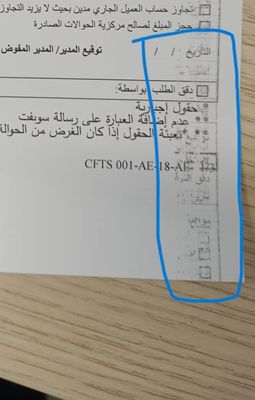
other color documents are printing fine only black is printing like this, even after i changed the toner, its the same,
please let me know what measures to be taken here to
I even changed the black toner, but its
4 REPLIES 4


Options
- Mark as New
- Bookmark
- Subscribe
- Mute
- Subscribe to RSS Feed
- Permalink
- Report Inappropriate Content
02-18-2024 11:52 AM
Greetings,
Since the black toner is not low, I would open the printer and inspect the paper paths for spilled toner. A small vacuum can be helpful here. The fixing assembly could also be dirty. You can clean using the printers LCD.
From the printer's LCD..
Menu> Adjustment/Maintenance> Maintenance> Clean Fixing Assembly> Check that the paper indicated in the screen is loaded, and then select OK> Start> One sheet with a cleaning pattern printed on it is ejected when cleaning is completed.
~Rick
Bay Area - CA
~R5 C (1.0.9.1), ~R50v (1.1.1) ~RF Trinity, ~RF 100 Macro, ~RF 100~400, ~RF 100~500, ~RF 200-800 +RF 1.4x TC, BG-R10, 430EX III-RT ~DxO PhotoLab Elite ~DaVinci Resolve Studio ~ImageClass MF644Cdw/MF656Cdw ~Pixel 8 ~CarePaks Are Worth It
Options
- Mark as New
- Bookmark
- Subscribe
- Mute
- Subscribe to RSS Feed
- Permalink
- Report Inappropriate Content
10-27-2024 10:21 PM
Hi, when I attempt to do that, I am getting a “could not perform cleaning” error message. Any idea what the problem could be? Thanks!
Options
- Mark as New
- Bookmark
- Subscribe
- Mute
- Subscribe to RSS Feed
- Permalink
- Report Inappropriate Content
10-28-2024 07:58 AM
It could be the use of third party toner cartridges.
Options
- Mark as New
- Bookmark
- Subscribe
- Mute
- Subscribe to RSS Feed
- Permalink
- Report Inappropriate Content
10-28-2024 09:51 AM
Greetings,
Third party toner is certainly possible. There's also an auto cleaning setting that if enabled keeps you from running the maintenance service manually.
~Rick
Bay Area - CA
~R5 C (1.0.9.1), ~R50v (1.1.1) ~RF Trinity, ~RF 100 Macro, ~RF 100~400, ~RF 100~500, ~RF 200-800 +RF 1.4x TC, BG-R10, 430EX III-RT ~DxO PhotoLab Elite ~DaVinci Resolve Studio ~ImageClass MF644Cdw/MF656Cdw ~Pixel 8 ~CarePaks Are Worth It


Announcements
12/15/2025: New firmware update available for EOS C50 - Version 1.0.1.1
10/21/2025: Service Notice: To Users of the Compact Digital Camera PowerShot V1
07/28/2025: Notice of Free Repair Service for the Mirrorless Camera EOS R50 (Black)
05/21/2025: New firmware update available for EOS C500 Mark II - Version 1.1.5.1
01/22/2024: Canon Supports Disaster Relief Efforts in California
01/14/2025: Steps to resolve still image problem when using certain SanDisk SD cards with the Canon EOS R5 Mark II
11/20/2025: New firmware updates are available.
EOS R6 Mark III - Version 1.0.1
EOS R5 Mark II - Version 1.2.0
PowerShot G7 X Mark III - Version 1.4.0
PowerShot SX740 HS - Version 1.0.2
10/21/2025: Service Notice: To Users of the Compact Digital Camera PowerShot V1
10/15/2025: New firmware updates are available.
Speedlite EL-5 - Version 1.2.0
Speedlite EL-1 - Version 1.1.0
Speedlite Transmitter ST-E10 - Version 1.2.0
07/28/2025: Notice of Free Repair Service for the Mirrorless Camera EOS R50 (Black)
07/24/2025: New firmware updates are available.
07/23/2025: New firmware updates are available.
7/17/2025: New firmware updates are available.
05/21/2025: New firmware update available for EOS C500 Mark II - Version 1.1.5.1
02/20/2025: New firmware updates are available.
RF70-200mm F2.8 L IS USM Z - Version 1.0.6
RF24-105mm F2.8 L IS USM Z - Version 1.0.9
RF100-300mm F2.8 L IS USM - Version 1.0.8
RF50mm F1.4 L VCM - Version 1.0.2
RF24mm F1.4 L VCM - Version 1.0.3
01/22/2024: Canon Supports Disaster Relief Efforts in California
01/14/2025: Steps to resolve still image problem when using certain SanDisk SD cards with the Canon EOS R5 Mark II
Related Content
- PIXMA G3270 won't print on PC after printing from my iPhone in Desktop Inkjet Printers
- MF751Cdw Yellow Cartridge nightmare in Office Printers
- MAXIFY GX2020: Gray and colored lines running from top to bottom when printing document in Office Printers
- imageCLASS MF753Cdw - prints a faded red line on the right hand side of documents in Office Printers
- MG3605s stops half way through printing or doesn't print at all. in Desktop Inkjet Printers

Ⓒ 2025
Canon U.S.A Inc. All Rights Reserved. Reproduction in whole or part without permission is prohibited.
