Turn on suggestions
Auto-suggest helps you quickly narrow down your search results by suggesting possible matches as you type.
- Canon Community
- Discussions & Help
- Printer
- Office Printers
- Re: My Imageclass D530 is printing lines down each...
Options
- Subscribe to RSS Feed
- Mark Topic as New
- Mark Topic as Read
- Float this Topic for Current User
- Bookmark
- Subscribe
- Mute
- Printer Friendly Page

Options
- Mark as New
- Bookmark
- Subscribe
- Mute
- Subscribe to RSS Feed
- Permalink
- Report Inappropriate Content
02-01-2016 10:34 AM
My Imageclass D530 is printing lines down each sheet. I've run the "clean fixing unit" function several times and it has not made a difference. I've run over a 100 copies thinking it would get better and it is not. I've tried to clean any where I could and that hasn't helped.
The lines that print appear to have faint characters in them.
Help.
Solved! Go to Solution.
1 ACCEPTED SOLUTION
Accepted Solutions


Options
- Mark as New
- Bookmark
- Subscribe
- Mute
- Subscribe to RSS Feed
- Permalink
- Report Inappropriate Content
07-02-2018 10:02 AM
Hello kjhmills,
It sounds like the drum in the toner cartridge is damaged. I recommend you replace the toner cartridge with a Genuine Canon Cartridge 128 to restore your print quality. You can purchase a replacement toner cartridge at your local office supply store and from our Sales Department. To order directly from Canon, please call our Sales Department at 1-800-OK-CANON (652-2666). They are open seven days a week from 8 AM to Midnight ET (excluding holidays).
Did this answer your question? Please click the Accept as Solution button so that others may find the answer as well.
5 REPLIES 5
Options
- Mark as New
- Bookmark
- Subscribe
- Mute
- Subscribe to RSS Feed
- Permalink
- Report Inappropriate Content
09-17-2016 12:03 PM
When I try to clean, I get the message, "failed."
Options
- Mark as New
- Bookmark
- Subscribe
- Mute
- Subscribe to RSS Feed
- Permalink
- Report Inappropriate Content
11-01-2016 04:43 PM
Hi back2denise.
I will be able to assist you.
If the cleaning failed, it could be due to documents stored in the memory of the machine. To check and clear jobs, please follow the instructions below:
NOTE: The instructions show the [Copy] function. Please select a different job status to check all of the functions.
1. Press [  ] or [
  ] (Status Monitor/Cancel).
] or [ ] (Status Monitor/Cancel).
2. Press [  ] or [
  ] to highlight <Copy Job Status>, and then press [OK].
] or [ ] to highlight <Copy Job Status>, and then press [OK].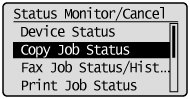
The detailed information is displayed.
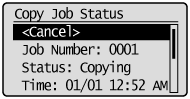
 To cancel the job:
(1) Press [ ] or [ ] to highlight <Cancel>, and then press [OK].
] or [ ] to highlight <Cancel>, and then press [OK].(2) Press [  ] to highlight <Yes>, and then press [OK].
] to highlight <Yes>, and then press [OK].The job is canceled.

(3) Press [ ] or [ ] (Status Monitor/Cancel) to close the screen.
] or [ ] (Status Monitor/Cancel) to close the screen.To only check the details of the selected job:After you finish checking the details of the selected job, press [ ] or [ ] (Status Monitor/Cancel) to close the screen.
] or [ ] (Status Monitor/Cancel) to close the screen.If the failed cleanings persists, it is recommended that you call us at 1-800-OK-CANON (1-800-652-2666).
Did this answer your question? Please click the Accept as Solution button so that others may find the answer as well.
Options
- Mark as New
- Bookmark
- Subscribe
- Mute
- Subscribe to RSS Feed
- Permalink
- Report Inappropriate Content
06-30-2018 10:44 PM
My prints have lines across and down with the faint text that was mentioned above. I tried the procedure recommended here, but I didn't have any documents stored in memory. And when I try to clean, I also get the message "failed". Do you have any other suggestions? Thanks.
Options
- Mark as New
- Bookmark
- Subscribe
- Mute
- Subscribe to RSS Feed
- Permalink
- Report Inappropriate Content
07-02-2018 10:02 AM
Hello kjhmills,
It sounds like the drum in the toner cartridge is damaged. I recommend you replace the toner cartridge with a Genuine Canon Cartridge 128 to restore your print quality. You can purchase a replacement toner cartridge at your local office supply store and from our Sales Department. To order directly from Canon, please call our Sales Department at 1-800-OK-CANON (652-2666). They are open seven days a week from 8 AM to Midnight ET (excluding holidays).
Did this answer your question? Please click the Accept as Solution button so that others may find the answer as well.
Options
- Mark as New
- Bookmark
- Subscribe
- Mute
- Subscribe to RSS Feed
- Permalink
- Report Inappropriate Content
07-22-2018 07:20 PM
Thank you. That was exactly the problem. Thank you for your prompt and helpful response.

Announcements
07/22/2026: New firmware updates are available.
EOS R6 Mark III - Version 1.1.0
05/13/2026: New firmware updates are available.
EOS R5 Mark II - Version 1.3.0
EOS R6 Mark II - Version 1.7.0
04/28/2026: Service Notice: Caution Concerning use of Lithium Batteries
03/17/2026: New firmware updates are available.
SELPHY CP1500 - Version 1.0.7.0
02/23/2026: New firmware update is available for EOS C50- Version 1.0.3.1
01/23/2026: New firmware update is available for RF 24-105mm F4 IS USM- Version 2.0.7
01/20/2026: New firmware updates are available.
10/21/2025: Service Notice: To Users of the Compact Digital Camera PowerShot V1
10/15/2025: New firmware updates are available.
Speedlite EL-5 - Version 1.2.0
Speedlite EL-1 - Version 1.1.0
Speedlite Transmitter ST-E10 - Version 1.2.0
07/28/2025: Notice of Free Repair Service for the Mirrorless Camera EOS R50 (Black)
05/21/2025: New firmware update available for EOS C500 Mark II - Version 1.1.5.1
Related Content
- imageCLASS MF644Cdw - what paper type to select for printing transparency film in Office Printers
- imageCLASS MF665Cdw prints solid blue pages, faded black text, other issues in Office Printers
- imageCLASS MF273dw won't connect, unable to print test page, no paper error in Printer Software & Networking
- imageCLASS MF656Cdw Paper Jam even with no actual Paper Jam in Office Printers
- imageCLASS LPB6030w Trouble printing on new Windows 11 computer in Office Printers

Ⓒ 2026
Canon U.S.A Inc. All Rights Reserved. Reproduction in whole or part without permission is prohibited.
