- Meet Our Illuminaries
- Discussions & Help
- Gallery
- Learn With Canon
- About Our Community
- Meet Our Illuminaries
- Discussions & Help
- Gallery
- Learn With Canon
- About Our Community
Turn on suggestions
Auto-suggest helps you quickly narrow down your search results by suggesting possible matches as you type.
- Canon Community
- Discussions & Help
- Printer
- Office Printers
- Re: Automatic Document Feeder (ADF) scans/copies 1...
Options
- Subscribe to RSS Feed
- Mark Topic as New
- Mark Topic as Read
- Float this Topic for Current User
- Bookmark
- Subscribe
- Mute
- Printer Friendly Page
Automatic Document Feeder (ADF) scans/copies 1 page into multiple pages

Options
- Mark as New
- Bookmark
- Subscribe
- Mute
- Subscribe to RSS Feed
- Permalink
- Report Inappropriate Content
08-27-2020 02:54 PM
I have an MF217W printer. All works good EXCEPT that the Automatic Document Feeder takes 1 page and scans it (or copies it) into several pages, usually 3 or 4 pages. The result is that I get 1/4 page scan/copy on each page.
I tried cleaning ADF with compressed air, and checked for any paper jams, nothing.
Has anyone came accross this issues? any fix for it?
7 REPLIES 7
Options
- Mark as New
- Bookmark
- Subscribe
- Mute
- Subscribe to RSS Feed
- Permalink
- Report Inappropriate Content
09-03-2020 04:02 PM
Hi steel77.
The results you're describing are indicative of the N on 1 or Paper Saver settings. Scan using the normal Copy mode, and make sure [N on 1] is set to OFF.
Did this answer your question? Please click the Accept as Solution button so that others may find the answer as well.
Options
- Mark as New
- Bookmark
- Subscribe
- Mute
- Subscribe to RSS Feed
- Permalink
- Report Inappropriate Content
09-03-2020 04:37 PM
Thanks for the reply.
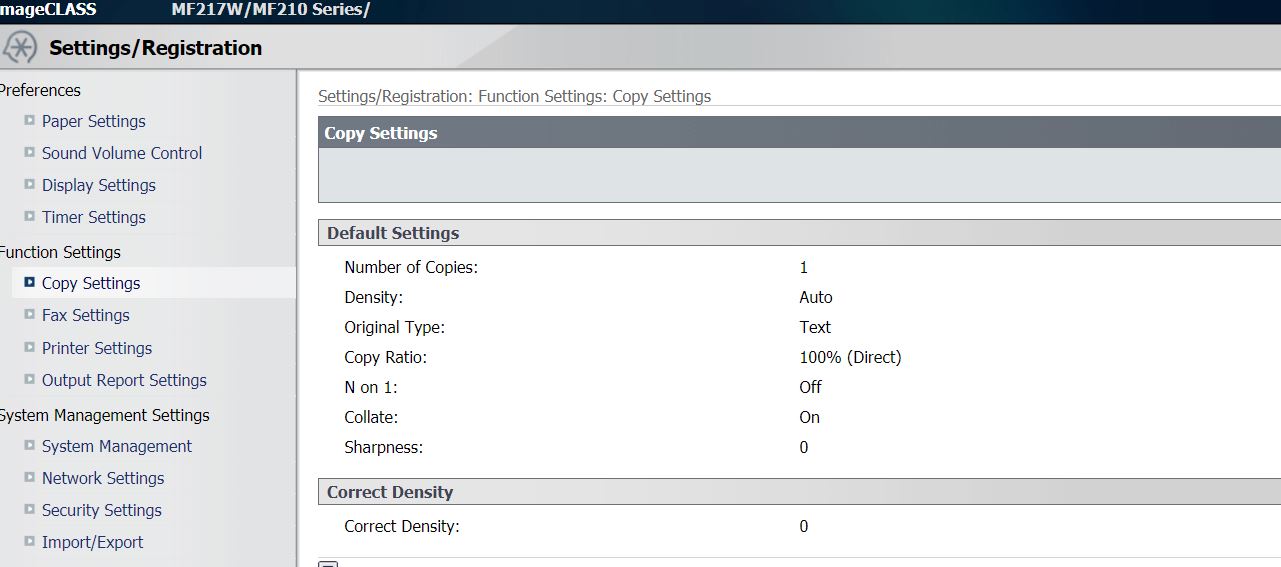
I checked the Copy settings, and the [N on 1] function is OFF. I turned it ON, then OFF again to see if it resets, but still getting the same issue.
I also noticed that the last bit of page is always stuck in the feeder at the end, and it is not released. I have to pull it out manually. It is doing that on every scan/copy from the ADF !

Options
- Mark as New
- Bookmark
- Subscribe
- Mute
- Subscribe to RSS Feed
- Permalink
- Report Inappropriate Content
09-24-2020 01:47 PM
Hi,
Please look into these areas to try to resolve the issue since you state no paper jam is in the printer:
Placing Document
https://oip.manual.canon/USRMA-0023-zz-SS-enUS/contents/02030000.html
Document Type
https://oip.manual.canon/USRMA-0023-zz-SS-enUS/contents/14020040.html#03050000
Clean Feeder
https://oip.manual.canon/USRMA-0023-zz-SS-enUS/contents/13010030.html
Collate features shoud be off. <Copy> <Collate> <OFF>
Copy Ratio should be %100.
Enlarging or Reducing
https://oip.manual.canon/USRMA-0023-zz-SS-enUS/contents/04030010.html
Power off printer. Disconnect power cord for 30 seconds. Reconnect and power back on the printer.
Did this answer your question? Please click the Accept as Solution button so that others may find the answer as well.
Options
- Mark as New
- Bookmark
- Subscribe
- Mute
- Subscribe to RSS Feed
- Permalink
- Report Inappropriate Content
09-28-2020 03:02 PM
I tried all the above and checked the guides, nothing seem to make a difference so far !
Options
- Mark as New
- Bookmark
- Subscribe
- Mute
- Subscribe to RSS Feed
- Permalink
- Report Inappropriate Content
02-12-2021 01:46 AM
were you able to resolve this issue? looks like my printer is having the same problem. 😞
Options
- Mark as New
- Bookmark
- Subscribe
- Mute
- Subscribe to RSS Feed
- Permalink
- Report Inappropriate Content
12-22-2023 04:14 PM
Hi, I have same issue when scanning and tried all option. Please let me know any other option to fix?
I has paper jam before and no more paper inside.
thanks


Options
- Mark as New
- Bookmark
- Subscribe
- Mute
- Subscribe to RSS Feed
- Permalink
- Report Inappropriate Content
12-04-2024 12:00 PM
Hello,
If you have already changed the settings and it did not resolve the issue, it looks like the printer needs service. If it happened after a jam and now the paper does not feed properly, it looks like the paper feed for the ADF is damaged.
To check your service options, you can log into your MyCanon account or contact support over the phone at 1-800-652-2666.

Announcements
07/22/2026: New firmware updates are available.
EOS R6 Mark III - Version 1.1.0
05/13/2026: New firmware updates are available.
EOS R5 Mark II - Version 1.3.0
EOS R6 Mark II - Version 1.7.0
04/28/2026: Service Notice: Caution Concerning use of Lithium Batteries
03/17/2026: New firmware updates are available.
SELPHY CP1500 - Version 1.0.7.0
02/23/2026: New firmware update is available for EOS C50- Version 1.0.3.1
01/23/2026: New firmware update is available for RF 24-105mm F4 IS USM- Version 2.0.7
01/20/2026: New firmware updates are available.
10/21/2025: Service Notice: To Users of the Compact Digital Camera PowerShot V1
10/15/2025: New firmware updates are available.
Speedlite EL-5 - Version 1.2.0
Speedlite EL-1 - Version 1.1.0
Speedlite Transmitter ST-E10 - Version 1.2.0
07/28/2025: Notice of Free Repair Service for the Mirrorless Camera EOS R50 (Black)
05/21/2025: New firmware update available for EOS C500 Mark II - Version 1.1.5.1
Related Content
- PIXMA TS6320 prints blank pages, but test pages and copies are fine in Desktop Inkjet Printers
- PIXMA TS6420a cartridge issue, support Code 7700 in Desktop Inkjet Printers
- imageCLASS MF656Cdw Paper Jam even with no actual Paper Jam in Office Printers
- PRO-2100 Black lines in the red channel in Production Printing
- Bug Report: macOS Driver Conflict – Booklet Printing on Legal Paper (iR ADV DX C5840i / Finisher-AB1 in Production Printing

Ⓒ 2026
Canon U.S.A Inc. All Rights Reserved. Reproduction in whole or part without permission is prohibited.
