Turn on suggestions
Auto-suggest helps you quickly narrow down your search results by suggesting possible matches as you type.
- Canon Community
- Discussions & Help
- Printer
- Mobile & Compact Printers
- Re: Web login credentials for Selphy CP1500
Options
- Subscribe to RSS Feed
- Mark Topic as New
- Mark Topic as Read
- Float this Topic for Current User
- Bookmark
- Subscribe
- Mute
- Printer Friendly Page

Options
- Mark as New
- Bookmark
- Subscribe
- Mute
- Subscribe to RSS Feed
- Permalink
- Report Inappropriate Content
04-10-2024
07:32 AM
- last edited on
03-31-2025
04:01 PM
by
 James_C
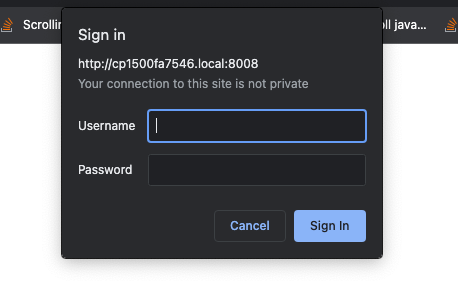
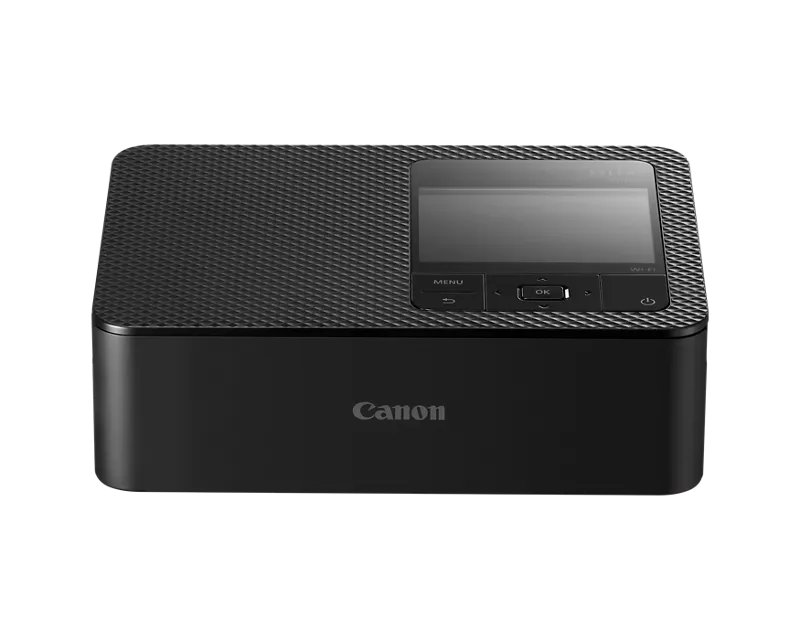
Does anyone know default login credentials for remote UI on Selphy CP1500 printer?
I've scoured the online docs and resources and cannot determine.
Per what I've found for other Canon printers, I've tried the following, which failed:
-
uname = [ADMIN] pw = [canon]
-
uname = [admin] pw = [7654321]
Solved! Go to Solution.
1 ACCEPTED SOLUTION
Accepted Solutions


Options
- Mark as New
- Bookmark
- Subscribe
- Mute
- Subscribe to RSS Feed
- Permalink
- Report Inappropriate Content
04-10-2024 09:59 AM - edited 04-10-2024 10:01 AM
Greetings,
This is from the manual. I have not verified it:
Authentication is required in order to display the printer's webpage from printer
settings screens in macOS. Log in by entering ADMIN as the name, and as the
password, enter the MAC address without colons (for example,
AA:BB:CC:DD:EE:FF -> AABBCCDDEEFF).
You can check the MAC address in [Wi-Fi settings] ► [Confirm Settings] ►
[MAC Address].
If you have changed the password and no longer remember it, use [Reset
Settings] in [Wi-Fi settings] or [Reset all to default] in [Setup] on SELPHY to
restore the default password.
Let us know if it works.
~Rick
Bay Area - CA
~R5 C (1.1.3.1), ~RF Trinity, ~RF 100 Macro, ~RF 100~400, ~RF 100~500, ~RF 200-800, ~RF 1.4x TC, BG-R10, 430EX III-RT ~DxO PhotoLab Elite ~DaVinci Resolve Studio ~ImageClass MF644Cdw MF656Cdw ~Pixel 10 ~CarePaks Are Worth It
4 REPLIES 4
Options
- Mark as New
- Bookmark
- Subscribe
- Mute
- Subscribe to RSS Feed
- Permalink
- Report Inappropriate Content
04-10-2024 09:59 AM - edited 04-10-2024 10:01 AM
Greetings,
This is from the manual. I have not verified it:
Authentication is required in order to display the printer's webpage from printer
settings screens in macOS. Log in by entering ADMIN as the name, and as the
password, enter the MAC address without colons (for example,
AA:BB:CC:DD:EE:FF -> AABBCCDDEEFF).
You can check the MAC address in [Wi-Fi settings] ► [Confirm Settings] ►
[MAC Address].
If you have changed the password and no longer remember it, use [Reset
Settings] in [Wi-Fi settings] or [Reset all to default] in [Setup] on SELPHY to
restore the default password.
Let us know if it works.
~Rick
Bay Area - CA
~R5 C (1.1.3.1), ~RF Trinity, ~RF 100 Macro, ~RF 100~400, ~RF 100~500, ~RF 200-800, ~RF 1.4x TC, BG-R10, 430EX III-RT ~DxO PhotoLab Elite ~DaVinci Resolve Studio ~ImageClass MF644Cdw MF656Cdw ~Pixel 10 ~CarePaks Are Worth It
Options
- Mark as New
- Bookmark
- Subscribe
- Mute
- Subscribe to RSS Feed
- Permalink
- Report Inappropriate Content
04-10-2024 11:28 AM - edited 04-10-2024 11:33 AM
Works exactly as you described, many thanks. Can't believe I missed this in the manual 😬 (long night).
Notes:
- Checking the MAC address as described requires scrolling down 1 full screen on printer display.
- This info appears in the manual (CT2-D202-B 2022) in a note on p.81.
Options
- Mark as New
- Bookmark
- Subscribe
- Mute
- Subscribe to RSS Feed
- Permalink
- Report Inappropriate Content
04-10-2024 11:38 AM
Believe me, you didn't miss it 🤣. I had to look twice myself.
Glad it helped. 🙂
~Rick
Bay Area - CA
~R5 C (1.1.3.1), ~RF Trinity, ~RF 100 Macro, ~RF 100~400, ~RF 100~500, ~RF 200-800, ~RF 1.4x TC, BG-R10, 430EX III-RT ~DxO PhotoLab Elite ~DaVinci Resolve Studio ~ImageClass MF644Cdw MF656Cdw ~Pixel 10 ~CarePaks Are Worth It
Options
- Mark as New
- Bookmark
- Subscribe
- Mute
- Subscribe to RSS Feed
- Permalink
- Report Inappropriate Content
03-31-2025 06:33 AM
I tried and it doesn't work for me. Is it different version in Europe?

Announcements
07/22/2026: New firmware updates are available.
EOS R6 Mark III - Version 1.1.0
05/13/2026: New firmware updates are available.
EOS R5 Mark II - Version 1.3.0
EOS R6 Mark II - Version 1.7.0
04/28/2026: Service Notice: Caution Concerning use of Lithium Batteries
03/17/2026: New firmware updates are available.
SELPHY CP1500 - Version 1.0.7.0
02/23/2026: New firmware update is available for EOS C50- Version 1.0.3.1
01/23/2026: New firmware update is available for RF 24-105mm F4 IS USM- Version 2.0.7
01/20/2026: New firmware updates are available.
10/21/2025: Service Notice: To Users of the Compact Digital Camera PowerShot V1
10/15/2025: New firmware updates are available.
Speedlite EL-5 - Version 1.2.0
Speedlite EL-1 - Version 1.1.0
Speedlite Transmitter ST-E10 - Version 1.2.0
07/28/2025: Notice of Free Repair Service for the Mirrorless Camera EOS R50 (Black)
05/21/2025: New firmware update available for EOS C500 Mark II - Version 1.1.5.1
Related Content
- SELPHY CP1500 Ink Cartridge Keeps Getting Stuck in Mobile & Compact Printers
- SELPHY CP1500 borders too big when printing directly from SD card in Mobile & Compact Printers
- SELPHY CP1500 Error message, won't print in Mobile & Compact Printers
- CP1500 line 1,5 sm in every photo in Mobile & Compact Printers
- Selphy cp1500 Paper or cassette incorrectly inserted Error Message in Mobile & Compact Printers

Ⓒ 2026
Canon U.S.A Inc. All Rights Reserved. Reproduction in whole or part without permission is prohibited.
