Turn on suggestions
Auto-suggest helps you quickly narrow down your search results by suggesting possible matches as you type.
- Canon Community
- Discussions & Help
- General Discussion
- General Discussion
- Re: Canon LiDE 120 Error message: "Cannot communic...
Options
- Subscribe to RSS Feed
- Mark Topic as New
- Mark Topic as Read
- Float this Topic for Current User
- Bookmark
- Subscribe
- Mute
- Printer Friendly Page

Options
- Mark as New
- Bookmark
- Subscribe
- Mute
- Subscribe to RSS Feed
- Permalink
- Report Inappropriate Content
04-27-2015 12:15 AM - edited 04-27-2015 12:22 AM
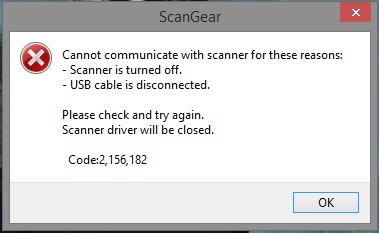
I've tried troubleshooting multiple times:
- Uninstalled and reinstalled drivers
- Returned and bought same model scanner
- Tried different drivers
- Tried different USB ports
My computer build is:
Intel i7 4770k
16GB 1866MHz RAM
Asus Maximus Impact VI
nVidia GTX 780
Corsair RM550
Windows 8.1 64bit
I don't know what I'm doing wrong. Anyone else get this? It's making me quite livid just trouble shooting it. I've read a lot of reviews on this on Amazon and other websites that says that this is plug and play for the most part. What am I doing wrong??
Solved! Go to Solution.
75 REPLIES 75
Options
- Mark as New
- Bookmark
- Subscribe
- Mute
- Subscribe to RSS Feed
- Permalink
- Report Inappropriate Content
03-31-2016 04:25 PM
Just installed my LIDE 120 today, same problem on OSX El Capitan. Looks like Canon is not doing anything about it, if I read this thread. I am going to try and return it to the supplier.
Options
- Mark as New
- Bookmark
- Subscribe
- Mute
- Subscribe to RSS Feed
- Permalink
- Report Inappropriate Content
04-14-2016 06:26 AM
Driver v1.02 is posted.
History:
[Ver.1.02]
- The scan error in the certain PC has been rectified.
Maybe this will fix the scanning errorfor good.
Options
- Mark as New
- Bookmark
- Subscribe
- Mute
- Subscribe to RSS Feed
- Permalink
- Report Inappropriate Content
04-14-2016 12:29 PM
Whoa! 5 consecutively successful scanning with the newest driver on W10 x64! Just the other day, I couldn't not get it to scan one picture! Thank you!
Options
- Mark as New
- Bookmark
- Subscribe
- Mute
- Subscribe to RSS Feed
- Permalink
- Report Inappropriate Content
04-14-2016 06:40 PM - edited 04-15-2016 06:41 PM
I can confirm that this thread problem is fixed now, Win10 usb2&usb3, with newest Canoscan Lide -driver of 13 April, version 17.0.5 , so install it from Canon Support site and scanning works.
Options
- Mark as New
- Bookmark
- Subscribe
- Mute
- Subscribe to RSS Feed
- Permalink
- Report Inappropriate Content
04-15-2016 05:22 PM
Well i guess i bought the scanner not knowing the problem so i will share it with my facebook friend 😞
This sux soz
Options
- Mark as New
- Bookmark
- Subscribe
- Mute
- Subscribe to RSS Feed
- Permalink
- Report Inappropriate Content
04-15-2016 05:24 PM
Problem is confirmed by a few users to be fixed with the latest drivers. I confirmed that it's working fine after the update as well.
Options
- Mark as New
- Bookmark
- Subscribe
- Mute
- Subscribe to RSS Feed
- Permalink
- Report Inappropriate Content
04-15-2016 05:31 PM
Mine still not working after laste update and running in a usb 2.0 working maby every 10-15 time 1 time then the same stops at 10-15 % and error
Options
- Mark as New
- Bookmark
- Subscribe
- Mute
- Subscribe to RSS Feed
- Permalink
- Report Inappropriate Content
04-15-2016 05:35 PM
Are you running W10 x64? That's the OS I have and I am also using USB 2.0. I went through the same pain of trying and timing out or getting an error until the latest update. I haven't scanned more than 10 times since the last update, so I don't know if I was just getting lucky or not.
Options
- Mark as New
- Bookmark
- Subscribe
- Mute
- Subscribe to RSS Feed
- Permalink
- Report Inappropriate Content
04-15-2016 05:43 PM
Same os 😞 same old problem
Options
- Mark as New
- Bookmark
- Subscribe
- Mute
- Subscribe to RSS Feed
- Permalink
- Report Inappropriate Content
04-15-2016 05:44 PM
Oh boy... Thanks for the info.

Announcements
07/22/2026: New firmware updates are available.
EOS R6 Mark III - Version 1.1.0
05/13/2026: New firmware updates are available.
EOS R5 Mark II - Version 1.3.0
EOS R6 Mark II - Version 1.7.0
04/28/2026: Service Notice: Caution Concerning use of Lithium Batteries
03/17/2026: New firmware updates are available.
SELPHY CP1500 - Version 1.0.7.0
02/23/2026: New firmware update is available for EOS C50- Version 1.0.3.1
01/23/2026: New firmware update is available for RF 24-105mm F4 IS USM- Version 2.0.7
01/20/2026: New firmware updates are available.
10/21/2025: Service Notice: To Users of the Compact Digital Camera PowerShot V1
10/15/2025: New firmware updates are available.
Speedlite EL-5 - Version 1.2.0
Speedlite EL-1 - Version 1.1.0
Speedlite Transmitter ST-E10 - Version 1.2.0
07/28/2025: Notice of Free Repair Service for the Mirrorless Camera EOS R50 (Black)
05/21/2025: New firmware update available for EOS C500 Mark II - Version 1.1.5.1
Related Content
- Cannot reach Canon upper management; would a community member/manager please help ME???? in General Discussion
- The Reply Notification emails from Canon Community don’t have links to the Reply on iPhones. in General Discussion
- Have I been put on the bad guy list here in Canon Community? in General Discussion
- Accept Solutions for a Better Community Experience! in General Discussion
- Community Enhancements in General Discussion

Ⓒ 2026
Canon U.S.A Inc. All Rights Reserved. Reproduction in whole or part without permission is prohibited.
