Resolved! EOS Webcam Utility1.cab not found
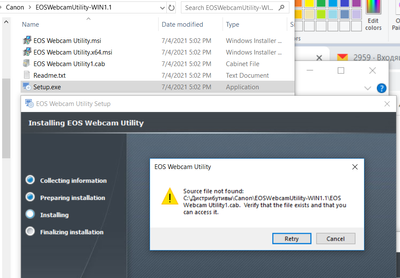
Hello! Very strange thing. I've just installed windows 10pro x64, downloaded EOSWebcamUtility-WIN1.1.zip (few times), unpacked it and started Setup.exe Result is on screenshot. Why so? How to install?
I am trying to set up a multi camera streaming platform with up to 8 cameras being available at any given time. The M50 mark 2 is the camera I would like to use for this setup as the price point and lens options are by far the best for the applicati...
Hi i hope you can help me because i'm trying to fix this issue for over 2 h with no success so i tryed turining off wifi and bluetooth 5 different cablems closing eos utilty (the one for downloading phtos)the wierd thing is i can use remote shooti...
Hello, I'm failing to use my 600D as a webcam with the "EOS Webcam Utility". It works OK with the standard utility, i can control my camera, record videos on the SD card, no worries.However when i'm trying to use some other soft that see the virtual ...
Windows 10, EOS 6D, EOS 100D both with latest firmware, Webcam utility 1.1, multiple cables, multiple ports, no "switch it off and on again" suggestions, please ... i have tried EVERY possible combination and resinstalled and restarted everything tha...
Bought the camera just for webcam... Not being able to use it... EOS Webcam Utility is not showing up as a camera option. Camera: Rebel T6iComputer: Mac Book ProSoftware: macOS Big Sur 11.4 I have installed the EOS Webcam Utility for Rebel T6i.I have...
So I’ve been trying to use my Rebel T6 as my webcam but it has not been working out. I’ve been watching YouTube videos as well as researched but for some reason none of them had really worked. The closest I’ve gotten to my camera actually working is ...
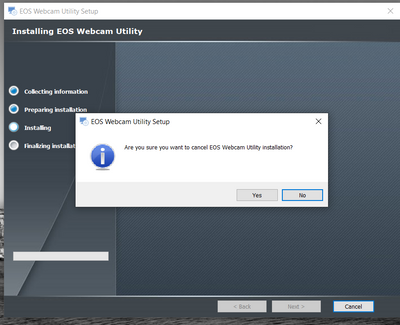
I have downloaded the software but every time I get to the point of "install" and push that button, I then get the question "are you sure you want to cancel EOS Webcam Utility installation?". Either yes or no, I get thrown out of the process.. Any fi...
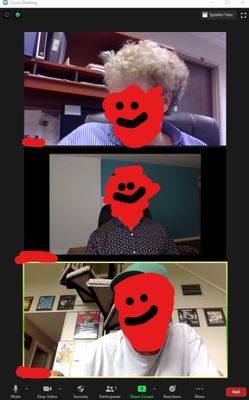
This is a great beta software but when I'm using it for meetings in ZOOM my image is cropped in. Now, when the camera is off and the "Webcam utility" splash screen is displayed, it's full screen. Can I crop in on the software to cut in? I'm using t...
I've installed the EOS Webcam Utility and having problems connecting to OBS on my Canon Rebel T3i. Also Facetime, and Photobooth. I'm using Big Sur v 11.2.3 on the Mac. I've tried using 3 USB cables and none of them solved my issues. OBS Photobooth ...
I've tried everything from uninstalling zoom and webcam utility and installing it again, nothing seems to be working. It's not showing anywhere but OBS. It's also not showing up on the web version of zoom, skype or google hangouts. My only solution ...
When will Canon fix its software to work on a new MacBook Pro (M1 chip, Big Sur OS)?
Hi, I've searched the boards for a similar post and couldn't find one relating to the full release of the webcam utility. I've got a EOS 60D and have been using it with the beta version of the webcam utility through 2020. It worked in all of the soft...
The EOS Utility and EOS Webcam Utility do not work properly with AMD Ryzen-powered computers. I have a brand new Lenovo Legion 5 (Ryzen 7 4800h, RTX 2060 graphics). While my 10 yearold Intel-powered desktop runs EOS Utility and EOS Webcam Utility pe...
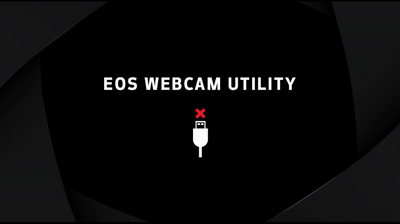
henlo i was trying to download the webcam utility thing and like after pressing finish nothing happens like the camera is detected but it just shows up as a black screen with "eos webcam utility" all the videos i've watched say to close the eos ebcam...
| Subject | Author | Posted |
|---|---|---|
| 08-02-2025 05:16 PM | ||
| 06-26-2025 10:36 PM | ||
| 02-27-2025 07:43 PM | ||
| 12-13-2024 02:47 PM | ||
| 12-09-2024 06:59 PM |
New to the community? Here's some information to help you get acquainted:
12/18/2025: New firmware updates are available.
11/20/2025: New firmware updates are available.
EOS R5 Mark II - Version 1.2.0
PowerShot G7 X Mark III - Version 1.4.0
PowerShot SX740 HS - Version 1.0.2
10/15/2025: New firmware updates are available.
Speedlite EL-5 - Version 1.2.0
Speedlite EL-1 - Version 1.1.0
Speedlite Transmitter ST-E10 - Version 1.2.0
7/17/2025: New firmware updates are available.
02/20/2025: New firmware updates are available.
RF70-200mm F2.8 L IS USM Z - Version 1.0.6
RF24-105mm F2.8 L IS USM Z - Version 1.0.9
RF100-300mm F2.8 L IS USM - Version 1.0.8
Canon U.S.A Inc. All Rights Reserved. Reproduction in whole or part without permission is prohibited.