Turn on suggestions
Auto-suggest helps you quickly narrow down your search results by suggesting possible matches as you type.
- Canon Community
- Discussions & Help
- EOS Webcam Utility Pro
- EOS Webcam Utility Pro - Discussions
- Re: EOS Webcam utility full version and MAC OS Big...
Options
- Subscribe to RSS Feed
- Mark Topic as New
- Mark Topic as Read
- Float this Topic for Current User
- Bookmark
- Subscribe
- Mute
- Printer Friendly Page

Options
- Mark as New
- Bookmark
- Subscribe
- Mute
- Subscribe to RSS Feed
- Permalink
- Report Inappropriate Content
11-17-2020 11:28 AM
I will like to know if anyone have the full version of Big Sur OS and EOS Webcam Utility full version working together. If theres any bug or trouble using both together. Thank you
Solved! Go to Solution.
74 REPLIES 74
Options
- Mark as New
- Bookmark
- Subscribe
- Mute
- Subscribe to RSS Feed
- Permalink
- Report Inappropriate Content
12-02-2020 01:42 AM - edited 12-03-2020 05:29 AM
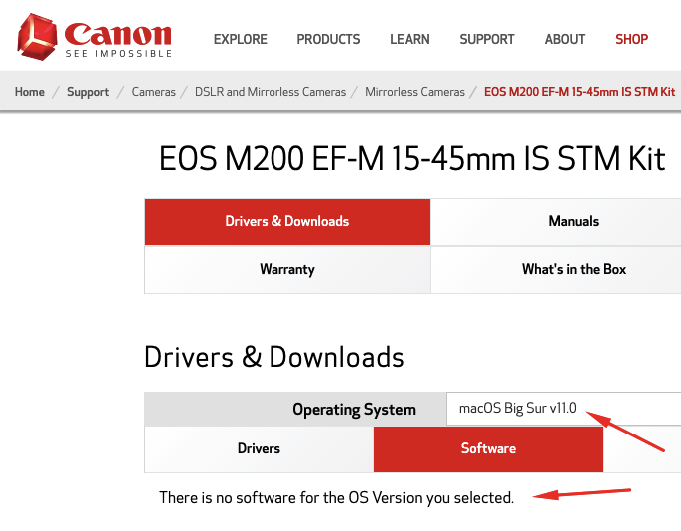
Hello. Could you plz explain how did you get Webcam utility for Big Sur? As I now it is not available yet. At least for M200 & M50.
I tried to install the version for Catalina, but after installing there were no new icon in Applications. Just uninstallation.

Options
- Mark as New
- Bookmark
- Subscribe
- Mute
- Subscribe to RSS Feed
- Permalink
- Report Inappropriate Content
12-03-2020 07:46 AM
There is no special version for Big Sur so far. I installed the available version. It installs a driver, which appears as selectable camera in apps like Teams, Zoom or Streamlabs. No need to start an app, just connect your camera via USB and select it as a camera device in the app.
Options
- Mark as New
- Bookmark
- Subscribe
- Mute
- Subscribe to RSS Feed
- Permalink
- Report Inappropriate Content
12-03-2020 07:56 AM
Great. Thx!
Options
- Mark as New
- Bookmark
- Subscribe
- Mute
- Subscribe to RSS Feed
- Permalink
- Report Inappropriate Content
12-04-2020 06:50 AM
Hi,
So you upgrade to Big Sur and eos webcam utility works fine?
Options
- Mark as New
- Bookmark
- Subscribe
- Mute
- Subscribe to RSS Feed
- Permalink
- Report Inappropriate Content
12-07-2020 06:40 PM
So you have Full Big Sur and the eos webcam utility and works smoothly?
Options
- Mark as New
- Bookmark
- Subscribe
- Mute
- Subscribe to RSS Feed
- Permalink
- Report Inappropriate Content
12-08-2020 02:09 AM
Hi. Yes
Options
- Mark as New
- Bookmark
- Subscribe
- Mute
- Subscribe to RSS Feed
- Permalink
- Report Inappropriate Content
12-18-2020 11:20 AM
I haven't been able to get it to work. I have 2019 MacBook Air runnign Big Sur. Using Canon 80D. EOS Utilty NOT running. Installed EOS Webcam utility. Camera not visible in ANY services listed. I've tried reinstalling a few times and finally gave up. I know it's not the USB cable because I can run the camera from my Mac (EOS Utility) with the USB cable I have. Sure would be nice to have it work. No other cloud services running either.
Options
- Mark as New
- Bookmark
- Subscribe
- Mute
- Subscribe to RSS Feed
- Permalink
- Report Inappropriate Content
12-19-2020 03:16 PM
Hey so I just got off the phone with support because I was having this EXACT issue. Make sure you download EOS Utility 3.13.10 for macOS, not the Utility 1.0. You may have to pick a different camera to find it (go to the "Choose a Search Area" search bar at the upper right and type in a camera name). For example, I have a T5, but it only showed up as an option for the T6. Download the EOS Utility 3.13.10 for macOS software, and after installation make sure to restart your computer. It should work after that.
Options
- Mark as New
- Bookmark
- Subscribe
- Mute
- Subscribe to RSS Feed
- Permalink
- Report Inappropriate Content
12-19-2020 04:10 PM
Thanks! I rolled Big Sur back to Catalina and it worked. I may try your solution next week.
Options
- Mark as New
- Bookmark
- Subscribe
- Mute
- Subscribe to RSS Feed
- Permalink
- Report Inappropriate Content
12-25-2020 06:30 PM
I believe the answer for now is that it is not compatible. I have read through almost all comments and here is what I have experienced.
There isn't software available for Big Sur right now. Someone else said they have it, but I doubt they could get it again if they delete it. Maybe they could share a liok to the download. Might have been a beta version and then they upgraded OS.
I am running M1 MBA and have been messing with this for 3 days and finally got it to work. I think its because I am running the rosetta version of Zoom and EOS Webcam Utility. When I go to downloads for any of my cameras it says there isn't anything for Big Sur, but does say that Catalina is detected (I assume it is recognizing something through Rosetta).
If you need EOS Webcam Utility then I would suggest holding off from updating to Big Sur. I am disappointed that Canon released the full version of EOS Webcam Utility around the same time as Big Sur and didn't release a version for that OS.
Final clarification. I am running EOS Webcam Utility and Zoom on Big Sur, but I think it is working only because of Rosetta which is used with New (Fall 2020) M1 Macs.
Good Luck

Announcements
07/22/2026: New firmware updates are available.
EOS R6 Mark III - Version 1.1.0
05/13/2026: New firmware updates are available.
EOS R5 Mark II - Version 1.3.0
EOS R6 Mark II - Version 1.7.0
04/28/2026: Service Notice: Caution Concerning use of Lithium Batteries
03/17/2026: New firmware updates are available.
SELPHY CP1500 - Version 1.0.7.0
02/23/2026: New firmware update is available for EOS C50- Version 1.0.3.1
01/23/2026: New firmware update is available for RF 24-105mm F4 IS USM- Version 2.0.7
01/20/2026: New firmware updates are available.
10/21/2025: Service Notice: To Users of the Compact Digital Camera PowerShot V1
10/15/2025: New firmware updates are available.
Speedlite EL-5 - Version 1.2.0
Speedlite EL-1 - Version 1.1.0
Speedlite Transmitter ST-E10 - Version 1.2.0
07/28/2025: Notice of Free Repair Service for the Mirrorless Camera EOS R50 (Black)
05/21/2025: New firmware update available for EOS C500 Mark II - Version 1.1.5.1
Related Content
- eos webcam utility pro on windows 10 home not working in EOS Webcam Utility Pro - Discussions
- EOS Webcam Utility stopped working after a Windows Update. in EOS Webcam Utility Pro - Discussions
- This version of "EOSWebcamUtility" will not open in a future release of MacOS in EOS Webcam Utility Pro - Discussions
- EOS Webcam utility pro not working with 6D Mark 2 in EOS Webcam Utility Pro - Discussions
- EOS Webcam Utility PRO does not work after upgrade to Windows 11 in EOS Webcam Utility Pro - Discussions

Ⓒ 2026
Canon U.S.A Inc. All Rights Reserved. Reproduction in whole or part without permission is prohibited.
