Turn on suggestions
Auto-suggest helps you quickly narrow down your search results by suggesting possible matches as you type.
- Canon Community
- Discussions & Help
- Camera
- EOS DSLR & Mirrorless Cameras
- LR3 cannot read RAW from 5D3
Options
- Subscribe to RSS Feed
- Mark Topic as New
- Mark Topic as Read
- Float this Topic for Current User
- Bookmark
- Subscribe
- Mute
- Printer Friendly Page
LR3 cannot read RAW from 5D3

Options
- Mark as New
- Bookmark
- Subscribe
- Mute
- Subscribe to RSS Feed
- Permalink
- Report Inappropriate Content
03-17-2016 12:31 AM
Just collected my new 5D3 less than a week ago and I am very pleased with the camera so far.
I do have a unpleasant surprise though. While trying to import RAW files to LR3 I have this response:
" The files are from a camera which is not recognised by the RAW format supported in Lightroom".
Do I need to purchase the latest LR or is there any free upgrade from LR online.
I would rather stick with LR as I have several years of photos managed in LR. I have no problem working with DNG files fom Leica M9.
Any sugestions is much appreciated.
Edwin Ho - Perth, Western Australia
5D, 5D III, EF 24-70mm f/2.8L, EF 70-200mm f/2.8L IS II, EF 40mm f/2.8 STM, 580 EX II
Lightroom 6, Photoshop Elements 10
And others.
5D, 5D III, EF 24-70mm f/2.8L, EF 70-200mm f/2.8L IS II, EF 40mm f/2.8 STM, 580 EX II
Lightroom 6, Photoshop Elements 10
And others.
25 REPLIES 25


Options
- Mark as New
- Bookmark
- Subscribe
- Mute
- Subscribe to RSS Feed
- Permalink
- Report Inappropriate Content
03-18-2016 12:33 PM
@Waddizzle wrote:
I always wonder which package has the better lens correction for Canon lenses, DPP or LR. I have not seen compensation, or recognition, for using Canon extenders with "L" series lenses in LR as of yet. But, DPP has it built in.
It is my understanding that Canon's Digital Lens Optimizer corrects for more than Lightroom does. However DLO only works with Canon lenses, and I have a number of Sigma lenses, so that's why I normally use Lightroom. Prior to LR 4, I felt DPP did a much better job at RAW conversion than Lightroom did. With LR 4 and later I don't see as much of a difference.

Options
- Mark as New
- Bookmark
- Subscribe
- Mute
- Subscribe to RSS Feed
- Permalink
- Report Inappropriate Content
03-18-2016 08:06 PM
"It is my understanding that Canon's Digital Lens Optimizer corrects for more than Lightroom does."
Canon's DLO has a hidden surprise feature associated with it, which probably explains why it can seem to work with more lenses. When you use DLO, then any lens correciton gets ignored. You use one, or the other, not both. I guess DLO is present so that you can apply some sort of correction to non-Canon lenses, because only Canon lenses are the DPP lens correction database.
--------------------------------------------------------
"Enjoying photography since 1972."
"Enjoying photography since 1972."

Options
- Mark as New
- Bookmark
- Subscribe
- Mute
- Subscribe to RSS Feed
- Permalink
- Report Inappropriate Content
03-19-2016 12:18 AM
@Waddizzle wrote:"It is my understanding that Canon's Digital Lens Optimizer corrects for more than Lightroom does."
Canon's DLO has a hidden surprise feature associated with it, which probably explains why it can seem to work with more lenses. When you use DLO, then any lens correciton gets ignored. You use one, or the other, not both. I guess DLO is present so that you can apply some sort of correction to non-Canon lenses, because only Canon lenses are the DPP lens correction database.
Well, there's obviously some confusion here. In DPP, "DLO" stands for "Digital Lighting Optimizer". It's a semi-automatic brightness adjustment and has nothing to do with lens correction. You can set it to any of three levels of strength. Using Auto Gamma Adjustment turns it off, but you can turn it back on afterwards without reversing the auto-gamma effect.
Auto Gamma Adjustment was introduced in DPP Version 4, but DLO has been around for as long as I can remember. (Although in DPP 3 the slider that sets it is in an out-of-the-way location.)
Bob
Philadelphia, Pennsylvania USA
Philadelphia, Pennsylvania USA
Options
- Mark as New
- Bookmark
- Subscribe
- Mute
- Subscribe to RSS Feed
- Permalink
- Report Inappropriate Content
03-19-2016 07:20 AM - edited 03-19-2016 07:20 AM
"Well, there's obviously some confusion here. In DPP, "DLO" stands for "Digital Lighting Optimizer". "
----------------------------------------------------------------------------------------------
It was pretty obvious that I was talking about the Digital Lens Optimizer, though.
BTW, the tool in DPP is actually called ALO, "Automatic Lighting Optimizer", not DLO.
--------------------------------------------------------
"Enjoying photography since 1972."
"Enjoying photography since 1972."
Options
- Mark as New
- Bookmark
- Subscribe
- Mute
- Subscribe to RSS Feed
- Permalink
- Report Inappropriate Content
03-19-2016 09:04 AM

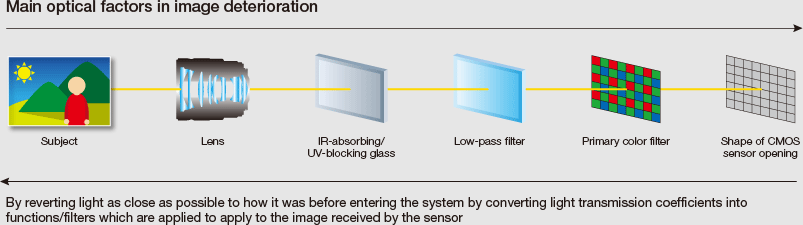
After passing the lens and various filters, the light has diverted from the ideal condition as it reaches the image sensor where the image will be formed. This is due to the influence of factors such as aberrations, diffraction, and the low-pass filter. If these influences can be compensated for using highly precise and specific data, the result ideally would be the original and optimal image. This is the unique principle behind the Digital Lens Optimizer. Factors contributing to optical image deterioration as the light passes through the lenses and filters in the camera were identified and converted into mathematical functions (optical transfer functions (OTF)). By applying the inverse functions to the captured image, the state of the light (image quality) can be returned to approach the state that the incident light had before entering the camera.
The factors such as aberrations, diffraction, and low-pass filter influence differ for different lenses and cameras, and they also are dependent on shooting parameters. The Digital Lens Optimizer therefore uses inverse functions that are carefully optimized and based on precise data. This makes it possible to compensate even for complex and asymmetric aberrations such as coma.
Options
- Mark as New
- Bookmark
- Subscribe
- Mute
- Subscribe to RSS Feed
- Permalink
- Report Inappropriate Content
03-19-2016 09:12 AM
@Waddizzle wrote:"Well, there's obviously some confusion here. In DPP, "DLO" stands for "Digital Lighting Optimizer". "
----------------------------------------------------------------------------------------------
It was pretty obvious that I was talking about the Digital Lens Optimizer, though.
BTW, the tool in DPP is actually called ALO, "Automatic Lighting Optimizer", not DLO.
You're right; my error. I even looked it up last night, but I must have been even sleepier than I thought I was.
But every embarrassment has a silver lining, I guess. When I looked again this morning after reading your reply, I discovered that I hadn't loaded the lens correction data on my new Windows 10 laptop. (I wish the installation program would add that to the list of options.) So at least I got that fixed.
Bob
Philadelphia, Pennsylvania USA
Philadelphia, Pennsylvania USA

- « Previous
- Next »
- « Previous
- Next »
Announcements
07/22/2026: New firmware updates are available.
EOS R6 Mark III - Version 1.1.0
05/13/2026: New firmware updates are available.
EOS R5 Mark II - Version 1.3.0
EOS R6 Mark II - Version 1.7.0
04/28/2026: Service Notice: Caution Concerning use of Lithium Batteries
03/17/2026: New firmware updates are available.
SELPHY CP1500 - Version 1.0.7.0
02/23/2026: New firmware update is available for EOS C50- Version 1.0.3.1
01/23/2026: New firmware update is available for RF 24-105mm F4 IS USM- Version 2.0.7
01/20/2026: New firmware updates are available.
10/21/2025: Service Notice: To Users of the Compact Digital Camera PowerShot V1
10/15/2025: New firmware updates are available.
Speedlite EL-5 - Version 1.2.0
Speedlite EL-1 - Version 1.1.0
Speedlite Transmitter ST-E10 - Version 1.2.0
07/28/2025: Notice of Free Repair Service for the Mirrorless Camera EOS R50 (Black)
05/21/2025: New firmware update available for EOS C500 Mark II - Version 1.1.5.1
Related Content
- EOS R5 hot pixels lower iso in video mode in EOS DSLR & Mirrorless Cameras
- EOS M10 "Memory Card Error" & Corrupted Files – Found a Bent Pin in the SD Slot. in EOS DSLR & Mirrorless Cameras
- Product Registration Problem: Unable to read serial number on PowerShot SX620 HS in Point & Shoot Digital Cameras
- PowerShot A590 LCD screen not working right in Point & Shoot Digital Cameras
- Canon R6V AF grayed out. in EOS DSLR & Mirrorless Cameras

Ⓒ 2026
Canon U.S.A Inc. All Rights Reserved. Reproduction in whole or part without permission is prohibited.
