Turn on suggestions
Auto-suggest helps you quickly narrow down your search results by suggesting possible matches as you type.
- Canon Community
- Discussions & Help
- Camera
- EOS DSLR & Mirrorless Cameras
- How to Transfer RAW files from Canon R50 to Androi...
Options
- Subscribe to RSS Feed
- Mark Topic as New
- Mark Topic as Read
- Float this Topic for Current User
- Bookmark
- Subscribe
- Mute
- Printer Friendly Page
How to Transfer RAW files from Canon R50 to Android devices

Options
- Mark as New
- Bookmark
- Subscribe
- Mute
- Subscribe to RSS Feed
- Permalink
- Report Inappropriate Content
09-30-2023 02:32 AM
I know that the Canon Camera Connect app can only transfer RAW files to iOS only. For Android the RAW files will convert to jpeg format if we import it to the Android. So the question, is there any alternative app to transfer RAW files from my Canon R50 to android devices?
3 REPLIES 3


Options
- Mark as New
- Bookmark
- Subscribe
- Mute
- Subscribe to RSS Feed
- Permalink
- Report Inappropriate Content
09-30-2023 10:36 AM
Greetings,
No app is needed. You can use a card reader connected directly to your device. I've used a USB-C adapter with standard USB A. Works just fine.
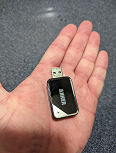
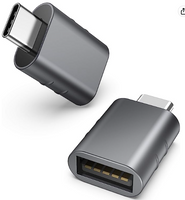
~Rick
Bay Area - CA
~R5 C (1.1.3.1), ~RF Trinity, ~RF 100 Macro, ~RF 100~400, ~RF 100~500, ~RF 200-800, ~RF 1.4x TC, BG-R10, 430EX III-RT ~DxO PhotoLab Elite ~DaVinci Resolve Studio ~ImageClass MF644Cdw MF656Cdw ~Pixel 10 ~CarePaks Are Worth It

Options
- Mark as New
- Bookmark
- Subscribe
- Mute
- Subscribe to RSS Feed
- Permalink
- Report Inappropriate Content
09-30-2023 10:37 AM
steadfasting,
One way to do this is with a wired transfer by either a USB cable or by way of a card reader that has a micro USB port cable on one end. You can read up on this.
I use the Camera Connect and Control app.
I have a Canon T8i .
You'll need an OTG (on the go) cable to connect your Android device to the USB cable, and an IFC-600PCU interface cable to connect the USB cable to the USB port on your camera. Your manual should tell you what cable your camera specifically uses.
I got the OTG cable off Amazon, and the IFC-600PCU cable from Canon
I haven't used this app to transfer Raw files myself, but I've read that you can.
Steve Thomas

Options
- Mark as New
- Bookmark
- Subscribe
- Mute
- Subscribe to RSS Feed
- Permalink
- Report Inappropriate Content
09-30-2023 11:06 PM
I have used third-party Camera Connect and Control to transfer raw files wirelessly from my 6D to my OnePlus 6.
When I travel I use USB C card reader for my Android. Faster.


Announcements
07/22/2026: New firmware updates are available.
EOS R6 Mark III - Version 1.1.0
05/13/2026: New firmware updates are available.
EOS R5 Mark II - Version 1.3.0
EOS R6 Mark II - Version 1.7.0
04/28/2026: Service Notice: Caution Concerning use of Lithium Batteries
03/17/2026: New firmware updates are available.
SELPHY CP1500 - Version 1.0.7.0
02/23/2026: New firmware update is available for EOS C50- Version 1.0.3.1
01/23/2026: New firmware update is available for RF 24-105mm F4 IS USM- Version 2.0.7
01/20/2026: New firmware updates are available.
10/21/2025: Service Notice: To Users of the Compact Digital Camera PowerShot V1
10/15/2025: New firmware updates are available.
Speedlite EL-5 - Version 1.2.0
Speedlite EL-1 - Version 1.1.0
Speedlite Transmitter ST-E10 - Version 1.2.0
07/28/2025: Notice of Free Repair Service for the Mirrorless Camera EOS R50 (Black)
05/21/2025: New firmware update available for EOS C500 Mark II - Version 1.1.5.1
Related Content
- R7 Problem connecting to iOS via Camera Connect, but Android Works in Camera Software
- Having trouble uploading photos from my EOS Rebel T2i to new Macbook :( in EOS DSLR & Mirrorless Cameras
- EOS R6 Mark II – Firmware 1.7.0 – Bug: 5GHz hotspot invisible on Samsung Android (DFS channel issue) in EOS DSLR & Mirrorless Cameras
- EOS R5 Mark II firmware 1.30 notes in Camera Software
- EOS R7 unable to connect to Android Galaxy S22 in EOS DSLR & Mirrorless Cameras

Ⓒ 2026
Canon U.S.A Inc. All Rights Reserved. Reproduction in whole or part without permission is prohibited.
