Turn on suggestions
Auto-suggest helps you quickly narrow down your search results by suggesting possible matches as you type.
- Canon Community
- Discussions & Help
- Camera
- EOS DSLR & Mirrorless Cameras
- Re: For Picture Styles, the EXIF data does not mat...
Options
- Subscribe to RSS Feed
- Mark Topic as New
- Mark Topic as Read
- Float this Topic for Current User
- Bookmark
- Subscribe
- Mute
- Printer Friendly Page

Options
- Mark as New
- Bookmark
- Subscribe
- Mute
- Subscribe to RSS Feed
- Permalink
- Report Inappropriate Content
02-24-2020 02:44 PM
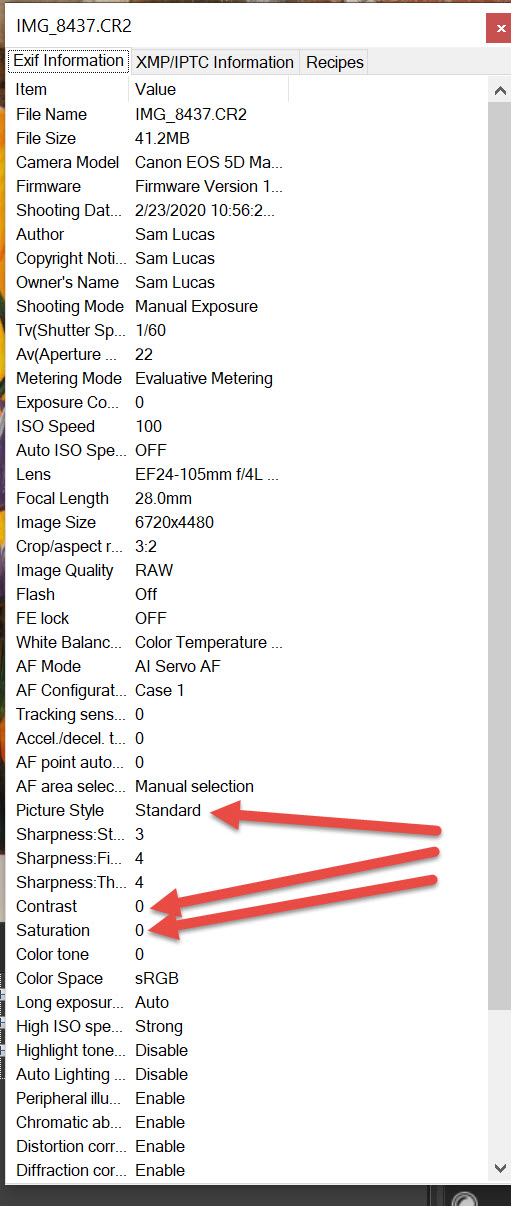
On a Canon D5 Mark iV I am working with Picture Styles and there is a difference between the in camera value for Contrast and Saturation and the value in the EXIF information. For example, with the Standard Picture Style, the EXIF data says contrast and saturation are 0, but the in camera value is 4 and 4. Which value is correct? Is this a known bug with this camera?
Solved! Go to Solution.
2 ACCEPTED SOLUTIONS
Accepted Solutions
Options
- Mark as New
- Bookmark
- Subscribe
- Mute
- Subscribe to RSS Feed
- Permalink
- Report Inappropriate Content
02-26-2020 09:04 AM
My bad...I was mis-reading the summary screen (just prior to the 'detail screen' in your image). I thought the 4/4 on the summary screen were contrast and saturation. Instead, they are part of the Sharpness parameter set.
Thank you for your assistance....
Sam
Options
- Mark as New
- Bookmark
- Subscribe
- Mute
- Subscribe to RSS Feed
- Permalink
- Report Inappropriate Content
02-26-2020 09:05 AM
6 REPLIES 6


Options
- Mark as New
- Bookmark
- Subscribe
- Mute
- Subscribe to RSS Feed
- Permalink
- Report Inappropriate Content
02-24-2020 02:50 PM
What are you using to view the numbers?
Options
- Mark as New
- Bookmark
- Subscribe
- Mute
- Subscribe to RSS Feed
- Permalink
- Report Inappropriate Content
02-25-2020 11:18 AM
In DPP4, I click on the View menu and then on the Info menu item.

Options
- Mark as New
- Bookmark
- Subscribe
- Mute
- Subscribe to RSS Feed
- Permalink
- Report Inappropriate Content
02-25-2020 06:50 PM
@samhoustonlucas wrote:On a Canon D5 Mark iV I am working with Picture Styles and there is a difference between the in camera value for Contrast and Saturation and the value in the EXIF information. For example, with the Standard Picture Style, the EXIF data says contrast and saturation are 0, but the in camera value is 4 and 4. Which value is correct? Is this a known bug with this camera?
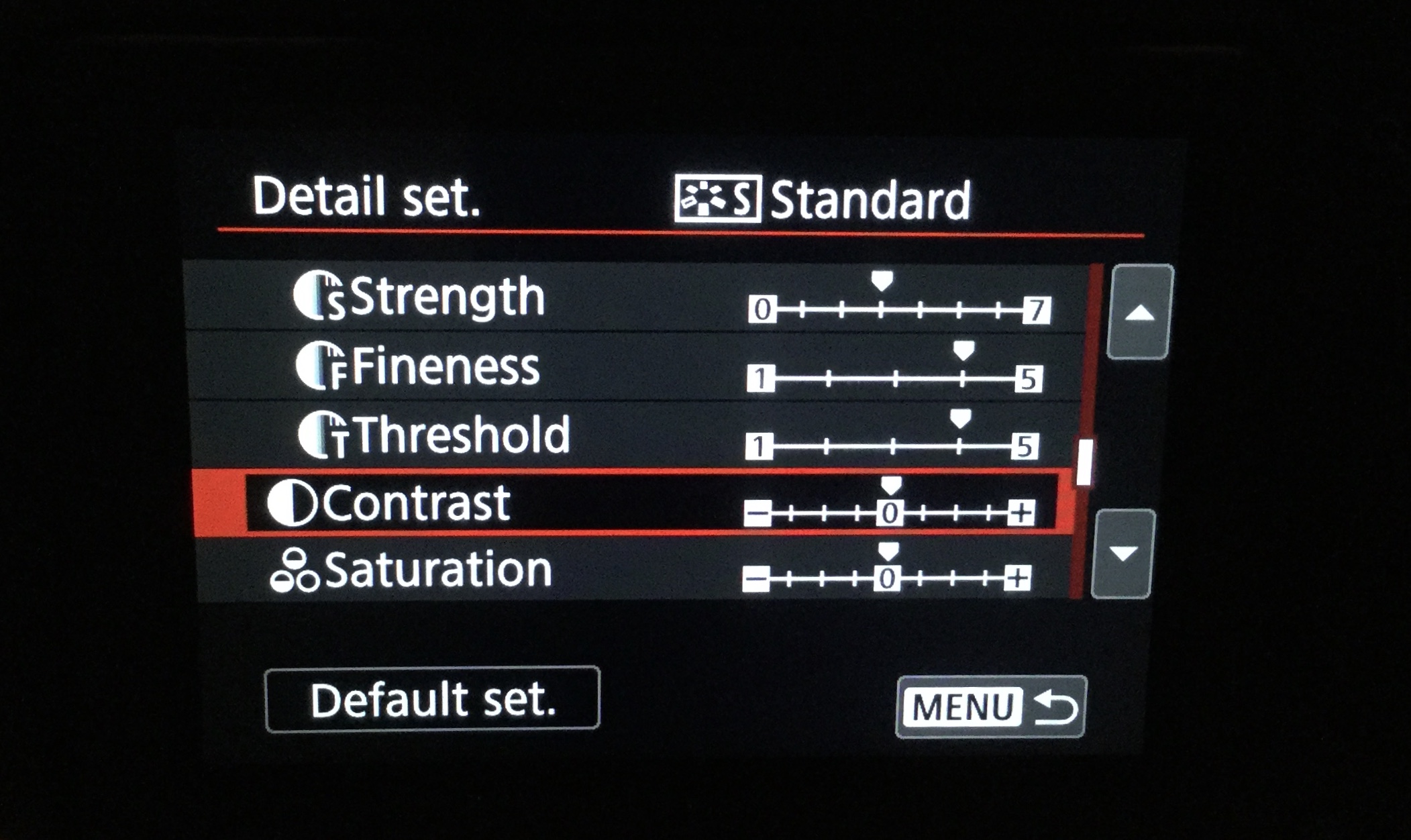
Are you certain that you are looking at the correct settings in the camera?
--------------------------------------------------------
"Enjoying photography since 1972."
"Enjoying photography since 1972."
Options
- Mark as New
- Bookmark
- Subscribe
- Mute
- Subscribe to RSS Feed
- Permalink
- Report Inappropriate Content
02-26-2020 09:04 AM
My bad...I was mis-reading the summary screen (just prior to the 'detail screen' in your image). I thought the 4/4 on the summary screen were contrast and saturation. Instead, they are part of the Sharpness parameter set.
Thank you for your assistance....
Sam
Options
- Mark as New
- Bookmark
- Subscribe
- Mute
- Subscribe to RSS Feed
- Permalink
- Report Inappropriate Content
02-26-2020 09:05 AM
Oh, by the way...How did you get an image of the camera screen??????
Options
- Mark as New
- Bookmark
- Subscribe
- Mute
- Subscribe to RSS Feed
- Permalink
- Report Inappropriate Content
02-26-2020 11:43 AM
How? I used an iPad to photograph the camera.
--------------------------------------------------------
"Enjoying photography since 1972."
"Enjoying photography since 1972."

Announcements
07/22/2026: New firmware updates are available.
EOS R6 Mark III - Version 1.1.0
05/13/2026: New firmware updates are available.
EOS R5 Mark II - Version 1.3.0
EOS R6 Mark II - Version 1.7.0
04/28/2026: Service Notice: Caution Concerning use of Lithium Batteries
03/17/2026: New firmware updates are available.
SELPHY CP1500 - Version 1.0.7.0
02/23/2026: New firmware update is available for EOS C50- Version 1.0.3.1
01/23/2026: New firmware update is available for RF 24-105mm F4 IS USM- Version 2.0.7
01/20/2026: New firmware updates are available.
10/21/2025: Service Notice: To Users of the Compact Digital Camera PowerShot V1
10/15/2025: New firmware updates are available.
Speedlite EL-5 - Version 1.2.0
Speedlite EL-1 - Version 1.1.0
Speedlite Transmitter ST-E10 - Version 1.2.0
07/28/2025: Notice of Free Repair Service for the Mirrorless Camera EOS R50 (Black)
05/21/2025: New firmware update available for EOS C500 Mark II - Version 1.1.5.1
Related Content
- EOS Rebel G Shutter Button not Working in EOS DSLR & Mirrorless Cameras
- New Features Added For The C80 & C400 And Updates For The C50, C70 & R5C in Camera Software
- EOS 6d Mark II Used camera Viewfinder Grid Lines - are these able to turn off? in EOS DSLR & Mirrorless Cameras
- PowerShot SX620 HS Zoom and other functions limited via Canon Connect in Point & Shoot Digital Cameras
- EOS Rebel T7 making ticking noise and busy error message in EOS DSLR & Mirrorless Cameras

Ⓒ 2026
Canon U.S.A Inc. All Rights Reserved. Reproduction in whole or part without permission is prohibited.
