Turn on suggestions
Auto-suggest helps you quickly narrow down your search results by suggesting possible matches as you type.
- Canon Community
- Discussions & Help
- Camera
- EOS DSLR & Mirrorless Cameras
- Re: Cannot format change card
Options
- Subscribe to RSS Feed
- Mark Topic as New
- Mark Topic as Read
- Float this Topic for Current User
- Bookmark
- Subscribe
- Mute
- Printer Friendly Page

Options
- Mark as New
- Bookmark
- Subscribe
- Mute
- Subscribe to RSS Feed
- Permalink
- Report Inappropriate Content
12-19-2022
01:02 PM
- last edited on
12-20-2022
09:52 AM
by
 Danny
Danny
I have the EOS Rebel T7. I bought the SanDisk SDXC UHS-I Card. When I try to format I get message Cannot format change card. Change card to what?
Thank you,
KellyG
Solved! Go to Solution.
1 ACCEPTED SOLUTION
Accepted Solutions


Options
- Mark as New
- Bookmark
- Subscribe
- Mute
- Subscribe to RSS Feed
- Permalink
- Report Inappropriate Content
12-19-2022 05:47 PM - edited 12-19-2022 08:25 PM
256 GB, you say? That is much too large for this camera. I had not noticed that you had written SDXC, not SDHC. The Class I part is fine. It is the “XC”, for extended capacity, instead of “HC”, for high capacity, that is the issue.
I know the camera specifications say that the SDXC card should work. I get that. In the real world, the SDXC cards do not work. This is speaking from personal experience,, as well as the combined experiences of other forum users with the T5, T6, and T7 models.
You need to dial down card storage capacity to [UHS-I] I, SDHC, which is 32 GB or smaller, and I can almost guarantee you that all of your issues will go away.
--------------------------------------------------------
"Enjoying photography since 1972."
"Enjoying photography since 1972."
6 REPLIES 6
Options
- Mark as New
- Bookmark
- Subscribe
- Mute
- Subscribe to RSS Feed
- Permalink
- Report Inappropriate Content
12-19-2022 01:35 PM
@KellyG wrote:I have the EOS Rebel T7. I bought the SanDisk SDXC UHS-I Card. When I try to format I get message Cannot format change card. Change card to what?
Thank you,
KellyG
I think the reply “change card” is telling you to try a different SD card.
What brand of card do you have? Where did you buy the SD card?
Do you have a full size SD card, or a micro-SD card with an adapter?
--------------------------------------------------------
"Enjoying photography since 1972."
"Enjoying photography since 1972."
Options
- Mark as New
- Bookmark
- Subscribe
- Mute
- Subscribe to RSS Feed
- Permalink
- Report Inappropriate Content
12-19-2022 01:57 PM
Thank you for your response! It is SanDisk brand. I bought it through our company procurement system. It is full size: SanDisk 256GB Ultra SDXC UHS-I Memory Card - 120MB/s, C10, U1, Full HD, SD Card - SDSDUN4-256G-GN6IN
Options
- Mark as New
- Bookmark
- Subscribe
- Mute
- Subscribe to RSS Feed
- Permalink
- Report Inappropriate Content
12-19-2022 05:47 PM - edited 12-19-2022 08:25 PM
256 GB, you say? That is much too large for this camera. I had not noticed that you had written SDXC, not SDHC. The Class I part is fine. It is the “XC”, for extended capacity, instead of “HC”, for high capacity, that is the issue.
I know the camera specifications say that the SDXC card should work. I get that. In the real world, the SDXC cards do not work. This is speaking from personal experience,, as well as the combined experiences of other forum users with the T5, T6, and T7 models.
You need to dial down card storage capacity to [UHS-I] I, SDHC, which is 32 GB or smaller, and I can almost guarantee you that all of your issues will go away.
--------------------------------------------------------
"Enjoying photography since 1972."
"Enjoying photography since 1972."

Options
- Mark as New
- Bookmark
- Subscribe
- Mute
- Subscribe to RSS Feed
- Permalink
- Report Inappropriate Content
12-19-2022 07:06 PM
Is Error 02 what you are seeing?
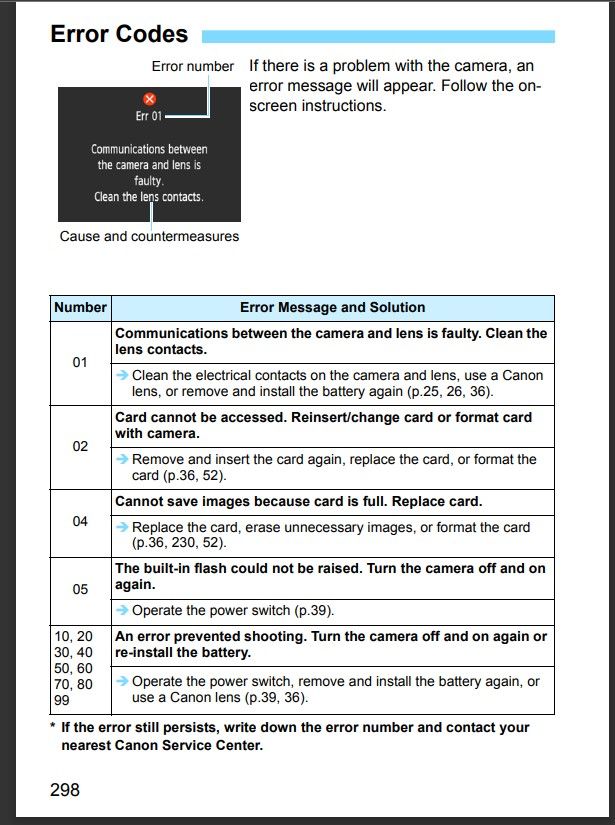
Sometimes a brand new card needs to formatted in a PC first, and then formatted in camera.
John Hoffman
Conway, NH
R6 Mark III, M200 (converted to infrared), RF lenses, Pixma PRO-100, Pixma TR8620a, Lr Classic
Conway, NH
R6 Mark III, M200 (converted to infrared), RF lenses, Pixma PRO-100, Pixma TR8620a, Lr Classic
Options
- Mark as New
- Bookmark
- Subscribe
- Mute
- Subscribe to RSS Feed
- Permalink
- Report Inappropriate Content
01-04-2023 03:22 PM
Thank you again so much. I will try a smaller capacity card.
Options
- Mark as New
- Bookmark
- Subscribe
- Mute
- Subscribe to RSS Feed
- Permalink
- Report Inappropriate Content
01-04-2023 03:23 PM
Thank you for your response! I tried formatting in PC first and it still would not work. I'll try another card.

Announcements
07/22/2026: New firmware updates are available.
EOS R6 Mark III - Version 1.1.0
05/13/2026: New firmware updates are available.
EOS R5 Mark II - Version 1.3.0
EOS R6 Mark II - Version 1.7.0
04/28/2026: Service Notice: Caution Concerning use of Lithium Batteries
03/17/2026: New firmware updates are available.
SELPHY CP1500 - Version 1.0.7.0
02/23/2026: New firmware update is available for EOS C50- Version 1.0.3.1
01/23/2026: New firmware update is available for RF 24-105mm F4 IS USM- Version 2.0.7
01/20/2026: New firmware updates are available.
10/21/2025: Service Notice: To Users of the Compact Digital Camera PowerShot V1
10/15/2025: New firmware updates are available.
Speedlite EL-5 - Version 1.2.0
Speedlite EL-1 - Version 1.1.0
Speedlite Transmitter ST-E10 - Version 1.2.0
07/28/2025: Notice of Free Repair Service for the Mirrorless Camera EOS R50 (Black)
05/21/2025: New firmware update available for EOS C500 Mark II - Version 1.1.5.1
Related Content
- EOS Canon R6 mkIII Image write failure in EOS DSLR & Mirrorless Cameras
- Changing lenses outside in EOS DSLR & Mirrorless Cameras
- R6II slot 1 won’t read card in EOS DSLR & Mirrorless Cameras
- Aperture communication issues between Canon EOS R8 and sigma 150-600mm f/5-6.3 DG OS HSM C in EOS DSLR & Mirrorless Cameras
- Canon EOS R50 mode dial broken in EOS DSLR & Mirrorless Cameras

Ⓒ 2026
Canon U.S.A Inc. All Rights Reserved. Reproduction in whole or part without permission is prohibited.
