Turn on suggestions
Auto-suggest helps you quickly narrow down your search results by suggesting possible matches as you type.
- Canon Community
- Discussions & Help
- Camera
- EOS DSLR & Mirrorless Cameras
- Re: EOS R7 can't connect to WiFi - Camera Connect ...
Options
- Subscribe to RSS Feed
- Mark Topic as New
- Mark Topic as Read
- Float this Topic for Current User
- Bookmark
- Subscribe
- Mute
- Printer Friendly Page

Options
- Mark as New
- Bookmark
- Subscribe
- Mute
- Subscribe to RSS Feed
- Permalink
- Report Inappropriate Content
03-29-2024
04:13 PM
- last edited on
04-01-2025
08:19 AM
by
 James_C
Hello,
I have an R7 and I was trying to connect it to the Camera Connect app so I could import some pictures from my camera to my iPhone. I'm able to connect to the app using bluetooth, but whenever I try to import photos or use any other functionality, the app says "Switching to a faster Wifi connection" which just hangs and never completes.
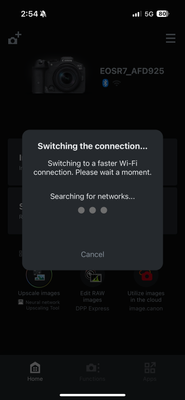
I've tried removing the camera from the app and re-registering it, deleted connection settings in my camera, and followed some steps to try to connect to the camera while it's off. None of these have solved my issue. Please let me know if anyone can help, thanks!
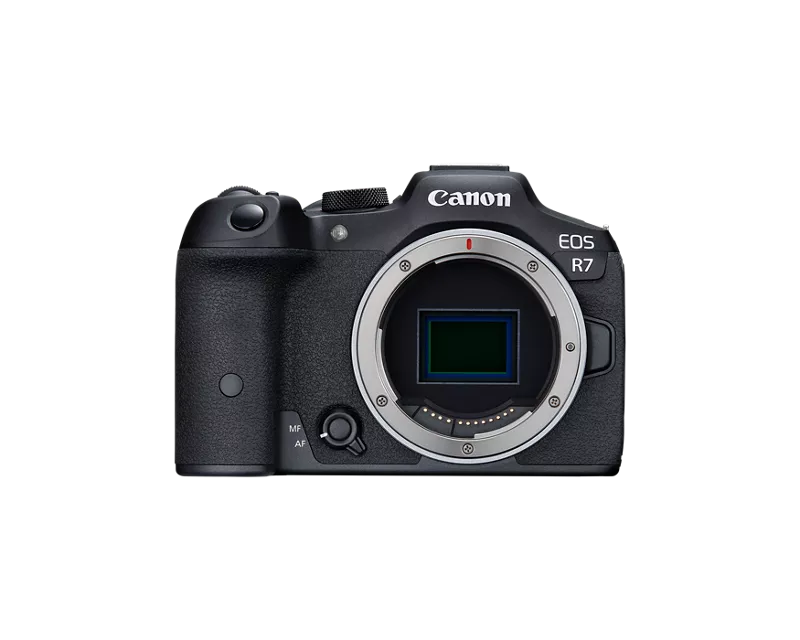
Camera Body: EOS R7 Firmware 1.4.0 (updated today)
iPhone Device/OS: iPhone 15 Pro iOS 17.3.1
Solved! Go to Solution.
32 REPLIES 32
Options
- Mark as New
- Bookmark
- Subscribe
- Mute
- Subscribe to RSS Feed
- Permalink
- Report Inappropriate Content
04-01-2025 08:34 AM
Sorry never noticed this question. Everything works fine now and there was no cost to me, it was completely covered under warranty.

Options
- Mark as New
- Bookmark
- Subscribe
- Mute
- Subscribe to RSS Feed
- Permalink
- Report Inappropriate Content
10-25-2025 03:42 PM - edited 10-25-2025 03:42 PM
Hi everyone,
I just bought my Canon R7 from the official Canon store recently, and I’m having trouble connecting it to Wi-Fi through the Camera Connect App. The app detects my camera, but every time I try to connect, it says “Connection failed, please check network settings.”
I’ve already updated the firmware, reset network settings, and even reinstalled the app on my iPhone, but nothing seems to fix it.
While reading about similar connectivity setups, I came across Nulls Brawl APK'sını en son sürüme — it mentioned optimizing network sync between mobile and server devices. Maybe there’s something similar I’m missing in Canon’s network setup?
Would appreciate any tips or troubleshooting steps from other R7 users.
Options
- Mark as New
- Bookmark
- Subscribe
- Mute
- Subscribe to RSS Feed
- Permalink
- Report Inappropriate Content
10-25-2025 04:55 PM - edited 10-25-2025 04:57 PM
Hello,
I purchased my Canon R7 from Canon’s online store last month, and it connects fine at first, but then Wi-Fi disconnects automatically after a few seconds. The Camera Connect App shows “camera not detected” even though the camera is still on.
I’ve tried changing the Wi-Fi channel, forgetting the connection, and reconnecting, but no luck. My home network works perfectly for other devices.
I also tested similar mobile connectivity concepts on Minecraft iOS/iPhone/iPad Descargar, where stable pairing depends on device permissions and sync timing. Could it be a similar timeout issue with Canon’s firmware?
Would love to hear if others faced the same.

- « Previous
- Next »
- « Previous
- Next »
Announcements
07/22/2026: New firmware updates are available.
EOS R6 Mark III - Version 1.1.0
05/13/2026: New firmware updates are available.
EOS R5 Mark II - Version 1.3.0
EOS R6 Mark II - Version 1.7.0
04/28/2026: Service Notice: Caution Concerning use of Lithium Batteries
03/17/2026: New firmware updates are available.
SELPHY CP1500 - Version 1.0.7.0
02/23/2026: New firmware update is available for EOS C50- Version 1.0.3.1
01/23/2026: New firmware update is available for RF 24-105mm F4 IS USM- Version 2.0.7
01/20/2026: New firmware updates are available.
10/21/2025: Service Notice: To Users of the Compact Digital Camera PowerShot V1
10/15/2025: New firmware updates are available.
Speedlite EL-5 - Version 1.2.0
Speedlite EL-1 - Version 1.1.0
Speedlite Transmitter ST-E10 - Version 1.2.0
07/28/2025: Notice of Free Repair Service for the Mirrorless Camera EOS R50 (Black)
05/21/2025: New firmware update available for EOS C500 Mark II - Version 1.1.5.1
Related Content
- Camera Connect won't connect to PowerShot SX720 HS after app update in Camera Software
- Canon Connect no longer working in Camera Software
- Just bought Canon R100- questions about using bluetooth to transfer images to smartphone in EOS DSLR & Mirrorless Cameras
- R7 Problem connecting to iOS via Camera Connect, but Android Works in Camera Software
- Need Assistance Connecting BR-E1 Remote to EOS M200. in Camera Accessories

Ⓒ 2026
Canon U.S.A Inc. All Rights Reserved. Reproduction in whole or part without permission is prohibited.
