Turn on suggestions
Auto-suggest helps you quickly narrow down your search results by suggesting possible matches as you type.
- Canon Community
- Discussions & Help
- Camera
- EOS DSLR & Mirrorless Cameras
- Re: Cannon r100 up and set button and up button se...
Options
- Subscribe to RSS Feed
- Mark Topic as New
- Mark Topic as Read
- Float this Topic for Current User
- Bookmark
- Subscribe
- Mute
- Printer Friendly Page
EOS R100 set button and up button seem bugged

Options
- Mark as New
- Bookmark
- Subscribe
- Mute
- Subscribe to RSS Feed
- Permalink
- Report Inappropriate Content
11-17-2025
02:25 PM
- last edited on
11-21-2025
02:13 PM
by
 Danny
Danny
Hello everyone!
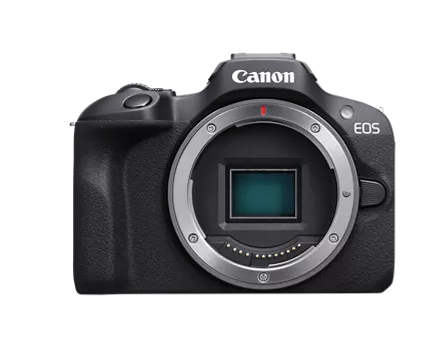
I have the oddest issue with my cannon r100 camera with it's kit lens. One day I went to use and the up and set buttons on the Dial did function. I found that if I switch to auto mode, the up button works as expected but the center button will only go up. I used my phone and the app to perform a firmware update and it has me select on the to move forward. The set button worked as expected in this instance but reverted back to the issue once the update ended. This seems like a setting issue but I cannot select any so I cannot do a factory reset to fix it.
I tried to remove battery/memory card and lens then hold shutter button for a min or 2 before putting back in. I see it did a soft reset but the issue remained
I checked every mode on the camera to ensure it was not a mode issue.
The camera still can take pictures. But Many settings are unchangeable because the set button does not function properly.
Thank you!
Kay
12 REPLIES 12


Options
- Mark as New
- Bookmark
- Subscribe
- Mute
- Subscribe to RSS Feed
- Permalink
- Report Inappropriate Content
11-17-2025 03:34 PM
Kay,
What about in other modes besides Auto?
In Auto, many of your settings would be unchangeable.
Steve Thomas

Options
- Mark as New
- Bookmark
- Subscribe
- Mute
- Subscribe to RSS Feed
- Permalink
- Report Inappropriate Content
11-17-2025 04:28 PM
I've pinged @LeeP for his assistance.
~Rick
Bay Area - CA
~R5 C (1.1.3.1), ~RF Trinity, ~RF 100 Macro, ~RF 100~400, ~RF 100~500, ~RF 200-800, ~RF 1.4x TC, BG-R10, 430EX III-RT ~DxO PhotoLab Elite ~DaVinci Resolve Studio ~ImageClass MF644Cdw MF656Cdw ~Pixel 10 ~CarePaks Are Worth It
Options
- Mark as New
- Bookmark
- Subscribe
- Mute
- Subscribe to RSS Feed
- Permalink
- Report Inappropriate Content
11-17-2025 04:39 PM
I tried every mode and in the other modes the set/up button does nothing. Only in auto and I believe the video mode will the set button do anything but it still only goes up. The up button acts like normal in those modes.
Like in manual mode, up and set have no functionality. Not only can I not move up or select settings, I also cannot press up to cycle though the white balance and shutter speed or anything else the up or set buttons could be used for.

Options
- Mark as New
- Bookmark
- Subscribe
- Mute
- Subscribe to RSS Feed
- Permalink
- Report Inappropriate Content
11-17-2025 06:16 PM
If the camera seems to work properly in AUTO shooting mode, then you may have some custom settings causing the issues.
I suggest that you perform a full reset of your camera., in particular the custom controls.
--------------------------------------------------------
"Enjoying photography since 1972."
"Enjoying photography since 1972."
Options
- Mark as New
- Bookmark
- Subscribe
- Mute
- Subscribe to RSS Feed
- Permalink
- Report Inappropriate Content
11-17-2025 06:20 PM
Unfortunately the center button only goes up even in auto. The only point where the set button worked as expected was during the firmware update.
I do think a factory reset would work. Is there a way to do so without the camera interface or at least without using the set button?
Options
- Mark as New
- Bookmark
- Subscribe
- Mute
- Subscribe to RSS Feed
- Permalink
- Report Inappropriate Content
11-17-2025 06:52 PM - edited 11-17-2025 06:53 PM
Firmware updates cannot repair faulty electronics.
If your buttons don’t function properly in AUTO, then your camera needs to be serviced. Contact Canon Support.
--------------------------------------------------------
"Enjoying photography since 1972."
"Enjoying photography since 1972."
Options
- Mark as New
- Bookmark
- Subscribe
- Mute
- Subscribe to RSS Feed
- Permalink
- Report Inappropriate Content
11-17-2025 07:48 PM
Definitely my next step unless there's a way to factory reset or settings reset without using the buttons.
Thank you!
Options
- Mark as New
- Bookmark
- Subscribe
- Mute
- Subscribe to RSS Feed
- Permalink
- Report Inappropriate Content
11-17-2025 08:28 PM - edited 11-17-2025 08:28 PM
Kay,
I don't have an R100, but you should be able to get to the factory reset by hitting your Menu and then tapping on your screen to move around.
Steve Thomas
Options
- Mark as New
- Bookmark
- Subscribe
- Mute
- Subscribe to RSS Feed
- Permalink
- Report Inappropriate Content
11-18-2025 03:00 PM
Unfortunately this camera does not have touch screen abilities. Screen exist but is not touch able. Good idea tho.
Thank you


Announcements
07/22/2026: New firmware updates are available.
EOS R6 Mark III - Version 1.1.0
05/13/2026: New firmware updates are available.
EOS R5 Mark II - Version 1.3.0
EOS R6 Mark II - Version 1.7.0
04/28/2026: Service Notice: Caution Concerning use of Lithium Batteries
03/17/2026: New firmware updates are available.
SELPHY CP1500 - Version 1.0.7.0
02/23/2026: New firmware update is available for EOS C50- Version 1.0.3.1
01/23/2026: New firmware update is available for RF 24-105mm F4 IS USM- Version 2.0.7
01/20/2026: New firmware updates are available.
10/21/2025: Service Notice: To Users of the Compact Digital Camera PowerShot V1
10/15/2025: New firmware updates are available.
Speedlite EL-5 - Version 1.2.0
Speedlite EL-1 - Version 1.1.0
Speedlite Transmitter ST-E10 - Version 1.2.0
07/28/2025: Notice of Free Repair Service for the Mirrorless Camera EOS R50 (Black)
05/21/2025: New firmware update available for EOS C500 Mark II - Version 1.1.5.1
Related Content
- EOS R50 "Set button to cancel" error message in EOS DSLR & Mirrorless Cameras
- EOS Canon R6 mkIII Image write failure in EOS DSLR & Mirrorless Cameras
- T8i AEB and 2 second time delay in EOS DSLR & Mirrorless Cameras
- Cannot batch-select / select all photos by date in Camera Connect App (IXUS 255 HS & iPhone 12) in Camera Software
- Rebel SL3 - Screen is dark (can't see subject matter) when I choose "on" setting in EOS DSLR & Mirrorless Cameras

Ⓒ 2026
Canon U.S.A Inc. All Rights Reserved. Reproduction in whole or part without permission is prohibited.
