Turn on suggestions
Auto-suggest helps you quickly narrow down your search results by suggesting possible matches as you type.
- Canon Community
- Discussions & Help
- Camera
- EOS DSLR & Mirrorless Cameras
- Best Image Formats From CR2 Format
Options
- Subscribe to RSS Feed
- Mark Topic as New
- Mark Topic as Read
- Float this Topic for Current User
- Bookmark
- Subscribe
- Mute
- Printer Friendly Page
Best Image Formats From CR2 Format

Options
- Mark as New
- Bookmark
- Subscribe
- Mute
- Subscribe to RSS Feed
- Permalink
- Report Inappropriate Content
01-19-2024 03:38 PM
Hi,
I am pretty new to the DSLR world and don't have a lot of experience. Looking for advice for the best image formats for:
- Using in Apple Photos
- Make prints to frame
I have edited my photos in Canon Digital Photo Professional 4. Mostlly just cropping and some easy processing using preset values. I would like to convert my edited raw photos to import to Apple Photos. I would also like to have some of my better photos professionally printed and framed.
I've always gravitated to PNG files but I'm sure there are better formats for both. Any help is greatly appreciated.
Regards,
Paul
3 REPLIES 3


Options
- Mark as New
- Bookmark
- Subscribe
- Mute
- Subscribe to RSS Feed
- Permalink
- Report Inappropriate Content
01-19-2024 04:05 PM
Are you shooting in Raw now?
The best is (if you don't have a new unsupported camera*) is RAW with exported highest quality JPEG for printing. You can export losslessly compressed TIF's, too, but this results in *large* files - larger than raw!
*Canon's get supported by Apple pretty quickly. Other mfg's not so much. I doubt that my Olympus TG-5 will ever be supported.
Options
- Mark as New
- Bookmark
- Subscribe
- Mute
- Subscribe to RSS Feed
- Permalink
- Report Inappropriate Content
01-19-2024 06:54 PM
Thank you. I'll try JPEG's at the highest quality. I've experimented with rawtherapee which works pretty well. The only thing I can't get to work is to respect the editing I've done with Canons Digital Photo Professional.
Thanks again for the suggestion.
Regards,
Paul

Options
- Mark as New
- Bookmark
- Subscribe
- Mute
- Subscribe to RSS Feed
- Permalink
- Report Inappropriate Content
01-19-2024 07:36 PM
@paulm888 wrote:Thank you. I'll try JPEG's at the highest quality. I've experimented with rawtherapee which works pretty well. The only thing I can't get to work is to respect the editing I've done with Canons Digital Photo Professional.
Thanks again for the suggestion.Regards,
Paul
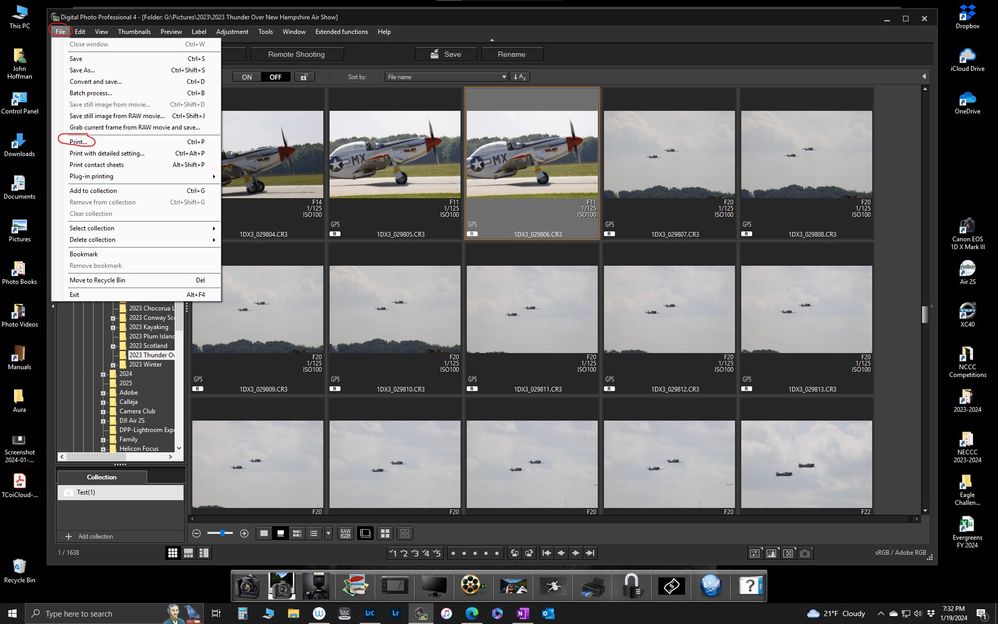
Not sure I understand the question. If you mean Rawtherapee doesn't recognize the edits you made in DPP then that is correct. Any DPP edits aren't applied to an image until you Convert and Save and it would be a JPEG or TIFF.
But you can print an edited RAW file directly from DPP. File->Print
John Hoffman
Conway, NH
R6 Mark III, M200 (converted to infrared), RF lenses, Pixma PRO-100, Pixma TR8620a, Lr Classic
Conway, NH
R6 Mark III, M200 (converted to infrared), RF lenses, Pixma PRO-100, Pixma TR8620a, Lr Classic


Announcements
07/22/2026: New firmware updates are available.
EOS R6 Mark III - Version 1.1.0
05/13/2026: New firmware updates are available.
EOS R5 Mark II - Version 1.3.0
EOS R6 Mark II - Version 1.7.0
04/28/2026: Service Notice: Caution Concerning use of Lithium Batteries
03/17/2026: New firmware updates are available.
SELPHY CP1500 - Version 1.0.7.0
02/23/2026: New firmware update is available for EOS C50- Version 1.0.3.1
01/23/2026: New firmware update is available for RF 24-105mm F4 IS USM- Version 2.0.7
01/20/2026: New firmware updates are available.
10/21/2025: Service Notice: To Users of the Compact Digital Camera PowerShot V1
10/15/2025: New firmware updates are available.
Speedlite EL-5 - Version 1.2.0
Speedlite EL-1 - Version 1.1.0
Speedlite Transmitter ST-E10 - Version 1.2.0
07/28/2025: Notice of Free Repair Service for the Mirrorless Camera EOS R50 (Black)
05/21/2025: New firmware update available for EOS C500 Mark II - Version 1.1.5.1
Related Content
- DPP4: "Target file does not exist" in Camera Software
- Canon EDSDK decoding Evf Memory Stream data C++ (not working) vs Python (working) in Camera Software
- EOS R6 Mark II SD card can't be read error in EOS DSLR & Mirrorless Cameras
- EOS Rebel T2i won't show SD card images after format recovery in EOS DSLR & Mirrorless Cameras
- Questions about saving and converting in DPP4 in Camera Software

Ⓒ 2026
Canon U.S.A Inc. All Rights Reserved. Reproduction in whole or part without permission is prohibited.
