Turn on suggestions
Auto-suggest helps you quickly narrow down your search results by suggesting possible matches as you type.
- Canon Community
- Discussions & Help
- Camera
- EOS DSLR & Mirrorless Cameras
- Re: 90d too dark in HDR
Options
- Subscribe to RSS Feed
- Mark Topic as New
- Mark Topic as Read
- Float this Topic for Current User
- Bookmark
- Subscribe
- Mute
- Printer Friendly Page
90d too dark in HDR

Options
- Mark as New
- Bookmark
- Subscribe
- Mute
- Subscribe to RSS Feed
- Permalink
- Report Inappropriate Content
02-28-2021 05:55 PM
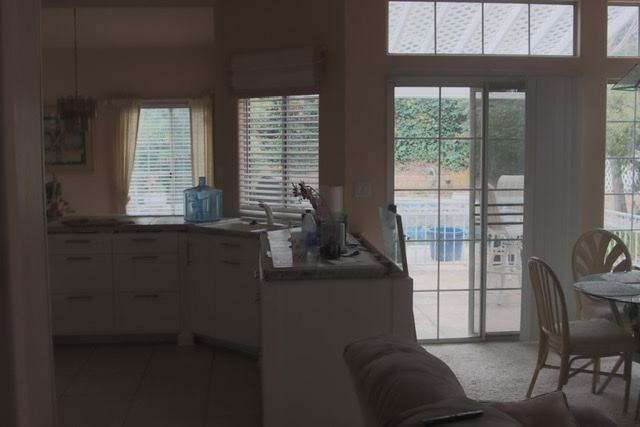
I’m really having issues with the 90d In-camera HDR. My subject is an interior room in afternoon light with large windows for natural light. Using a manual lens, I’m setting up for AV assuming if I set the ISO to 100 and the f-stop to 8, I’ll only need to be concerned with shutter speed. Using spot metering, I note that the dark is coming in at 0”8 and the bright is at 1/5, I’ve set up for both 3 and 5-shots at +-2ev and the resulting hdr image in both shots come out well-exposed for the highlights but too dark in the remaining areas. Am I doing something wrong or is the hdr function known for this?
Sent from my iPad
62 REPLIES 62


Options
- Mark as New
- Bookmark
- Subscribe
- Mute
- Subscribe to RSS Feed
- Permalink
- Report Inappropriate Content
03-03-2021 12:33 PM
At a constant aperture halving or doubling is one f/stop. 4,8, 15, 30, 60 is 5 f/stops.
John Hoffman
Conway, NH
R6 Mark III, M200 (converted to infrared), RF lenses, Pixma PRO-100, Pixma TR8620a, Lr Classic
Conway, NH
R6 Mark III, M200 (converted to infrared), RF lenses, Pixma PRO-100, Pixma TR8620a, Lr Classic
Options
- Mark as New
- Bookmark
- Subscribe
- Mute
- Subscribe to RSS Feed
- Permalink
- Report Inappropriate Content
03-03-2021 12:35 PM
OK and where do I get the other 2 stops?
Options
- Mark as New
- Bookmark
- Subscribe
- Mute
- Subscribe to RSS Feed
- Permalink
- Report Inappropriate Content
03-03-2021 12:36 PM
Its +-, so +-2 is a 4 stop range.
And, there are going to be conditions where even +-3 isn’t enough.
And, there are going to be conditions where even +-3 isn’t enough.
John Hoffman
Conway, NH
R6 Mark III, M200 (converted to infrared), RF lenses, Pixma PRO-100, Pixma TR8620a, Lr Classic
Conway, NH
R6 Mark III, M200 (converted to infrared), RF lenses, Pixma PRO-100, Pixma TR8620a, Lr Classic
Options
- Mark as New
- Bookmark
- Subscribe
- Mute
- Subscribe to RSS Feed
- Permalink
- Report Inappropriate Content
03-03-2021 12:38 PM
Ahh, I see. OK, let me go try this. Be right back and thanks so much for your patience and help.
Options
- Mark as New
- Bookmark
- Subscribe
- Mute
- Subscribe to RSS Feed
- Permalink
- Report Inappropriate Content
03-03-2021 12:45 PM
Options
- Mark as New
- Bookmark
- Subscribe
- Mute
- Subscribe to RSS Feed
- Permalink
- Report Inappropriate Content
03-03-2021 12:46 PM
So I guess this is one of those times where even six stops isn't enough so, if I understand this correctly, I'm outside of the cameras capabilities so I have to go to manual creation if I want to make an HDR shot look good; is that about it?

Options
- Mark as New
- Bookmark
- Subscribe
- Mute
- Subscribe to RSS Feed
- Permalink
- Report Inappropriate Content
03-03-2021 01:03 PM - edited 03-03-2021 01:03 PM
Why not try "Auto" and let the camera pick the range?
Options
- Mark as New
- Bookmark
- Subscribe
- Mute
- Subscribe to RSS Feed
- Permalink
- Report Inappropriate Content
03-03-2021 01:06 PM
I'll try anything.
Options
- Mark as New
- Bookmark
- Subscribe
- Mute
- Subscribe to RSS Feed
- Permalink
- Report Inappropriate Content
03-03-2021 01:08 PM
Nope; that didn't work either.
Options
- Mark as New
- Bookmark
- Subscribe
- Mute
- Subscribe to RSS Feed
- Permalink
- Report Inappropriate Content
03-03-2021 01:15 PM
Have you tried "Backlight HDR mode"?

Announcements
07/22/2026: New firmware updates are available.
EOS R6 Mark III - Version 1.1.0
05/13/2026: New firmware updates are available.
EOS R5 Mark II - Version 1.3.0
EOS R6 Mark II - Version 1.7.0
04/28/2026: Service Notice: Caution Concerning use of Lithium Batteries
03/17/2026: New firmware updates are available.
SELPHY CP1500 - Version 1.0.7.0
02/23/2026: New firmware update is available for EOS C50- Version 1.0.3.1
01/23/2026: New firmware update is available for RF 24-105mm F4 IS USM- Version 2.0.7
01/20/2026: New firmware updates are available.
10/21/2025: Service Notice: To Users of the Compact Digital Camera PowerShot V1
10/15/2025: New firmware updates are available.
Speedlite EL-5 - Version 1.2.0
Speedlite EL-1 - Version 1.1.0
Speedlite Transmitter ST-E10 - Version 1.2.0
07/28/2025: Notice of Free Repair Service for the Mirrorless Camera EOS R50 (Black)
05/21/2025: New firmware update available for EOS C500 Mark II - Version 1.1.5.1
Related Content
- Canon 24-70mm F2.8 II stopped focusing in EF & RF Lenses
- Rebel SL3 - Screen is dark (can't see subject matter) when I choose "on" setting in EOS DSLR & Mirrorless Cameras
- EOS R6 Mark III Firmware 1.1.0 makes pics too dark in macOS Preview app and Instagram Stories in Camera Software
- vertical line on my canon ixus 145 in Point & Shoot Digital Cameras
- EOS 7D Mark II live view grid hard to see in low light in EOS DSLR & Mirrorless Cameras

Ⓒ 2026
Canon U.S.A Inc. All Rights Reserved. Reproduction in whole or part without permission is prohibited.
