Turn on suggestions
Auto-suggest helps you quickly narrow down your search results by suggesting possible matches as you type.
- Canon Community
- Discussions & Help
- Camera
- EF & RF Lenses
- Re: R5C Canon EF lenses that don't work in video m...
Options
- Subscribe to RSS Feed
- Mark Topic as New
- Mark Topic as Read
- Float this Topic for Current User
- Bookmark
- Subscribe
- Mute
- Printer Friendly Page
R5C Canon EF lenses that don't work in video mode

Options
- Mark as New
- Bookmark
- Subscribe
- Mute
- Subscribe to RSS Feed
- Permalink
- Report Inappropriate Content
09-03-2023 03:25 PM - edited 11-24-2024 09:34 PM
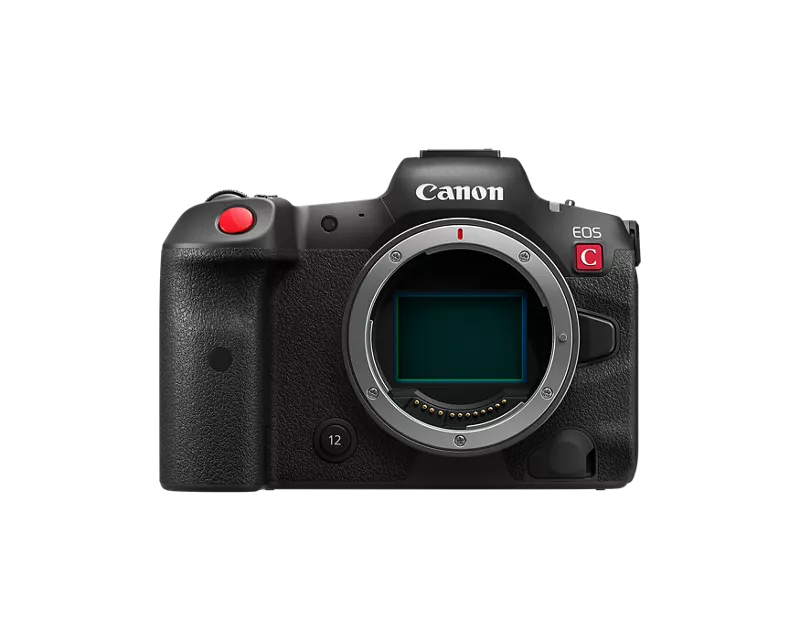
To all R5C owners, can you please indicate which CANON EF lenses don't work in video mode, so that we can bring it to the attention of Canon engineers who work on firmware updates, as well as warn fellow users which lenses to stay away from in the time being? I know certain third party lenses have issues, but you would think that Canon would at least support their own lenses, but this doesn't seem to be the case at all.
It would be good to compile a list of which ones aren't recognized by the camera's video menu with the "attached lens not supported by the camera. Lens will not work." message. (Edit Nov 24, 2024 I've added a photo of the error message)
To start:
Canon: 17-35mm 2.8L, 85mm 1.2L, Canon 20-35mm 2.8 L, Canon 14mm 2.8 L
Tokina: 28-70 2.8 ATX
Sigma: 35mm 1.4, Sigma 24-70mm 2.8 (works, but iffy auto focus and poor IS functionality)
Tamron: 24-70mm 2.8 G2 (some work fine and some don't), 70-200mm G2, 35mm 1.4
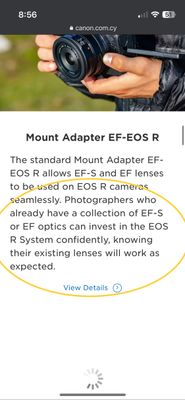
Edit: As pointed out repeatedly by users below, many third party lenses aren't fully compatible with high (photo) burst modes and that's fine, this topic is meant to focus on Canon's incompatible EF glass in VIDEO mode on the R5C/C70 despite their vague marketing that claims compatibility via the EF-RF adapter (see screenshot, attached). I also peaked at the R5C user guide which does make mention of certain "optimal" lenses, for PHOTO mode and there's no mention of optimal nor incompatible lenses in the Cine menu which is frustrating because often the lenses that are prompting the "lens will not work" message on the R5C in Video, turn work perfectly fine in photo mode or on the regular R5 in both photo & video modes, and on all other R series bodies (R6, R3 etc...). Perhaps this will change with the release of the R5Markii and R1.

27 REPLIES 27
Options
- Mark as New
- Bookmark
- Subscribe
- Mute
- Subscribe to RSS Feed
- Permalink
- Report Inappropriate Content
11-24-2024 09:25 PM
Oh boy, another L series that doesn't work in video mode? When you say it's not working, are you getting the "Attached lens not supported by the camera. Lens will not function" message? Or is it another form of "not working"?


Options
- Mark as New
- Bookmark
- Subscribe
- Mute
- Subscribe to RSS Feed
- Permalink
- Report Inappropriate Content
11-25-2024 06:45 PM
The thing is the communication never changed. But the communication speed did. A lot of older lenses use a very slow communication speed. Arc Form Drive AF motor lenses use a very slow communication speed. That’s why they’re limited to 3 fps it’s not the camera it’s the lens. When a Canon EF lens is mounted to an EF Mount camera. The camera and the lens will find an optimal clock speed.
-Demetrius
Bodies: EOS 40D & EOS 5D Mark IV
Lenses: EF Holy Trinity, EF 50mm F/1.8 STM, EF 70-210mm F/4 & EF 85mm F/1.8 USM
Speedlites: 420EX, 470EX-AI, 550EX & 600EX II-RT
Bodies: EOS 40D & EOS 5D Mark IV
Lenses: EF Holy Trinity, EF 50mm F/1.8 STM, EF 70-210mm F/4 & EF 85mm F/1.8 USM
Speedlites: 420EX, 470EX-AI, 550EX & 600EX II-RT
Options
- Mark as New
- Bookmark
- Subscribe
- Mute
- Subscribe to RSS Feed
- Permalink
- Report Inappropriate Content
02-23-2025 10:40 AM
For some reason I can no longer edit the original post, so I'm replying to update the list and add more lenses that myself and other Reddit/Facebook users have reported, that don't work in Video mode.
AKA the dreaded, R5 C "Attached lens not supported by the camera. It will not function." message followed by "Invalid operation" if you try to record or adjust the aperture.
Once again, to all the Canon ambassadors on this forum, this lens list is exclusive to Video mode, has nothing to do with FPS burst, other photo modes or USB-C power. All of the lenses on this list below, work adequately in Photo mode, given their age and 3rd party status. R5 C owners do not expect these lenses to perform as well as modern native RF glass, but Canon continues to market R mount bodies with the EF-RF Adapter, "knowing their existing lenses will work as expected" -but that is simply not true. I've emailed Canon Customer service about this and to date I have not received a response, so in the meantime, I'll continue to compile this list to help future R5C video shooters avoid buying secondhand lenses that are essentially, expensive paperweights.
Canon:
- 35mm f/2.0 EF
- 50mm f/1.8 (classic) EF
- 17-35mm f/2.8L EF
- 85mm f/1.2L (mark I) EF
- 20-35mm f/2.8 L EF
- 14mm f/2.8 L EF
- 70-200mm f/2.8 L (mark I) EF
- 24-70mm f/4.0 L EF
Tokina:
- 28-70 f/2.8 ATX EF
Sigma:
- 35mm f/1.4 EF (with firmware dock you can update the lens, to make it compatible)
- 24-70mm f/2.8 EF (it "works", but has noticeably poor auto focus tracking and poor IS functionality in handheld video)
Tamron:
- 24-70mm f/2.8 G2 EF (apparently some work fine and some suffer like the Sigma 24-70mm)
- 70-200mm f/2.8 G2 EF
- 35mm f/1.4 EF
Most recently, I noticed that of my older trinity of primes, the 24/35/50 only the 24mm 2.8 works on the R5C, the 35 and 50 have been added to the list above. I don't won the 85mm f/1.8 anymore but I would hazard a guess that it doesn't work either.




Options
- Mark as New
- Bookmark
- Subscribe
- Mute
- Subscribe to RSS Feed
- Permalink
- Report Inappropriate Content
02-23-2025 11:19 AM
This is laid out very clearly starting on page 242 of the EOS R5 C Advanced User Guide (VIDEO edition)
I've attached the pages that show the compatible lenses.
If you have other questions about which Canon lenses will work with your EOS R5 C, please call support at 1-800-OK-CANON (800-652-2666).
Options
- Mark as New
- Bookmark
- Subscribe
- Mute
- Subscribe to RSS Feed
- Permalink
- Report Inappropriate Content
02-25-2025 08:20 AM
"Very clearly" is a stretch. That chart only talks about IRIS control or Slow & Fast recording modes, it doesn't clarify anything or let users known that "hey, by the way, some EF lenses won't even let you hit record" and it also doesn't change the fact that Canon continues to poorly market the transition from EF-RF by telling users "get this adapter and all your EF lenses will work!" when instead they should be saying "with this adapter almost all your EF lenses will work, *except for the ones that don't". It's deceptive marketing and affects only a small subset of R5C video users, so they don't address it or they're content with a mod like you telling me to "read your manual", which again, doesn't clearly define anything.
Options
- Mark as New
- Bookmark
- Subscribe
- Mute
- Subscribe to RSS Feed
- Permalink
- Report Inappropriate Content
03-09-2026 12:57 AM - edited 03-09-2026 12:57 AM
I appreciate your eagerness to support canon in this matter to state “very clearly starting on”. Just to give you a polite reality check, nothing is clear there. I have an EF 85mm f1.2 mkii. This works with r5c in photo mode but not in video mode. That manual has mo mention of this lens. So nothing is clear.
this lens works amazingly well with the R5 in both photo and video modes of R5. However, R5C it only works in photo mode with this lens. In video mode, which uses the Cine OS of canon simply says attached lens is not supported.

Options
- Mark as New
- Bookmark
- Subscribe
- Mute
- Subscribe to RSS Feed
- Permalink
- Report Inappropriate Content
03-09-2026 10:42 AM
"... "hey, by the way, some EF lenses won't even let you hit record"..."
You are right, no, it doesn't. It does "clearly" state these are the lenses that are "Compatible Lenses and Functions". You probably are in need a a list of lenses that are not compatible which that list is not.
A change in mounting format is always a bad thing for the old platform users. Take the FD to EF change for instance. You have to understand Canon felt this change needed to be made to advance the RF system. You can debate whether that valid or a good thing. But keep in mind all your EF gear still works as usual on your EF gear for which it was designed.
EB
EOS 1DX and many lenses.
EOS 1DX and many lenses.

Options
- Mark as New
- Bookmark
- Subscribe
- Mute
- Subscribe to RSS Feed
- Permalink
- Report Inappropriate Content
03-09-2026 05:42 PM
“ To Deadeye Jonny's point I agree a list of compatible lenses or non compatible lenses should be handed out with the camera. “
I agree! And Canon does so. I believe that the R5 and R6 User Guides may have been the last models to have an actual list of lenses in the manual. It looks like this.

Canon began including a page inside the manuals that have a link and a QR code to documentation “Supplemental Information”about the cameras.
I suspect every camera has an identical page with the identical links. It comes after the linked table of contents, typically somewhere between pages 10 and 20. It looks like this.

--------------------------------------------------------
"Enjoying photography since 1972."
"Enjoying photography since 1972."

- « Previous
- Next »
- « Previous
- Next »
Announcements
04/28/2026: Service Notice: Caution Concerning use of Lithium Batteries
02/23/2026: New firmware update is available for EOS C50- Version 1.0.3.1
01/23/2026: New firmware update is available for RF 24-105mm F4 IS USM- Version 2.0.7
12/22/2025: New firmware update is available for EOS R6 Mark III- Version 1.0.2
10/21/2025: Service Notice: To Users of the Compact Digital Camera PowerShot V1
07/28/2025: Notice of Free Repair Service for the Mirrorless Camera EOS R50 (Black)
05/21/2025: New firmware update available for EOS C500 Mark II - Version 1.1.5.1
03/17/2026: New firmware updates are available.
SELPHY CP1500 - Version 1.0.7.0
02/23/2026: New firmware update is available for EOS C50- Version 1.0.3.1
01/23/2026: New firmware update is available for RF 24-105mm F4 IS USM- Version 2.0.7
01/20/2026: New firmware updates are available.
12/22/2025: New firmware update is available for EOS R6 Mark III- Version 1.0.2
11/20/2025: New firmware updates are available.
EOS R5 Mark II - Version 1.2.0
PowerShot G7 X Mark III - Version 1.4.0
PowerShot SX740 HS - Version 1.0.2
10/21/2025: Service Notice: To Users of the Compact Digital Camera PowerShot V1
10/15/2025: New firmware updates are available.
Speedlite EL-5 - Version 1.2.0
Speedlite EL-1 - Version 1.1.0
Speedlite Transmitter ST-E10 - Version 1.2.0
07/28/2025: Notice of Free Repair Service for the Mirrorless Camera EOS R50 (Black)
7/17/2025: New firmware updates are available.
05/21/2025: New firmware update available for EOS C500 Mark II - Version 1.1.5.1
Related Content
- Trouble registering G7X mark III says something is wrong with serial # but its the correct number in Point & Shoot Digital Cameras
- EOS R5 Stuck in Video Mode in EOS DSLR & Mirrorless Cameras
- Why do canon tele lenses have no focus range limiters? in EF & RF Lenses
- EOS R8 Shutter button suddenly stopped working - Please help! in EOS DSLR & Mirrorless Cameras
- R50 - Choppy video over HDMI in EOS DSLR & Mirrorless Cameras

Ⓒ 2026
Canon U.S.A Inc. All Rights Reserved. Reproduction in whole or part without permission is prohibited.
