Turn on suggestions
Auto-suggest helps you quickly narrow down your search results by suggesting possible matches as you type.
- Canon Community
- Discussions & Help
- Camera
- Camera Software
- Re: Trouble Tethering with the EOS R6 Mark II
Options
- Subscribe to RSS Feed
- Mark Topic as New
- Mark Topic as Read
- Float this Topic for Current User
- Bookmark
- Subscribe
- Mute
- Printer Friendly Page
Trouble Tethering with the EOS R6 Mark II

Options
- Mark as New
- Bookmark
- Subscribe
- Mute
- Subscribe to RSS Feed
- Permalink
- Report Inappropriate Content
09-23-2023
08:18 PM
- last edited on
09-26-2023
09:30 AM
by
 Danny
Danny
Has anyone had trouble tethering the Canon R6 Mark II? I can tether with "Lightroom" but its inconsistent and "Capture One" doesn't even recognize the camera. Any recommendations or help would greatly be appreciated.
Thanks.
16 REPLIES 16


Options
- Mark as New
- Bookmark
- Subscribe
- Mute
- Subscribe to RSS Feed
- Permalink
- Report Inappropriate Content
09-23-2023
09:10 PM
- last edited on
09-26-2023
09:30 AM
by
Danny
Greetings,
I cannot confirm support in Lr or C1, but the EOS Utility should work.
Canon Support for EOS R6 Mark II | Canon U.S.A., Inc.
In adobe, the R62 does not appear to be listed.
A list of cameras that can be tethered to Lightroom Classic (adobe.com)
C1 states support in 23 (16.0.1)

~Rick
Bay Area - CA
~R5 C (1.1.3.1), ~RF Trinity, ~RF 100 Macro, ~RF 100~400, ~RF 100~500, ~RF 200-800, ~RF 1.4x TC, BG-R10, 430EX III-RT ~DxO PhotoLab Elite ~DaVinci Resolve Studio ~ImageClass MF644Cdw MF656Cdw ~Pixel 10 ~CarePaks Are Worth It
Options
- Mark as New
- Bookmark
- Subscribe
- Mute
- Subscribe to RSS Feed
- Permalink
- Report Inappropriate Content
01-10-2024 03:16 AM
I don't know what Canon is waiting for to solve this problem. Many users and a long time angry about this issue.
Options
- Mark as New
- Bookmark
- Subscribe
- Mute
- Subscribe to RSS Feed
- Permalink
- Report Inappropriate Content
01-10-2024 03:19 AM
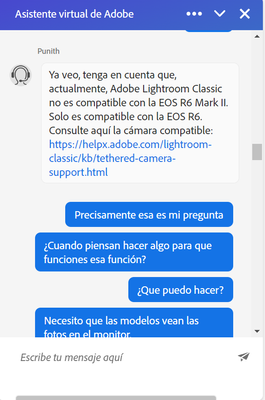
I have contacted support several times and the only solution is that the R6 Mark II is not supported in Lightroom. AND?

Options
- Mark as New
- Bookmark
- Subscribe
- Mute
- Subscribe to RSS Feed
- Permalink
- Report Inappropriate Content
01-10-2024 09:54 AM
@enizmon wrote:I have contacted support several times and the only solution is that the R6 Mark II is not supported in Lightroom. AND?
And until Adobe updates Lightroom it won't be able to be tethered. Not a Canon issue.
John Hoffman
Conway, NH
R6 Mark III, M200 (converted to infrared), RF lenses, Pixma PRO-100, Pixma TR8620a, Lr Classic
Conway, NH
R6 Mark III, M200 (converted to infrared), RF lenses, Pixma PRO-100, Pixma TR8620a, Lr Classic
Options
- Mark as New
- Bookmark
- Subscribe
- Mute
- Subscribe to RSS Feed
- Permalink
- Report Inappropriate Content
01-10-2024 10:51 AM
Yes, I know, those who don't do their job are the people at Adobe
Options
- Mark as New
- Bookmark
- Subscribe
- Mute
- Subscribe to RSS Feed
- Permalink
- Report Inappropriate Content
02-02-2024 01:59 AM
Could not agree more. I have been with Canon for 12 years and now am on the verge of moving to Nikon or Sony. It's really affecting my job and my clients are at their wits end too.
Options
- Mark as New
- Bookmark
- Subscribe
- Mute
- Subscribe to RSS Feed
- Permalink
- Report Inappropriate Content
03-24-2024 05:28 PM
If you take the SD cards out of camera you can get the camera to communicate with capture one. The problem I am still having is that even though you see and can work the camera, no image files will transfer to anywhere on the laptop.

Options
- Mark as New
- Bookmark
- Subscribe
- Mute
- Subscribe to RSS Feed
- Permalink
- Report Inappropriate Content
03-24-2024 06:33 PM
What type of USB port is being used on the computer? I’ve never tried to tether mine. I’ve found it easier to use Bluetooth and an iPad.
--------------------------------------------------------
"Enjoying photography since 1972."
"Enjoying photography since 1972."
Options
- Mark as New
- Bookmark
- Subscribe
- Mute
- Subscribe to RSS Feed
- Permalink
- Report Inappropriate Content
03-26-2024 02:34 PM
usba on computer, usbc on camera

Announcements
07/22/2026: New firmware updates are available.
EOS R6 Mark III - Version 1.1.0
05/13/2026: New firmware updates are available.
EOS R5 Mark II - Version 1.3.0
EOS R6 Mark II - Version 1.7.0
04/28/2026: Service Notice: Caution Concerning use of Lithium Batteries
03/17/2026: New firmware updates are available.
SELPHY CP1500 - Version 1.0.7.0
02/23/2026: New firmware update is available for EOS C50- Version 1.0.3.1
01/23/2026: New firmware update is available for RF 24-105mm F4 IS USM- Version 2.0.7
01/20/2026: New firmware updates are available.
10/21/2025: Service Notice: To Users of the Compact Digital Camera PowerShot V1
10/15/2025: New firmware updates are available.
Speedlite EL-5 - Version 1.2.0
Speedlite EL-1 - Version 1.1.0
Speedlite Transmitter ST-E10 - Version 1.2.0
07/28/2025: Notice of Free Repair Service for the Mirrorless Camera EOS R50 (Black)
05/21/2025: New firmware update available for EOS C500 Mark II - Version 1.1.5.1
Related Content
- EOS R5 Mark II died after month of using in EOS DSLR & Mirrorless Cameras
- Having trouble getting iPhone and 5d Mark IV to connect in EOS DSLR & Mirrorless Cameras
- EOS R5 Mark II stopped sending photos to computer while tether capturing. in EOS DSLR & Mirrorless Cameras
- Tethered EOS 5D Mark IV freezes with memory card, Lightroom requires card in EOS DSLR & Mirrorless Cameras
- Trouble Transferring Firmware from Camera Connect to Camera in Camera Software

Ⓒ 2026
Canon U.S.A Inc. All Rights Reserved. Reproduction in whole or part without permission is prohibited.
