Turn on suggestions
Auto-suggest helps you quickly narrow down your search results by suggesting possible matches as you type.
- Canon Community
- Discussions & Help
- Camera
- Camera Software
- Re: Tethered 7D eos utility 3 only shows subject u...
Options
- Subscribe to RSS Feed
- Mark Topic as New
- Mark Topic as Read
- Float this Topic for Current User
- Bookmark
- Subscribe
- Mute
- Printer Friendly Page
Tethered 7D eos utility 3 only shows subject using live view ?

Options
- Mark as New
- Bookmark
- Subscribe
- Mute
- Subscribe to RSS Feed
- Permalink
- Report Inappropriate Content
01-24-2024 05:54 AM
I have got this working but as ever the video below shows something similar to what I have 🙂 https://www.youtube.com/watch?v=bg2U2vxBir8
Am I right in thinking it has to be in Live view to see what the camera sees on the PC ? My 7D is obviously moving something inside (almighty clunk and slow to take photo) and I prefer it didn't have to do that.
The video says Utility 3 but this is an older version ? just that the change of such as Av are right click not drop down boxes.
https://www.usa.canon.com/support/p/eos-7d#idReference%3Dsoftware-drivers
If this is, as I suspect, unable to just let me see what the viewfinder sees does anyone know of something that will do that.
My knees aren't up to crawling on the ground these days so I just need something to check what the camera is looking at when on an ankle level tripod.
4 REPLIES 4


Options
- Mark as New
- Bookmark
- Subscribe
- Mute
- Subscribe to RSS Feed
- Permalink
- Report Inappropriate Content
01-24-2024 08:42 AM
@Charentejohn wrote:I have got this working but as ever the video below shows something similar to what I have 🙂 https://www.youtube.com/watch?v=bg2U2vxBir8
Am I right in thinking it has to be in Live view to see what the camera sees on the PC ? My 7D is obviously moving something inside (almighty clunk and slow to take photo) and I prefer it didn't have to do that.
The video says Utility 3 but this is an older version ? just that the change of such as Av are right click not drop down boxes.
https://www.usa.canon.com/support/p/eos-7d#idReference%3Dsoftware-driversIf this is, as I suspect, unable to just let me see what the viewfinder sees does anyone know of something that will do that.
My knees aren't up to crawling on the ground these days so I just need something to check what the camera is looking at when on an ankle level tripod.
What you see in the optical viewfinder with a DSLR is purely light. The only difference between the viewfinder and looking directly with your eyes is a smaller field of view that has been bent via two mirrors.
The only way to get that info into a computer is via the digital signal that is derived from the sensor in LiveView. LiveView shows you exactly what will be captured when you fire the shuuter.
John Hoffman
Conway, NH
R6 Mark III, M200 (converted to infrared), RF lenses, Pixma PRO-100, Pixma TR8620a, Lr Classic
Conway, NH
R6 Mark III, M200 (converted to infrared), RF lenses, Pixma PRO-100, Pixma TR8620a, Lr Classic
Options
- Mark as New
- Bookmark
- Subscribe
- Mute
- Subscribe to RSS Feed
- Permalink
- Report Inappropriate Content
01-24-2024 02:51 PM
Basically then none of the camera control apps will do what I want, show what the camera sees without using live view. Good to know I will try to sort something out.
Options
- Mark as New
- Bookmark
- Subscribe
- Mute
- Subscribe to RSS Feed
- Permalink
- Report Inappropriate Content
01-26-2024 07:17 AM
Never one to give up I remembered seeing something to take a photo down the viewfinder of s spotter scope. Tried it on the viewfinder of the camera and have a workable solution, for me anyway. For occasional use I position an old camera over the Canon and view via it's wifi.
Very rough test below 🙂 This is what the camera saw.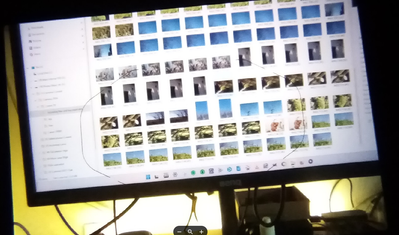
Options
- Mark as New
- Bookmark
- Subscribe
- Mute
- Subscribe to RSS Feed
- Permalink
- Report Inappropriate Content
01-26-2024 08:31 AM
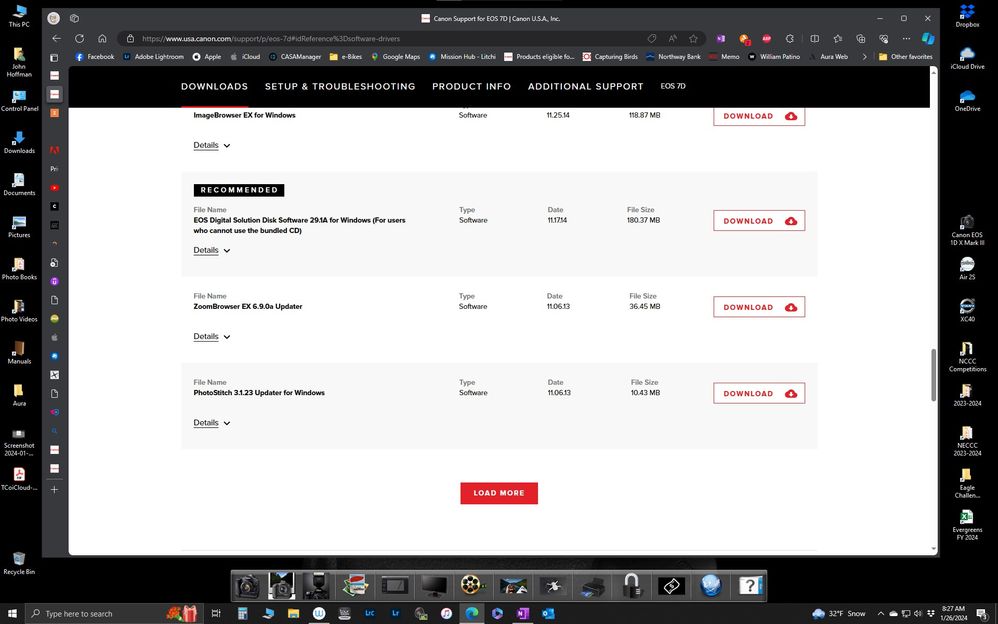
If you go to the Canon support page for the 7D and choose Windows 7 as the software version you can download a digital version of the CD that came with the camera. You will have the version of EOSU2 that you want.
Then you can download the updater and have the latest version of EOSU2.
If you are using a Mac come back and tell what version of macOS.
John Hoffman
Conway, NH
R6 Mark III, M200 (converted to infrared), RF lenses, Pixma PRO-100, Pixma TR8620a, Lr Classic
Conway, NH
R6 Mark III, M200 (converted to infrared), RF lenses, Pixma PRO-100, Pixma TR8620a, Lr Classic

Announcements
07/22/2026: New firmware updates are available.
EOS R6 Mark III - Version 1.1.0
05/13/2026: New firmware updates are available.
EOS R5 Mark II - Version 1.3.0
EOS R6 Mark II - Version 1.7.0
04/28/2026: Service Notice: Caution Concerning use of Lithium Batteries
03/17/2026: New firmware updates are available.
SELPHY CP1500 - Version 1.0.7.0
02/23/2026: New firmware update is available for EOS C50- Version 1.0.3.1
01/23/2026: New firmware update is available for RF 24-105mm F4 IS USM- Version 2.0.7
01/20/2026: New firmware updates are available.
10/21/2025: Service Notice: To Users of the Compact Digital Camera PowerShot V1
10/15/2025: New firmware updates are available.
Speedlite EL-5 - Version 1.2.0
Speedlite EL-1 - Version 1.1.0
Speedlite Transmitter ST-E10 - Version 1.2.0
07/28/2025: Notice of Free Repair Service for the Mirrorless Camera EOS R50 (Black)
05/21/2025: New firmware update available for EOS C500 Mark II - Version 1.1.5.1
Related Content
- Canon EOS Utility download for 5D Mk III and IV in Camera Software
- EOS R6 Mark II – Firmware 1.7.0 – Bug: 5GHz hotspot invisible on Samsung Android (DFS channel issue) in EOS DSLR & Mirrorless Cameras
- EOS R5 Mark II firmware 1.30 notes in Camera Software
- EOS 90D + EOS Utility 3 — Connection lost during long intervalometer session (~12–15 hrs) in Camera Software
- EOS Utility images missing in Camera Software

Ⓒ 2026
Canon U.S.A Inc. All Rights Reserved. Reproduction in whole or part without permission is prohibited.
