Turn on suggestions
Auto-suggest helps you quickly narrow down your search results by suggesting possible matches as you type.
- Canon Community
- Discussions & Help
- Camera
- Camera Software
- Re: Folders Unavailable in DPP
Options
- Subscribe to RSS Feed
- Mark Topic as New
- Mark Topic as Read
- Float this Topic for Current User
- Bookmark
- Subscribe
- Mute
- Printer Friendly Page

Options
- Mark as New
- Bookmark
- Subscribe
- Mute
- Subscribe to RSS Feed
- Permalink
- Report Inappropriate Content
05-05-2021 05:24 PM
Just starting to use DPP for RAW conversion from R5 based on comments that it is better than Adobe apps. However, when I open DPP on my iMac, I can't access several folders, including Desktop. The folder names in the left column have a very small white circle with a down arrow in it. See attached screen shot.
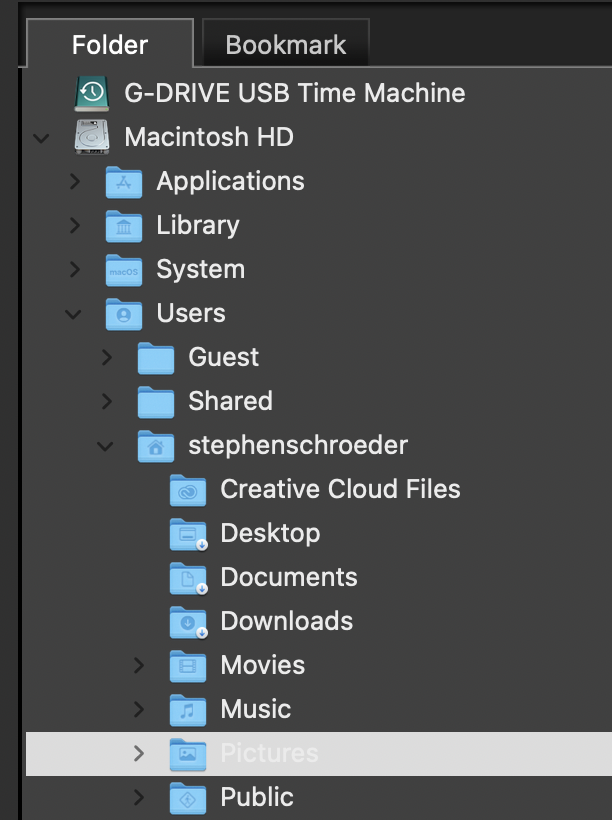
This probably reflects some setting I have wrong, but I can't find any reference to this. Any suggestions?
Thanks.
Solved! Go to Solution.
1 ACCEPTED SOLUTION
Accepted Solutions


Options
- Mark as New
- Bookmark
- Subscribe
- Mute
- Subscribe to RSS Feed
- Permalink
- Report Inappropriate Content
05-05-2021 06:47 PM - edited 05-05-2021 07:31 PM
Are those foldrs in iCloud and need to be downloaded?
Have you granted folder access to DPP in the Privacy section?
John Hoffman
Conway, NH
R6 Mark III, M200 (converted to infrared), RF lenses, Pixma PRO-100, Pixma TR8620a, Lr Classic
Conway, NH
R6 Mark III, M200 (converted to infrared), RF lenses, Pixma PRO-100, Pixma TR8620a, Lr Classic
4 REPLIES 4

Options
- Mark as New
- Bookmark
- Subscribe
- Mute
- Subscribe to RSS Feed
- Permalink
- Report Inappropriate Content
05-05-2021 06:08 PM
Ask Apple what it means. I don't think Canon makes Macs or their OS.
--------------------------------------------------------
"Enjoying photography since 1972."
"Enjoying photography since 1972."
Options
- Mark as New
- Bookmark
- Subscribe
- Mute
- Subscribe to RSS Feed
- Permalink
- Report Inappropriate Content
05-05-2021 06:47 PM - edited 05-05-2021 07:31 PM
Are those foldrs in iCloud and need to be downloaded?
Have you granted folder access to DPP in the Privacy section?
John Hoffman
Conway, NH
R6 Mark III, M200 (converted to infrared), RF lenses, Pixma PRO-100, Pixma TR8620a, Lr Classic
Conway, NH
R6 Mark III, M200 (converted to infrared), RF lenses, Pixma PRO-100, Pixma TR8620a, Lr Classic
Options
- Mark as New
- Bookmark
- Subscribe
- Mute
- Subscribe to RSS Feed
- Permalink
- Report Inappropriate Content
05-05-2021 08:50 PM
Bingo! Thank you John. The privacy settings did the trick.
Options
- Mark as New
- Bookmark
- Subscribe
- Mute
- Subscribe to RSS Feed
- Permalink
- Report Inappropriate Content
05-06-2021 08:07 AM - edited 05-06-2021 08:08 AM
@Schroed wrote:Bingo! Thank you John. The privacy settings did the trick.
I suspect that you would be better off over the long run by creating a separate folder just for DPP images.
[EDIT] I would also restore the previous access level that denied DPP access to the private folder.
--------------------------------------------------------
"Enjoying photography since 1972."
"Enjoying photography since 1972."

Announcements
07/22/2026: New firmware updates are available.
EOS R6 Mark III - Version 1.1.0
05/13/2026: New firmware updates are available.
EOS R5 Mark II - Version 1.3.0
EOS R6 Mark II - Version 1.7.0
04/28/2026: Service Notice: Caution Concerning use of Lithium Batteries
03/17/2026: New firmware updates are available.
SELPHY CP1500 - Version 1.0.7.0
02/23/2026: New firmware update is available for EOS C50- Version 1.0.3.1
01/23/2026: New firmware update is available for RF 24-105mm F4 IS USM- Version 2.0.7
01/20/2026: New firmware updates are available.
10/21/2025: Service Notice: To Users of the Compact Digital Camera PowerShot V1
10/15/2025: New firmware updates are available.
Speedlite EL-5 - Version 1.2.0
Speedlite EL-1 - Version 1.1.0
Speedlite Transmitter ST-E10 - Version 1.2.0
07/28/2025: Notice of Free Repair Service for the Mirrorless Camera EOS R50 (Black)
05/21/2025: New firmware update available for EOS C500 Mark II - Version 1.1.5.1
Related Content
- EOS R1 Eye Detection and Focus issues in EOS DSLR & Mirrorless Cameras
- Best way to transfer/back up photo and video files to external SSD in EOS DSLR & Mirrorless Cameras
- EOS R5 Mark II Hot shoe keeps failing in EOS DSLR & Mirrorless Cameras
- CFexpress 128GB capacity error on Canon R6 V – Shows "Full" but only 6GB are used in EOS DSLR & Mirrorless Cameras
- DPP4 Missing Subfolder (Just One) in Camera Software

Ⓒ 2026
Canon U.S.A Inc. All Rights Reserved. Reproduction in whole or part without permission is prohibited.
