Turn on suggestions
Auto-suggest helps you quickly narrow down your search results by suggesting possible matches as you type.
- Canon Community
- Discussions & Help
- Camera
- Camera Software
- EOS Utility 2 - can't connect my Canon 70D
Options
- Subscribe to RSS Feed
- Mark Topic as New
- Mark Topic as Read
- Float this Topic for Current User
- Bookmark
- Subscribe
- Mute
- Printer Friendly Page

Options
- Mark as New
- Bookmark
- Subscribe
- Mute
- Subscribe to RSS Feed
- Permalink
- Report Inappropriate Content
08-21-2022 02:25 PM
Hi, I downloaded EOS Utility which came with EOS Utility 3 but not EOS Utility 2. That's the message I get when I try to connect my 70D:
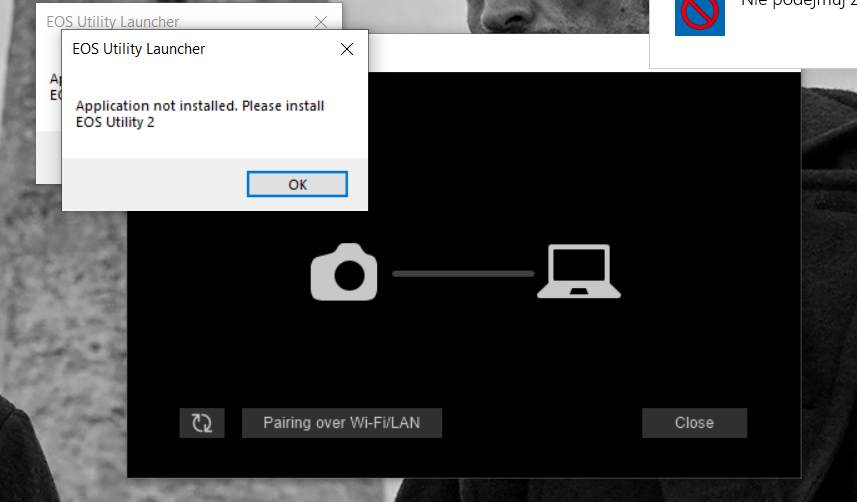
I tried to download it separately but it still doesn't appear anywhere in my Programme Files. What should I do? I need it to download a flat-like profile.
Solved! Go to Solution.
1 ACCEPTED SOLUTION
Accepted Solutions

Options
- Mark as New
- Bookmark
- Subscribe
- Mute
- Subscribe to RSS Feed
- Permalink
- Report Inappropriate Content
08-22-2022 12:06 PM
You do not want to download the latest version of the EOSU3 installer if you want to get EOSU2.
You need to download version 3.13.20 or earlier. That version will install EOSU3 along with EOSU2. The Canon support site used to explain that but the new format has removed a lot of explanatory material in the apparent interest of uniformity.
John Hoffman
Conway, NH
R6 Mark III, M200 (converted to infrared), RF lenses, Pixma PRO-100, Pixma TR8620a, Lr Classic
Conway, NH
R6 Mark III, M200 (converted to infrared), RF lenses, Pixma PRO-100, Pixma TR8620a, Lr Classic
11 REPLIES 11

Options
- Mark as New
- Bookmark
- Subscribe
- Mute
- Subscribe to RSS Feed
- Permalink
- Report Inappropriate Content
08-21-2022 05:55 PM
What Operating System are you running? What version of the EOS Utility 3 did you install?
The most current versions of the EOS Utility 3 for Windows 10 will also install EOS Utility 2 at the same time. The latest version is 3.15.0.
--------------------------------------------------------
"Enjoying photography since 1972."
"Enjoying photography since 1972."

Options
- Mark as New
- Bookmark
- Subscribe
- Mute
- Subscribe to RSS Feed
- Permalink
- Report Inappropriate Content
08-21-2022 07:49 PM
Go here: Canon Support for EOS 70D | Canon U.S.A., Inc.
Download EOSU 3.13.20. It will also install EOSU2. Any later version of EOSU3 will not install version 2 along with it.
John Hoffman
Conway, NH
R6 Mark III, M200 (converted to infrared), RF lenses, Pixma PRO-100, Pixma TR8620a, Lr Classic
Conway, NH
R6 Mark III, M200 (converted to infrared), RF lenses, Pixma PRO-100, Pixma TR8620a, Lr Classic

Options
- Mark as New
- Bookmark
- Subscribe
- Mute
- Subscribe to RSS Feed
- Permalink
- Report Inappropriate Content
08-22-2022 11:20 AM - edited 08-22-2022 11:35 AM
You can also install EU 2 separately if EU 3 is already installed. They can coexist just fine, and the correct version should open for the camera you connect.
Options
- Mark as New
- Bookmark
- Subscribe
- Mute
- Subscribe to RSS Feed
- Permalink
- Report Inappropriate Content
08-22-2022 11:27 AM
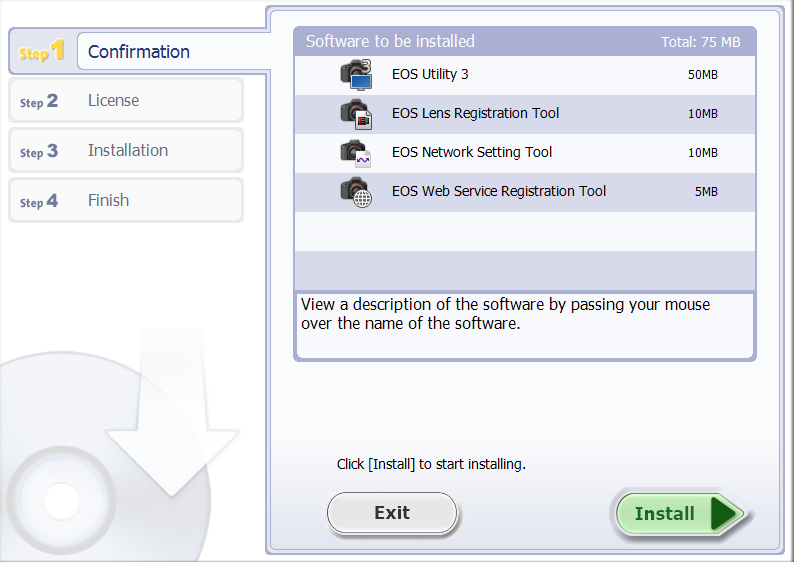
I uninstalled what I had before and downloaded the installer from the linked page. Still, no Utility 2. I'm running Windows 10.
Options
- Mark as New
- Bookmark
- Subscribe
- Mute
- Subscribe to RSS Feed
- Permalink
- Report Inappropriate Content
08-22-2022 11:32 AM
Did you download 3.13.20 (not 3.15)?
John Hoffman
Conway, NH
R6 Mark III, M200 (converted to infrared), RF lenses, Pixma PRO-100, Pixma TR8620a, Lr Classic
Conway, NH
R6 Mark III, M200 (converted to infrared), RF lenses, Pixma PRO-100, Pixma TR8620a, Lr Classic
Options
- Mark as New
- Bookmark
- Subscribe
- Mute
- Subscribe to RSS Feed
- Permalink
- Report Inappropriate Content
08-22-2022 11:34 AM
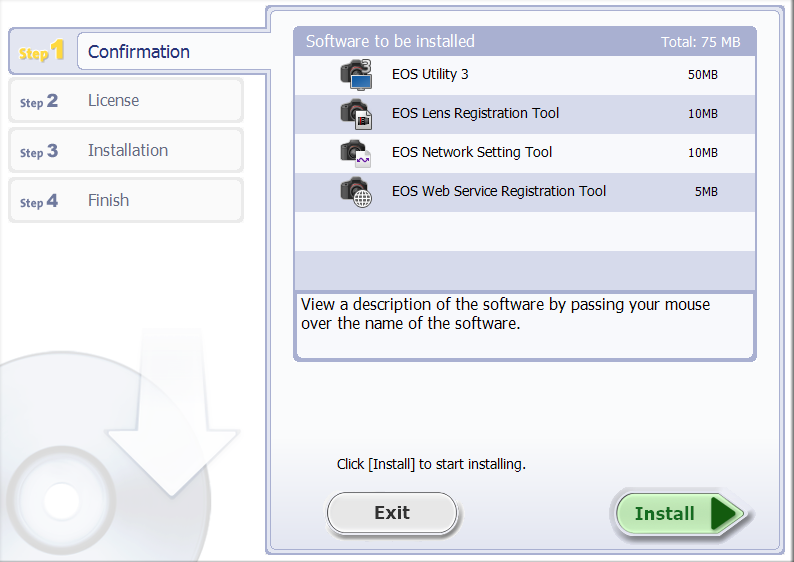
I'm running Windows 10. I installed the latest version of EOS Utility from the official page. Utility 3 came with it and it's the latest version as well. Utility 2 doesn't even appear on the list of the installer.
Options
- Mark as New
- Bookmark
- Subscribe
- Mute
- Subscribe to RSS Feed
- Permalink
- Report Inappropriate Content
08-22-2022 12:06 PM
You do not want to download the latest version of the EOSU3 installer if you want to get EOSU2.
You need to download version 3.13.20 or earlier. That version will install EOSU3 along with EOSU2. The Canon support site used to explain that but the new format has removed a lot of explanatory material in the apparent interest of uniformity.
John Hoffman
Conway, NH
R6 Mark III, M200 (converted to infrared), RF lenses, Pixma PRO-100, Pixma TR8620a, Lr Classic
Conway, NH
R6 Mark III, M200 (converted to infrared), RF lenses, Pixma PRO-100, Pixma TR8620a, Lr Classic
Options
- Mark as New
- Bookmark
- Subscribe
- Mute
- Subscribe to RSS Feed
- Permalink
- Report Inappropriate Content
08-22-2022 11:25 PM
Hi John, I just wanted to say I was having this same exact issue and you helped me a lot, thank you so much!
Options
- Mark as New
- Bookmark
- Subscribe
- Mute
- Subscribe to RSS Feed
- Permalink
- Report Inappropriate Content
08-23-2022 05:49 AM
Glad I could help.
John Hoffman
Conway, NH
R6 Mark III, M200 (converted to infrared), RF lenses, Pixma PRO-100, Pixma TR8620a, Lr Classic
Conway, NH
R6 Mark III, M200 (converted to infrared), RF lenses, Pixma PRO-100, Pixma TR8620a, Lr Classic

Announcements
07/22/2026: New firmware updates are available.
EOS R6 Mark III - Version 1.1.0
05/13/2026: New firmware updates are available.
EOS R5 Mark II - Version 1.3.0
EOS R6 Mark II - Version 1.7.0
04/28/2026: Service Notice: Caution Concerning use of Lithium Batteries
03/17/2026: New firmware updates are available.
SELPHY CP1500 - Version 1.0.7.0
02/23/2026: New firmware update is available for EOS C50- Version 1.0.3.1
01/23/2026: New firmware update is available for RF 24-105mm F4 IS USM- Version 2.0.7
01/20/2026: New firmware updates are available.
10/21/2025: Service Notice: To Users of the Compact Digital Camera PowerShot V1
10/15/2025: New firmware updates are available.
Speedlite EL-5 - Version 1.2.0
Speedlite EL-1 - Version 1.1.0
Speedlite Transmitter ST-E10 - Version 1.2.0
07/28/2025: Notice of Free Repair Service for the Mirrorless Camera EOS R50 (Black)
05/21/2025: New firmware update available for EOS C500 Mark II - Version 1.1.5.1
Related Content
- Canon EOS Utility download for 5D Mk III and IV in EOS DSLR & Mirrorless Cameras
- Canon Connect no longer working in Camera Software
- Just bought Canon R100- questions about using bluetooth to transfer images to smartphone in EOS DSLR & Mirrorless Cameras
- Image Transfer Utility 2 doesn't work if G7X M3 is plugged into USB power in Camera Software
- PowerShot SX620 HS Zoom and other functions limited via Canon Connect in Point & Shoot Digital Cameras

Ⓒ 2026
Canon U.S.A Inc. All Rights Reserved. Reproduction in whole or part without permission is prohibited.
