Turn on suggestions
Auto-suggest helps you quickly narrow down your search results by suggesting possible matches as you type.
- Canon Community
- Discussions & Help
- Camera
- Camera Software
- Re: EF 8-15mm f/4l 2 USM fisheye isn't registerin...
Options
- Subscribe to RSS Feed
- Mark Topic as New
- Mark Topic as Read
- Float this Topic for Current User
- Bookmark
- Subscribe
- Mute
- Printer Friendly Page

Options
- Mark as New
- Bookmark
- Subscribe
- Mute
- Subscribe to RSS Feed
- Permalink
- Report Inappropriate Content
03-09-2015 09:44 AM - edited 03-09-2015 09:46 AM
I use a Canon 6D with a EF 8-15mm f/4l 2 USM fisheye isn't registering in Digital Photo Professional 4.1.50. This lens profile isn't listed on the lens database either. The software control panel states Lens Data:Not available but the RAW CR2 file clearly shows the Canon lens used in the EXIF data. The lans isn't listed in the add/remove diolog either. Has anyone had this problem.
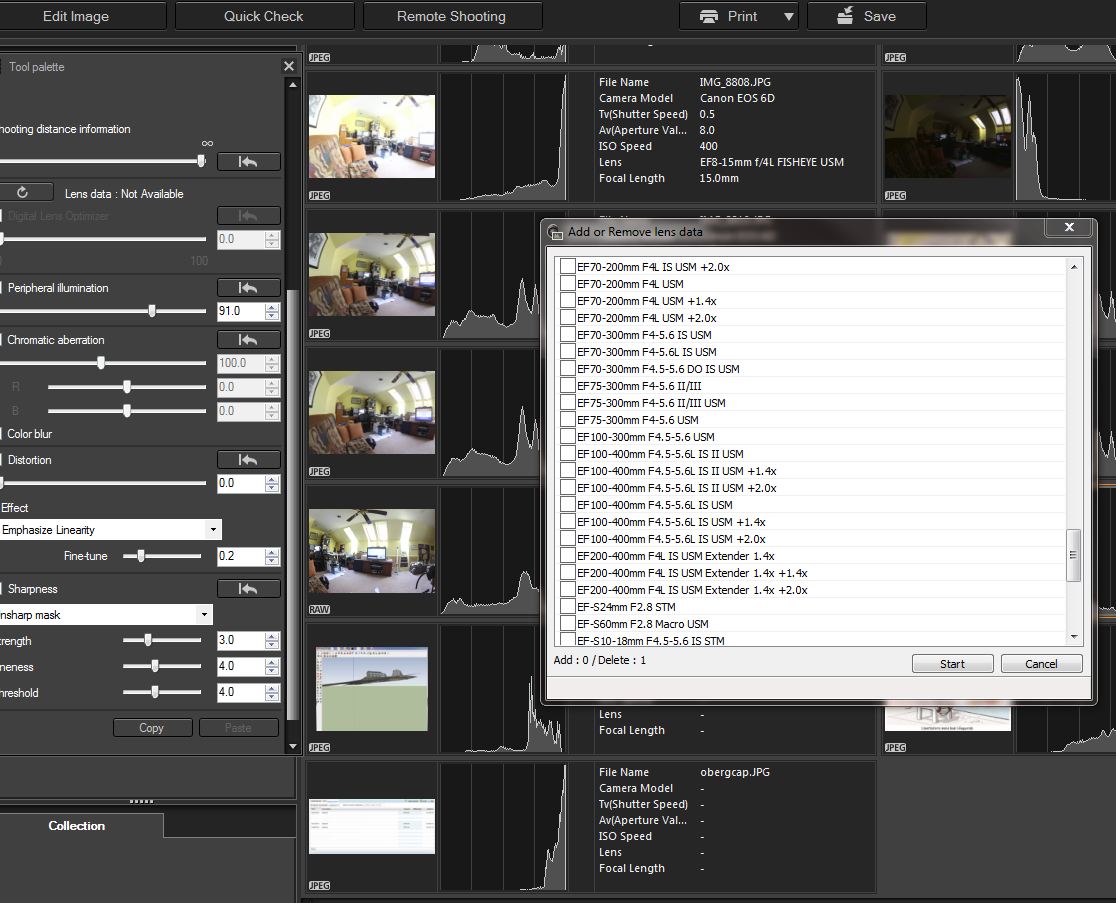
Solved! Go to Solution.
1 ACCEPTED SOLUTION
Accepted Solutions
Options
- Mark as New
- Bookmark
- Subscribe
- Mute
- Subscribe to RSS Feed
- Permalink
- Report Inappropriate Content
05-18-2017
05:57 AM
- last edited on
05-18-2017
01:39 PM
by
 Danny
Danny
It is possible to "fool" DPP to make it able to do some aberration and distortion correction (tried with version 3.10, not sure if it works with 4.xxx). There is an EXIFTOOL [link removed per forum guidelines] which can modify any EXIF information, including lens.
Since I shoot with non-Canon branded lens, I often have to do this. I'm still experimenting with parameters, but this worked so far.
After puting exiftool.exe in windows directory, copy this line
exiftool -FocalLength=7 -LongFocal=55 -ShortFocal=17 -LensType="Canon EF-S 17-55mm f/2.8 IS USM D:\Your_Photo_Directory
(change D:\Your_Photo_Directory to where your RAW photos are)
and paste in in Windows Start-run field and press enter. Or run CMD and left-click-paste and enter (this is better as you can see if any error happens).
Exif information will be changed and original backup file(s) will be created. After that open your RAW (CR2) file in DPP, and watch if you can correct distortion and aberration. Probably playing with parameters FocalLength, LongFocal and ShortFocal may give any better results.
8 REPLIES 8


Options
- Mark as New
- Bookmark
- Subscribe
- Mute
- Subscribe to RSS Feed
- Permalink
- Report Inappropriate Content
03-09-2015 11:48 AM
I am not a DPP fan and I don't know why Canon has most of its lenses listed and a few not. But the 8-15mm is designed to introduce distortion and maybe they guess folks don't want to correct it. The mere fact it can reproduce more than the eye can see may be the reason. And how do you correct a fisheye?
EB
EOS 1D, EOS 1D MK IIn, EOS 1D MK III, EOS 1Ds MK III, EOS 1D MK IV and EOS 1DX and many lenses.
EOS 1D, EOS 1D MK IIn, EOS 1D MK III, EOS 1Ds MK III, EOS 1D MK IV and EOS 1DX and many lenses.
Options
- Mark as New
- Bookmark
- Subscribe
- Mute
- Subscribe to RSS Feed
- Permalink
- Report Inappropriate Content
03-09-2015 02:57 PM
That's a great assumption. I currently use it for immersive photography Real Estate projects in conjuntion with virtual tour defishing software butit'd be nice to be able to defish the center of the shot w/o pulling out the PTGUI software solution that I have to pay for every few years. Changing a fisheye image to a rectilinear one always have tradeoffs.
Options
- Mark as New
- Bookmark
- Subscribe
- Mute
- Subscribe to RSS Feed
- Permalink
- Report Inappropriate Content
03-09-2015 03:46 PM
The manual claims it is supported, but I can't register it either. (1D Mark IV and Rebel T5i).
I suspect that all it will do is light falloff and chromatic aberation. Defishing is contrary to the purpose of the lens, so i wouldn't expect Canon to support that action.

John Hoffman
Conway, NH
R6 Mark III, M200, Many lenses, Pixma PRO-100, Pixma TR8620a, Lr Classic
Conway, NH
R6 Mark III, M200, Many lenses, Pixma PRO-100, Pixma TR8620a, Lr Classic
Options
- Mark as New
- Bookmark
- Subscribe
- Mute
- Subscribe to RSS Feed
- Permalink
- Report Inappropriate Content
03-10-2015 09:19 AM
Maybe they intend to add it later. Maybe they intend to add all their lenses at some time?
EB
EOS 1D, EOS 1D MK IIn, EOS 1D MK III, EOS 1Ds MK III, EOS 1D MK IV and EOS 1DX and many lenses.
EOS 1D, EOS 1D MK IIn, EOS 1D MK III, EOS 1Ds MK III, EOS 1D MK IV and EOS 1DX and many lenses.
Options
- Mark as New
- Bookmark
- Subscribe
- Mute
- Subscribe to RSS Feed
- Permalink
- Report Inappropriate Content
05-18-2017
05:57 AM
- last edited on
05-18-2017
01:39 PM
by
Danny
It is possible to "fool" DPP to make it able to do some aberration and distortion correction (tried with version 3.10, not sure if it works with 4.xxx). There is an EXIFTOOL [link removed per forum guidelines] which can modify any EXIF information, including lens.
Since I shoot with non-Canon branded lens, I often have to do this. I'm still experimenting with parameters, but this worked so far.
After puting exiftool.exe in windows directory, copy this line
exiftool -FocalLength=7 -LongFocal=55 -ShortFocal=17 -LensType="Canon EF-S 17-55mm f/2.8 IS USM D:\Your_Photo_Directory
(change D:\Your_Photo_Directory to where your RAW photos are)
and paste in in Windows Start-run field and press enter. Or run CMD and left-click-paste and enter (this is better as you can see if any error happens).
Exif information will be changed and original backup file(s) will be created. After that open your RAW (CR2) file in DPP, and watch if you can correct distortion and aberration. Probably playing with parameters FocalLength, LongFocal and ShortFocal may give any better results.

Options
- Mark as New
- Bookmark
- Subscribe
- Mute
- Subscribe to RSS Feed
- Permalink
- Report Inappropriate Content
05-18-2017 01:48 PM - edited 05-18-2017 03:18 PM
Download the latest version of DPP. It has corrections for 8-15mm lens and also allows for some artistic "defishing".
John Hoffman
Conway, NH
R6 Mark III, M200, Many lenses, Pixma PRO-100, Pixma TR8620a, Lr Classic
Conway, NH
R6 Mark III, M200, Many lenses, Pixma PRO-100, Pixma TR8620a, Lr Classic
Options
- Mark as New
- Bookmark
- Subscribe
- Mute
- Subscribe to RSS Feed
- Permalink
- Report Inappropriate Content
05-19-2017 09:45 AM
Using a different lens' data may not be helpful. In fact it could make things worse. The data is not 17mm or 18mm specific it is lens specific. This is a solution you should not pursue. Poor advice. 
EB
EOS 1D, EOS 1D MK IIn, EOS 1D MK III, EOS 1Ds MK III, EOS 1D MK IV and EOS 1DX and many lenses.
EOS 1D, EOS 1D MK IIn, EOS 1D MK III, EOS 1Ds MK III, EOS 1D MK IV and EOS 1DX and many lenses.

Options
- Mark as New
- Bookmark
- Subscribe
- Mute
- Subscribe to RSS Feed
- Permalink
- Report Inappropriate Content
05-19-2017 06:36 PM
Try to see if you can download the lens correction into the camera. That download comes direct from Canon. Maybe, just maybe, DPP might hitch a ride on the download.
--------------------------------------------------------
"Enjoying photography since 1972."
"Enjoying photography since 1972."


Announcements
12/18/2025: New firmware updates are available.
12/15/2025: New firmware update available for EOS C50 - Version 1.0.1.1
11/20/2025: New firmware updates are available.
EOS R6 Mark III - Version 1.0.1
EOS R5 Mark II - Version 1.2.0
PowerShot G7 X Mark III - Version 1.4.0
PowerShot SX740 HS - Version 1.0.2
10/21/2025: Service Notice: To Users of the Compact Digital Camera PowerShot V1
10/15/2025: New firmware updates are available.
Speedlite EL-5 - Version 1.2.0
Speedlite EL-1 - Version 1.1.0
Speedlite Transmitter ST-E10 - Version 1.2.0
07/28/2025: Notice of Free Repair Service for the Mirrorless Camera EOS R50 (Black)
7/17/2025: New firmware updates are available.
05/21/2025: New firmware update available for EOS C500 Mark II - Version 1.1.5.1
02/20/2025: New firmware updates are available.
RF70-200mm F2.8 L IS USM Z - Version 1.0.6
RF24-105mm F2.8 L IS USM Z - Version 1.0.9
RF100-300mm F2.8 L IS USM - Version 1.0.8
RF50mm F1.4 L VCM - Version 1.0.2
RF24mm F1.4 L VCM - Version 1.0.3
01/22/2024: Canon Supports Disaster Relief Efforts in California
01/14/2025: Steps to resolve still image problem when using certain SanDisk SD cards with the Canon EOS R5 Mark II
Related Content
- CameraWindow does not open in Windows 11 in Camera Software
- EOS Multi Remote specs for R1 & R5M2 in Camera Accessories
- EOS 90D Er 01 with all lenses in EOS DSLR & Mirrorless Cameras
- Camera Connect Remote Shooting - Limitations explained? in Camera Software
- Updated my R5 Mark II with latest firmware V.1.1.1 in EOS DSLR & Mirrorless Cameras

Ⓒ 2025
Canon U.S.A Inc. All Rights Reserved. Reproduction in whole or part without permission is prohibited.
