Turn on suggestions
Auto-suggest helps you quickly narrow down your search results by suggesting possible matches as you type.
- Canon Community
- Discussions & Help
- Camera
- Camera Software
- Re: Best workaround, and proof of bug
Options
- Subscribe to RSS Feed
- Mark Topic as New
- Mark Topic as Read
- Float this Topic for Current User
- Bookmark
- Subscribe
- Mute
- Printer Friendly Page
DPP4 Adobe RGB processed incorrect

Options
- Mark as New
- Bookmark
- Subscribe
- Mute
- Subscribe to RSS Feed
- Permalink
- Report Inappropriate Content
07-03-2017 03:15 PM - edited 07-03-2017 03:31 PM
I upraded from DPP3 to DPP4. (4.6.10.0)
I was stuggling with the shadow areas of the photo's I processed.
There was no detail in the shadows, it was pure black.
Today I opened an old image and exported it with the same settings, and discovered that DPP4 is displaying AND EXPORTING Adobe RGB all wrong. It's a mess!
When changing to sRGB colors are ok, but when choosing any other profile the contrast increases, like the top and bottom of the spectrum are cut off. But it should not change at all!! Just like when converting to another profile in Photoshop.
Am I missing something here or what the..?
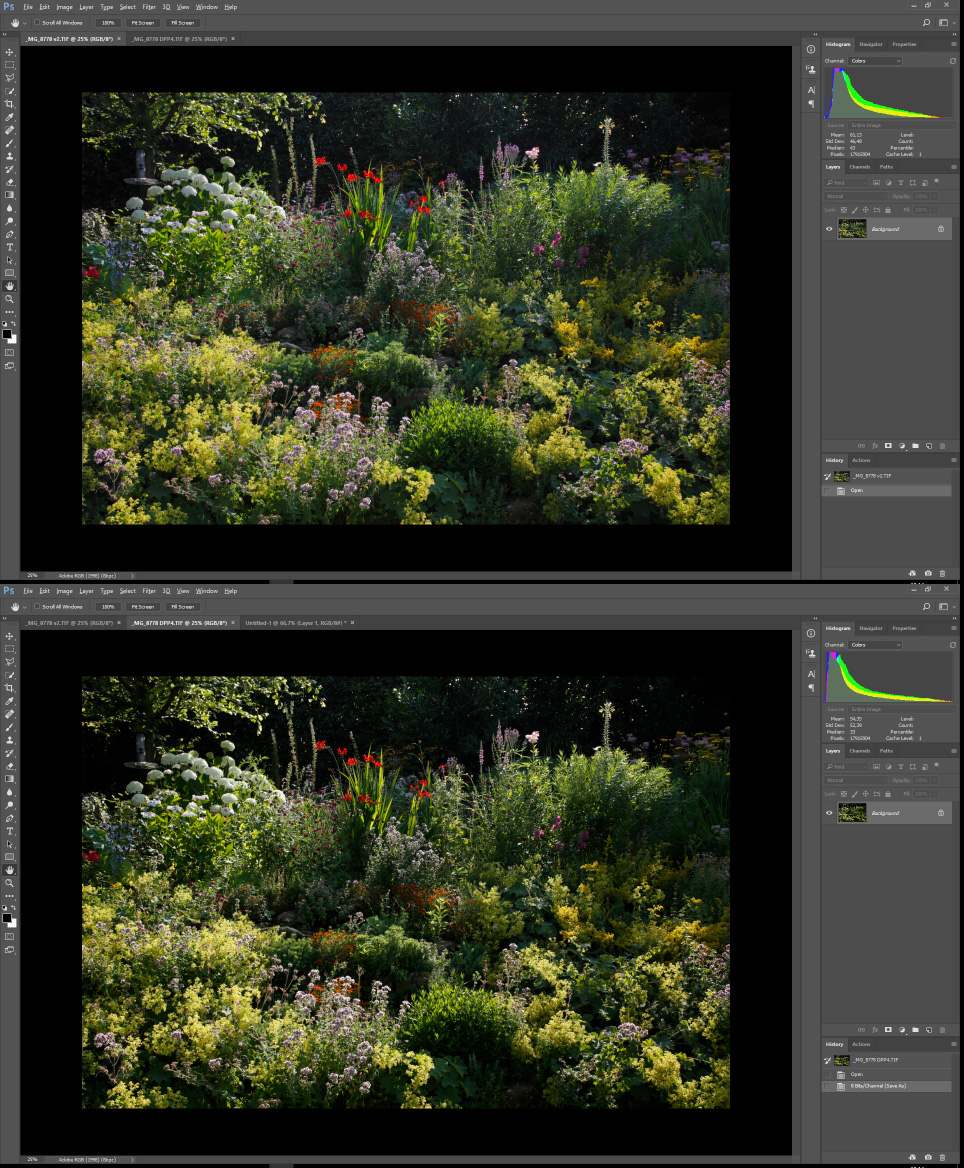
Attached are two screenshots of the DPP2/3 (top) and the DPP4 (bottom) version, as seen in Photoshop.
Note how the DPP4 version has lost all detail in the shadow areas.
Settings where the same for both exports. (defaults)
Also note the histogram that also shows that the actual file is different and it is not my color settings.
So I guess it's back to DPP3 again until this incredible bug - that for some mysterious reason has not been mentioned anywhere before - is fixed.
Sorry for my frustration but I recently also was blown away by a totally messed up 'saturation' slider on the Adobe side, that also nobody seemed to notice (Lumetri saturation in Premiere Pro). Adobe raw colors are also horrible and that's I why I use DPP.
I hope I am missing out on some checkbox or something that solves the problem.
33 REPLIES 33
Options
- Mark as New
- Bookmark
- Subscribe
- Mute
- Subscribe to RSS Feed
- Permalink
- Report Inappropriate Content
01-10-2019 09:03 AM
So I rarely use the Color Adjustment tab in DPP.
In DPP 4.9.20.0, when changing any color in the tab to any value (0.1 for example) the black values return normal!
The best way to demonstrate is via this video:
Options
- Mark as New
- Bookmark
- Subscribe
- Mute
- Subscribe to RSS Feed
- Permalink
- Report Inappropriate Content
05-28-2020 08:35 PM - edited 05-28-2020 08:48 PM
Hi Skies,
Finally I found someone who notice the same bug!
I also noticed in DDP4 (v.4.12.20.03, Mac OSX) that SRGB color tend to green/yellow what a i don't like, but still I see more information on whites and blacks than in adobeRGB.
I use a canon 6D.
So finally, the best workaround would be changing any color value (0.1 for example) and then make other adjustments?
Options
- Mark as New
- Bookmark
- Subscribe
- Mute
- Subscribe to RSS Feed
- Permalink
- Report Inappropriate Content
05-29-2020 09:08 AM
@font wrote:
So finally, the best workaround would be changing any color value (0.1 for example) and then make other adjustments?
Yes, that's what I have been doing.
But Ive since switched to DxO Photolab, which, with the right camera/film profiles can produce very impressive results. Some photo's still look better in DPP though 😉
I also still use DPP for viewing and selecting since Photolab isn't exacly fast in that regard.

Options
- Mark as New
- Bookmark
- Subscribe
- Mute
- Subscribe to RSS Feed
- Permalink
- Report Inappropriate Content
04-28-2025 05:27 PM
I have Digital Photo Professional v4.20.20.0, and the described problem still exists. I am using the Canon EOS R5. Thanks for sharing the workaround.

- « Previous
- Next »
- « Previous
- Next »
Announcements
07/22/2026: New firmware updates are available.
EOS R6 Mark III - Version 1.1.0
05/13/2026: New firmware updates are available.
EOS R5 Mark II - Version 1.3.0
EOS R6 Mark II - Version 1.7.0
04/28/2026: Service Notice: Caution Concerning use of Lithium Batteries
03/17/2026: New firmware updates are available.
SELPHY CP1500 - Version 1.0.7.0
02/23/2026: New firmware update is available for EOS C50- Version 1.0.3.1
01/23/2026: New firmware update is available for RF 24-105mm F4 IS USM- Version 2.0.7
01/20/2026: New firmware updates are available.
10/21/2025: Service Notice: To Users of the Compact Digital Camera PowerShot V1
10/15/2025: New firmware updates are available.
Speedlite EL-5 - Version 1.2.0
Speedlite EL-1 - Version 1.1.0
Speedlite Transmitter ST-E10 - Version 1.2.0
07/28/2025: Notice of Free Repair Service for the Mirrorless Camera EOS R50 (Black)
05/21/2025: New firmware update available for EOS C500 Mark II - Version 1.1.5.1
Related Content
- Digital Photo Professional 4 Latest Version - Adjust Specific Area "Undo" Not Working in Camera Software
- EOS R6 Mark II – Firmware 1.7.0 – Bug: 5GHz hotspot invisible on Samsung Android (DFS channel issue) in EOS DSLR & Mirrorless Cameras
- EOS R5 Mark II firmware 1.30 notes in Camera Software
- Canon G7 X MARK III - catastrophic power failure after 6 uses in Point & Shoot Digital Cameras
- Power shot Canon sx740hs Error 70 “An error prevented shooting." in Point & Shoot Digital Cameras

Ⓒ 2026
Canon U.S.A Inc. All Rights Reserved. Reproduction in whole or part without permission is prohibited.
