Turn on suggestions
Auto-suggest helps you quickly narrow down your search results by suggesting possible matches as you type.
- Canon Community
- Discussions & Help
- Camera
- Camera Software
- Re: Canon Camera Connect - Solution needed for MOV...
Options
- Subscribe to RSS Feed
- Mark Topic as New
- Mark Topic as Read
- Float this Topic for Current User
- Bookmark
- Subscribe
- Mute
- Printer Friendly Page

Options
- Mark as New
- Bookmark
- Subscribe
- Mute
- Subscribe to RSS Feed
- Permalink
- Report Inappropriate Content
03-04-2024
08:16 PM
- last edited on
03-05-2024
09:30 AM
by
 Danny
Danny
Rebel EOS T6 using camera connect app with wifi
Camera connect app on Android V14 will not support MOV video format. Connect app v3.1.10.49. Is there a solution to this error message
Solved! Go to Solution.
2 ACCEPTED SOLUTIONS
Accepted Solutions


Options
- Mark as New
- Bookmark
- Subscribe
- Mute
- Subscribe to RSS Feed
- Permalink
- Report Inappropriate Content
03-09-2024 08:43 PM
davidjluckey,
I have read that Android cannot play .mov files.
You may need to convert these to .mp4 format. There are plenty of free video converter programs out there.
Steve Thomas

Options
- Mark as New
- Bookmark
- Subscribe
- Mute
- Subscribe to RSS Feed
- Permalink
- Report Inappropriate Content
03-09-2024 08:51 PM
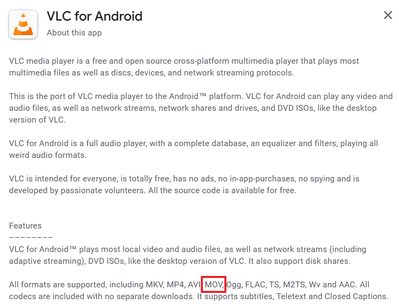
Steve's right. You'll need an app like VLC Player to play .MOV files.
~Rick
Bay Area - CA
~R5 C (1.1.3.1), ~RF Trinity, ~RF 100 Macro, ~RF 100~400, ~RF 100~500, ~RF 200-800, ~RF 1.4x TC, BG-R10, 430EX III-RT ~DxO PhotoLab Elite ~DaVinci Resolve Studio ~ImageClass MF644Cdw MF656Cdw ~Pixel 10 ~CarePaks Are Worth It
7 REPLIES 7

Options
- Mark as New
- Bookmark
- Subscribe
- Mute
- Subscribe to RSS Feed
- Permalink
- Report Inappropriate Content
03-06-2024 05:14 PM
Hi davidjluckey,
Unfortunately there is not a way to transfer videos from the EOS Rebel T6 to your phone through the Canon Camera Connect app. The EOS Rebel T6 is only able to shoot videos in .MOV format, and the app is not able to transfer that type of file.
For the EOS Rebel T6 we recommend using EOS Utility on a computer to transfer the videos. If you need that software it is available HERE. Once you are on the web page click on the Software & Drivers button and the current version for your operating system will be listed. If you need a manual for that software or your camera those are available on the same web page under the Manuals tab.
Options
- Mark as New
- Bookmark
- Subscribe
- Mute
- Subscribe to RSS Feed
- Permalink
- Report Inappropriate Content
03-06-2024 06:16 PM
Thank you Hazel_T for the quick reply. I have installed the utility on my laptop and will begin working with it. Best regards
David
Options
- Mark as New
- Bookmark
- Subscribe
- Mute
- Subscribe to RSS Feed
- Permalink
- Report Inappropriate Content
03-06-2024 06:18 PM
Dowloaded and installed utility. Will try working with it . Thanks all..
Options
- Mark as New
- Bookmark
- Subscribe
- Mute
- Subscribe to RSS Feed
- Permalink
- Report Inappropriate Content
03-09-2024 08:43 PM
davidjluckey,
I have read that Android cannot play .mov files.
You may need to convert these to .mp4 format. There are plenty of free video converter programs out there.
Steve Thomas
Options
- Mark as New
- Bookmark
- Subscribe
- Mute
- Subscribe to RSS Feed
- Permalink
- Report Inappropriate Content
03-09-2024 08:51 PM
Steve's right. You'll need an app like VLC Player to play .MOV files.
~Rick
Bay Area - CA
~R5 C (1.1.3.1), ~RF Trinity, ~RF 100 Macro, ~RF 100~400, ~RF 100~500, ~RF 200-800, ~RF 1.4x TC, BG-R10, 430EX III-RT ~DxO PhotoLab Elite ~DaVinci Resolve Studio ~ImageClass MF644Cdw MF656Cdw ~Pixel 10 ~CarePaks Are Worth It
Options
- Mark as New
- Bookmark
- Subscribe
- Mute
- Subscribe to RSS Feed
- Permalink
- Report Inappropriate Content
03-09-2024 09:24 PM
Thanks Steve for your help
Options
- Mark as New
- Bookmark
- Subscribe
- Mute
- Subscribe to RSS Feed
- Permalink
- Report Inappropriate Content
03-09-2024 09:26 PM
Thanks all for your guitdance 😀


Announcements
07/22/2026: New firmware updates are available.
EOS R6 Mark III - Version 1.1.0
05/13/2026: New firmware updates are available.
EOS R5 Mark II - Version 1.3.0
EOS R6 Mark II - Version 1.7.0
04/28/2026: Service Notice: Caution Concerning use of Lithium Batteries
03/17/2026: New firmware updates are available.
SELPHY CP1500 - Version 1.0.7.0
02/23/2026: New firmware update is available for EOS C50- Version 1.0.3.1
01/23/2026: New firmware update is available for RF 24-105mm F4 IS USM- Version 2.0.7
01/20/2026: New firmware updates are available.
10/21/2025: Service Notice: To Users of the Compact Digital Camera PowerShot V1
10/15/2025: New firmware updates are available.
Speedlite EL-5 - Version 1.2.0
Speedlite EL-1 - Version 1.1.0
Speedlite Transmitter ST-E10 - Version 1.2.0
07/28/2025: Notice of Free Repair Service for the Mirrorless Camera EOS R50 (Black)
05/21/2025: New firmware update available for EOS C500 Mark II - Version 1.1.5.1
Related Content
- Canon Connect no longer working in Camera Software
- EOS R5 Mark II sent in for repair and came back unrepaired in EOS DSLR & Mirrorless Cameras
- EOS M100 Error E60 When Enabling Wi-Fi in EOS DSLR & Mirrorless Cameras
- EOS R7 switches from Bluetooth to Wi-Fi in EOS DSLR & Mirrorless Cameras
- EOS Utility availability for Apple Silicon? in Camera Software

Ⓒ 2026
Canon U.S.A Inc. All Rights Reserved. Reproduction in whole or part without permission is prohibited.
