Turn on suggestions
Auto-suggest helps you quickly narrow down your search results by suggesting possible matches as you type.
- Canon Community
- Discussions & Help
- Camera
- Camera Software
- Re: Can't install Canon Software for MacOS Montere...
Options
- Subscribe to RSS Feed
- Mark Topic as New
- Mark Topic as Read
- Float this Topic for Current User
- Bookmark
- Subscribe
- Mute
- Printer Friendly Page
Can't install Canon Software for MacOS Monterey 12.1

Options
- Mark as New
- Bookmark
- Subscribe
- Mute
- Subscribe to RSS Feed
- Permalink
- Report Inappropriate Content
01-01-2022 05:57 PM - edited 01-01-2022 06:25 PM
Hi everyone,
I recently purchased Canon 90D camera and want to install software on my laptop (Macbook 2017).
Can't install either of these software applications:
EOS Utility 3.14.30 for macOS
Picture Style Editor 1.26.10 for macOS
Digital Photo Professional 4.15.20 for macOS
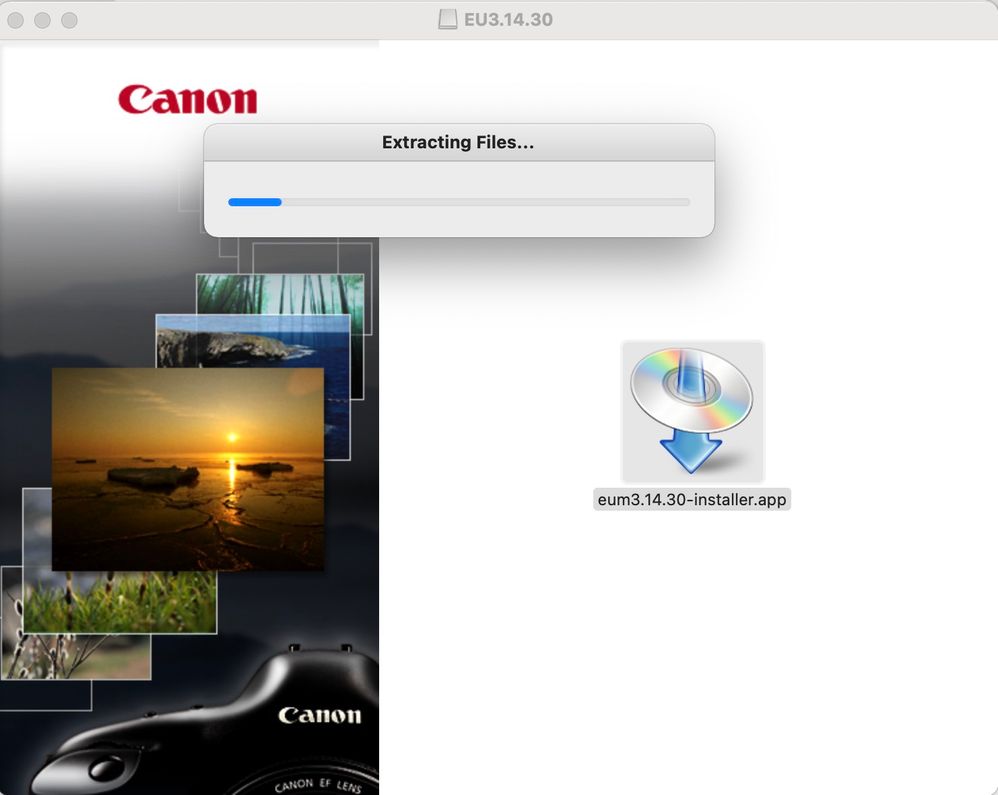
After I start *-installer.app the extracting files window pop-up and nothing after. See screenshot.
Does anyone know how to deal with it?
5 REPLIES 5


Options
- Mark as New
- Bookmark
- Subscribe
- Mute
- Subscribe to RSS Feed
- Permalink
- Report Inappropriate Content
01-01-2022 06:47 PM
When you downloaded the apps, did you check both the hardware and software prerequisites? I do not think the Canon apps are compatible with MacOS 12, which was just released on 10/25/2021. I also want to point out that Apple has since released two major updates, v12.1 and v12.2, which was just released on 12/17/2021.
Canon has yet to announce a date when an update to Monterey may be released.
--------------------------------------------------------
"Enjoying photography since 1972."
"Enjoying photography since 1972."

Options
- Mark as New
- Bookmark
- Subscribe
- Mute
- Subscribe to RSS Feed
- Permalink
- Report Inappropriate Content
01-02-2022 11:17 AM
While it is true gthat the Canon site doesn't list software for macOS 12, the macOS 11 software can be installed on my MacBook Air 2018 with macOS 12.1, which my MacBook says is up-to-date as of today.
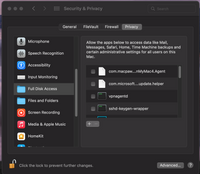
Perhaps there are some permission issues; go to System Preferences and see if there are disk access permissions you need to authorize. The Universalinstaller needs to be authorized for Full Disk Access.
John Hoffman
Conway, NH
R6 Mark III, M200 (converted to infrared), RF lenses, Pixma PRO-100, Pixma TR8620a, Lr Classic
Conway, NH
R6 Mark III, M200 (converted to infrared), RF lenses, Pixma PRO-100, Pixma TR8620a, Lr Classic
Options
- Mark as New
- Bookmark
- Subscribe
- Mute
- Subscribe to RSS Feed
- Permalink
- Report Inappropriate Content
01-02-2022 06:03 PM
Look like this particular laptop has a problem.
I tried on my second macOS laptop and after extracting files I got an installation prompt.
But I can't find how to allow UniversalInstaller full disk access. In system preference, there's no such application as UniversalInstaller.
Options
- Mark as New
- Bookmark
- Subscribe
- Mute
- Subscribe to RSS Feed
- Permalink
- Report Inappropriate Content
01-02-2022 06:13 PM
Found a solution. The problem was exactly the same as here - https://community.usa.canon.com/t5/Camera-Software/MAC-EOS-Solution-Disk-29-0A-Installer-Doesn-t-Wor...
After I switched the region to United stated an installation prompt appeared.

Options
- Mark as New
- Bookmark
- Subscribe
- Mute
- Subscribe to RSS Feed
- Permalink
- Report Inappropriate Content
05-12-2024 01:04 AM
Thanks for this link. Changing the system primary language enabled me to install DPP4 and EOS Utility updates finally on my Mac running the MacOS 13 Ventura. I had not been able to install updates for at least a couple of years.

Announcements
07/22/2026: New firmware updates are available.
EOS R6 Mark III - Version 1.1.0
05/13/2026: New firmware updates are available.
EOS R5 Mark II - Version 1.3.0
EOS R6 Mark II - Version 1.7.0
04/28/2026: Service Notice: Caution Concerning use of Lithium Batteries
03/17/2026: New firmware updates are available.
SELPHY CP1500 - Version 1.0.7.0
02/23/2026: New firmware update is available for EOS C50- Version 1.0.3.1
01/23/2026: New firmware update is available for RF 24-105mm F4 IS USM- Version 2.0.7
01/20/2026: New firmware updates are available.
10/21/2025: Service Notice: To Users of the Compact Digital Camera PowerShot V1
10/15/2025: New firmware updates are available.
Speedlite EL-5 - Version 1.2.0
Speedlite EL-1 - Version 1.1.0
Speedlite Transmitter ST-E10 - Version 1.2.0
07/28/2025: Notice of Free Repair Service for the Mirrorless Camera EOS R50 (Black)
05/21/2025: New firmware update available for EOS C500 Mark II - Version 1.1.5.1
Related Content
- Received a Product Advisory - EOS Network Setting Tool in Camera Software
- I prompted Claude AI to write a program to manipulate camera raw files in Camera Software
- Trouble finding EOS Utility for macOS to use Mac as monitor for EOS Rebel T3i in Camera Software
- Digital Camera Software v7.1: "Could not connect to internet" on install in Camera Software
- No Vignetting Fix for Powershot V1 in CR3/Raw? in Point & Shoot Digital Cameras

Ⓒ 2026
Canon U.S.A Inc. All Rights Reserved. Reproduction in whole or part without permission is prohibited.
