Turn on suggestions
Auto-suggest helps you quickly narrow down your search results by suggesting possible matches as you type.
- Canon Community
- Discussions & Help
- Camera
- Speedlite Flashes
- Re: Help with multiple groups with T7i
Options
- Subscribe to RSS Feed
- Mark Topic as New
- Mark Topic as Read
- Float this Topic for Current User
- Bookmark
- Subscribe
- Mute
- Printer Friendly Page
Help with multiple groups with T7i

Options
- Mark as New
- Bookmark
- Subscribe
- Mute
- Subscribe to RSS Feed
- Permalink
- Report Inappropriate Content
01-16-2021 10:33 AM
Sorry, originally posted in the wrong forum. My bad.
I have a T7i and three third party speedlites (Voking V580) that support ETTL and optical wireless triggereing. I am totally new to this so be gentle!
I am trying to set up the three V580s as off camera slaves triggered by the inbuilt camera flash. If I put all three in Group A they all fire. If I put one or two in Group A and the other(s) in Group B they all fire and I can control the ratio and exposure comp from the camera. However, if I configure one V580 for Group A, one for Group B and the third for Group C, only A and B fire. C does nothing.
My goal is to have two V580s used for side fill and the third as a highlight on the background. Ideally, I'd like to be able to control the output for each individually, thus being able to adjust the left and right highlights as well as the backlight all individually.
What am I doing wrong? I've read every relevant page in the T7i manual and the entire V580 manual multiple times now and I'm still clueless. I searched for a possible tutorial or sticky that might help me, but came up empty. If there is such a thing, lemme know and I'll read it. I saw that Speedlite Book but oh my they want real money for it!! More than all three V580s put together!!
Thanks for the help!
ted
2 REPLIES 2


Options
- Mark as New
- Bookmark
- Subscribe
- Mute
- Subscribe to RSS Feed
- Permalink
- Report Inappropriate Content
01-16-2021 02:49 PM
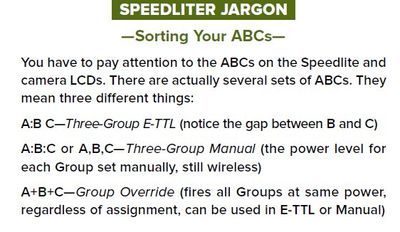
Group C can be confusing when using the Canon proprietary system.
This is from the Speedliter's Handbook by Syl Arena and may help.
Mike Sowsun

Options
- Mark as New
- Bookmark
- Subscribe
- Mute
- Subscribe to RSS Feed
- Permalink
- Report Inappropriate Content
04-16-2021 08:15 AM
This is a feature of your camera. It can only control A and B groups off-camera. The only cameras that control C group using the pop-up flash are EOS 7D and EOS 7D Mark II.
But there might be a workaround… on Canon Speedlites you can put a slave in to so called individual slave mode. In this mode you have to manually set the power on the Speedlite itself, and it won't be in any group. However it will flash when the camera instructs flashes to fire.
Normally a flash expects it's group letter, then a command, but when set to individual slave mode the only thing it reacts to is the "flash now" command.
A little more about this from an old post on my site: https://www.p4pictures.com/2014/05/speedlite-manual-mode/
I don't know if your Voking V580 supports individual slave mode.
Brian
EOS specialist trainer, photographer and author
-- Note: my spell checker is set for EN-GB, not EN-US --

Announcements
07/22/2026: New firmware updates are available.
EOS R6 Mark III - Version 1.1.0
05/13/2026: New firmware updates are available.
EOS R5 Mark II - Version 1.3.0
EOS R6 Mark II - Version 1.7.0
04/28/2026: Service Notice: Caution Concerning use of Lithium Batteries
03/17/2026: New firmware updates are available.
SELPHY CP1500 - Version 1.0.7.0
02/23/2026: New firmware update is available for EOS C50- Version 1.0.3.1
01/23/2026: New firmware update is available for RF 24-105mm F4 IS USM- Version 2.0.7
01/20/2026: New firmware updates are available.
10/21/2025: Service Notice: To Users of the Compact Digital Camera PowerShot V1
10/15/2025: New firmware updates are available.
Speedlite EL-5 - Version 1.2.0
Speedlite EL-1 - Version 1.1.0
Speedlite Transmitter ST-E10 - Version 1.2.0
07/28/2025: Notice of Free Repair Service for the Mirrorless Camera EOS R50 (Black)
05/21/2025: New firmware update available for EOS C500 Mark II - Version 1.1.5.1
Related Content
- EOS Canon R6 mkIII Image write failure in EOS DSLR & Mirrorless Cameras
- Cannot batch-select / select all photos by date in Camera Connect App (IXUS 255 HS & iPhone 12) in Camera Software
- EOS R6 Mark III Firmware 1.1.0 makes pics too dark in macOS Preview app and Instagram Stories in Camera Software
- Canon G7X Mark III flash not working in Point & Shoot Digital Cameras
- Canon BR-E1 can not do multiple H+ shots? in Camera Accessories

Ⓒ 2026
Canon U.S.A Inc. All Rights Reserved. Reproduction in whole or part without permission is prohibited.
