Turn on suggestions
Auto-suggest helps you quickly narrow down your search results by suggesting possible matches as you type.
- Canon Community
- Discussions & Help
- Camera
- Speedlite Flashes
- Re: Help! Godox ct-16 trigger not pairing with 430...
Options
- Subscribe to RSS Feed
- Mark Topic as New
- Mark Topic as Read
- Float this Topic for Current User
- Bookmark
- Subscribe
- Mute
- Printer Friendly Page

Options
- Mark as New
- Bookmark
- Subscribe
- Mute
- Subscribe to RSS Feed
- Permalink
- Report Inappropriate Content
03-02-2022 06:17 PM
Hello hope someone can help. Any clue why my Godox ct16 trigger doesn’t seem to be working? Also says it’s compatible multiple sales description. New batteries, The triggers communicate fine with each other(doesn’t flash even they trigger communicates with each other), same channels, ex 430ii slave mode is on. Tried Ettl and manual mode as well, I know it works for sure as I saw someone post a YouTube video showing same trigger and same ex 430ii. It was also on slave mode. (Just checked it’s actually ex 430 not ii https://youtu.be/uB-HwlYSYkg(1:46) please help~
Solved! Go to Solution.
1 ACCEPTED SOLUTION
Accepted Solutions


Options
- Mark as New
- Bookmark
- Subscribe
- Mute
- Subscribe to RSS Feed
- Permalink
- Report Inappropriate Content
03-03-2022 06:59 AM - edited 03-03-2022 07:09 AM
You have the flash mounted backwards on the receiver. If you turn it around, it should work if you have a good connection.
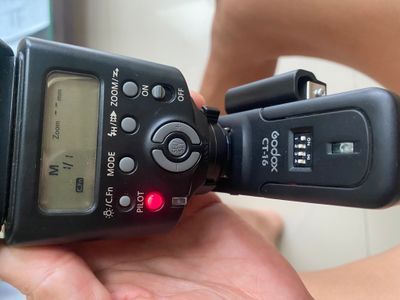
Mike Sowsun
6 REPLIES 6
Options
- Mark as New
- Bookmark
- Subscribe
- Mute
- Subscribe to RSS Feed
- Permalink
- Report Inappropriate Content
03-02-2022 10:49 PM - edited 03-02-2022 10:49 PM
Don’t use slave mode on the 430EX II. The Canon slave system uses an optical wireless protocol that is incompatible with Godox. Put the 430EX II in manual mode and place it on the Godox radio receiver.
Mike Sowsun
Options
- Mark as New
- Bookmark
- Subscribe
- Mute
- Subscribe to RSS Feed
- Permalink
- Report Inappropriate Content
03-02-2022 10:55 PM
Hi Mike thank you for the reply. I tried putting the 430ii in all 3 modes, ettl, manual, and slave, with no luck. Is there any link you might have for this specific Godox trigger and same flash?
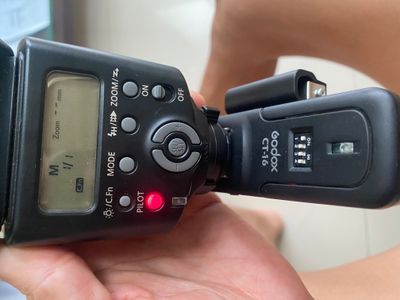
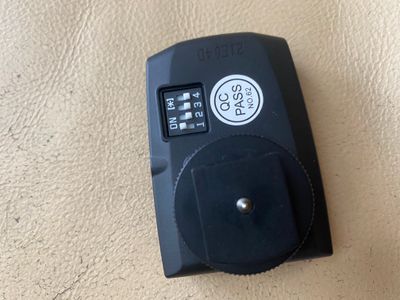
Options
- Mark as New
- Bookmark
- Subscribe
- Mute
- Subscribe to RSS Feed
- Permalink
- Report Inappropriate Content
03-02-2022 11:00 PM
Also the triggers communicate fine when mounted on my canon 100d still no flash~
Options
- Mark as New
- Bookmark
- Subscribe
- Mute
- Subscribe to RSS Feed
- Permalink
- Report Inappropriate Content
03-02-2022 11:14 PM
I’m actually wondering if this receiver connectors actually fits for the 430ii I was just try to connected one of the pins to the receiver manually in a angle and it flashes?? Hmm.
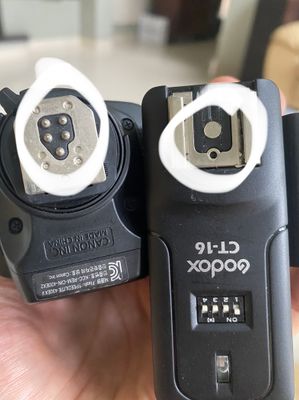
Options
- Mark as New
- Bookmark
- Subscribe
- Mute
- Subscribe to RSS Feed
- Permalink
- Report Inappropriate Content
03-03-2022 06:59 AM - edited 03-03-2022 07:09 AM
You have the flash mounted backwards on the receiver. If you turn it around, it should work if you have a good connection.
Mike Sowsun
Options
- Mark as New
- Bookmark
- Subscribe
- Mute
- Subscribe to RSS Feed
- Permalink
- Report Inappropriate Content
03-03-2022 07:02 AM
Tried both ways before, seems to be a faulty connection. I have to press down on the flash and on tight with the receiver. Will need to figure this out a bit more. Thanks for your help!

Announcements
07/22/2026: New firmware updates are available.
EOS R6 Mark III - Version 1.1.0
05/13/2026: New firmware updates are available.
EOS R5 Mark II - Version 1.3.0
EOS R6 Mark II - Version 1.7.0
04/28/2026: Service Notice: Caution Concerning use of Lithium Batteries
03/17/2026: New firmware updates are available.
SELPHY CP1500 - Version 1.0.7.0
02/23/2026: New firmware update is available for EOS C50- Version 1.0.3.1
01/23/2026: New firmware update is available for RF 24-105mm F4 IS USM- Version 2.0.7
01/20/2026: New firmware updates are available.
10/21/2025: Service Notice: To Users of the Compact Digital Camera PowerShot V1
10/15/2025: New firmware updates are available.
Speedlite EL-5 - Version 1.2.0
Speedlite EL-1 - Version 1.1.0
Speedlite Transmitter ST-E10 - Version 1.2.0
07/28/2025: Notice of Free Repair Service for the Mirrorless Camera EOS R50 (Black)
05/21/2025: New firmware update available for EOS C500 Mark II - Version 1.1.5.1

Ⓒ 2026
Canon U.S.A Inc. All Rights Reserved. Reproduction in whole or part without permission is prohibited.
