Turn on suggestions
Auto-suggest helps you quickly narrow down your search results by suggesting possible matches as you type.
- Canon Community
- Discussions & Help
- Printer
- Scanners
- Re: CanoScan LiDE 400 Driver install needing Admin...
Options
- Subscribe to RSS Feed
- Mark Topic as New
- Mark Topic as Read
- Float this Topic for Current User
- Bookmark
- Subscribe
- Mute
- Printer Friendly Page
CanoScan LiDE 400 Driver install needing Administrator

Options
- Mark as New
- Bookmark
- Subscribe
- Mute
- Subscribe to RSS Feed
- Permalink
- Report Inappropriate Content
05-10-2023 05:37 PM
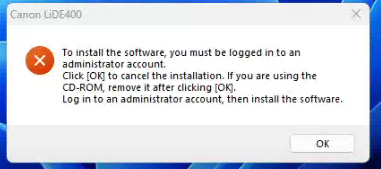
Downloaded the driver and software package. After I extract the files it gives me this message.
Problem: To install the software, you must be logged in to an administrator account.
Click [OK] to cancel the installation. If you are using the CD-ROM, remove it after clicking [OK]. Log in to an administrator account, then install the software.
Using this driver on this page: Canon Support for CanoScan LIDE 400 | Canon U.S.A., Inc.
CanoScan LiDE 400 Full Driver & Software Package (Windows)
Last Updated : 11-Mar-2022
Issue Number : 0100962901
I'm currently logged into an administrator account, but still get this error.
Any help will be appreciated!
12 REPLIES 12
Options
- Mark as New
- Bookmark
- Subscribe
- Mute
- Subscribe to RSS Feed
- Permalink
- Report Inappropriate Content
01-20-2026 11:52 AM
Ref.: LiDE 400
Options
- Mark as New
- Bookmark
- Subscribe
- Mute
- Subscribe to RSS Feed
- Permalink
- Report Inappropriate Content
01-20-2026 12:07 PM
The way I solved it was to create a new local admin, then I installed the software and then deleted the local admin account after.
You then don't get any shortcuts so have to go find the programs in explorer instead!
Options
- Mark as New
- Bookmark
- Subscribe
- Mute
- Subscribe to RSS Feed
- Permalink
- Report Inappropriate Content
01-21-2026 04:01 AM
Thank you, we have resolved this problem.

- « Previous
-
- 1
- 2
- Next »
- « Previous
-
- 1
- 2
- Next »

Announcements
05/13/2026: New firmware updates are available.
EOS R5 Mark II - Version 1.3.0
EOS R6 Mark II - Version 1.7.0
04/28/2026: Service Notice: Caution Concerning use of Lithium Batteries
03/17/2026: New firmware updates are available.
SELPHY CP1500 - Version 1.0.7.0
02/23/2026: New firmware update is available for EOS C50- Version 1.0.3.1
01/23/2026: New firmware update is available for RF 24-105mm F4 IS USM- Version 2.0.7
01/20/2026: New firmware updates are available.
12/22/2025: New firmware update is available for EOS R6 Mark III- Version 1.0.2
10/21/2025: Service Notice: To Users of the Compact Digital Camera PowerShot V1
10/15/2025: New firmware updates are available.
Speedlite EL-5 - Version 1.2.0
Speedlite EL-1 - Version 1.1.0
Speedlite Transmitter ST-E10 - Version 1.2.0
07/28/2025: Notice of Free Repair Service for the Mirrorless Camera EOS R50 (Black)
05/21/2025: New firmware update available for EOS C500 Mark II - Version 1.1.5.1
Related Content
- what cable needed for CanoScan Lide 300 to MacBook Air 2 in Scanners
- CanoScan 9000F Mark II software needed in Scanners
- Canoscan LiDE 300 will only scan to pdf, and I need it to scan to jpg in Scanners
- CanoScan 9950F driver needed in Scanners
- CanoScan LiDE 210 driver needed for Windows 11 in Scanners

Ⓒ 2026
Canon U.S.A Inc. All Rights Reserved. Reproduction in whole or part without permission is prohibited.
