Turn on suggestions
Auto-suggest helps you quickly narrow down your search results by suggesting possible matches as you type.
- Canon Community
- Discussions & Help
- Printer
- Professional Photo Printers
- Re: Drivers for macOS Monterey
Options
- Subscribe to RSS Feed
- Mark Topic as New
- Mark Topic as Read
- Float this Topic for Current User
- Bookmark
- Subscribe
- Mute
- Printer Friendly Page
imagePROGRAF PRO-300 Drivers for macOS Monterey

Options
- Mark as New
- Bookmark
- Subscribe
- Mute
- Subscribe to RSS Feed
- Permalink
- Report Inappropriate Content
04-13-2022
11:01 PM
- last edited on
11-04-2022
04:14 PM
by
 Danny
Danny
I just bought a imagePROGRAF PRO-300 to use with my M1 iMac running Monterey. The advanced settings (Quality and Media, Color options, etc.) don't show up in the Print dialog. I installed a printer driver from the Canon site, but that made no difference. The driver download page doesn't list Monterey in the OS versions list. Does this printer actually work properly with Monterey? If so what do I need to do?
12 REPLIES 12

Options
- Mark as New
- Bookmark
- Subscribe
- Mute
- Subscribe to RSS Feed
- Permalink
- Report Inappropriate Content
04-14-2022 02:54 PM
Select MacOS 12 from dropdown list
Options
- Mark as New
- Bookmark
- Subscribe
- Mute
- Subscribe to RSS Feed
- Permalink
- Report Inappropriate Content
04-21-2022 10:03 AM
There is no MacOS 12 option in the dropdown. In the driver details description though it does say that Monterey is supported. I had to install the driver twice to get it to take but it's working now.
Options
- Mark as New
- Bookmark
- Subscribe
- Mute
- Subscribe to RSS Feed
- Permalink
- Report Inappropriate Content
04-21-2022 10:13 AM

Options
- Mark as New
- Bookmark
- Subscribe
- Mute
- Subscribe to RSS Feed
- Permalink
- Report Inappropriate Content
04-21-2022 10:15 AM
Strange. When I downloaded the driver nothing newer than Catalina appeared in the dropdown. In any case, the latest version of the driver works for Monterey on an M1 Mac.
Options
- Mark as New
- Bookmark
- Subscribe
- Mute
- Subscribe to RSS Feed
- Permalink
- Report Inappropriate Content
04-21-2022 10:23 AM
Depending on your screen size you might have to scroll up in order to reveal the entire dropdown.
Options
- Mark as New
- Bookmark
- Subscribe
- Mute
- Subscribe to RSS Feed
- Permalink
- Report Inappropriate Content
11-04-2022 04:04 PM
I downloaded the driver and installed on both macOS12 and macOS13 on my Apple M1 Macbook Pro but it does not work. Any troubleshooting tips?
Options
- Mark as New
- Bookmark
- Subscribe
- Mute
- Subscribe to RSS Feed
- Permalink
- Report Inappropriate Content
11-04-2022 04:05 PM
* I upgraded to macOS13 hoping that might fix something, but it didn't.


Options
- Mark as New
- Bookmark
- Subscribe
- Mute
- Subscribe to RSS Feed
- Permalink
- Report Inappropriate Content
11-04-2022 06:16 PM
When dealing with Apple and Canon printers frequently the first driver version that appears when the Add Printer option is selected is the Apple AirPrint driver. It is a simple, limited capability driver and doesn't support things like media types and ICC profiles. Need to wait till the IJ Series driver appears (*assuming the appropriate Canon driver was downloaded and installed.
John Hoffman
Conway, NH
R6 Mark III, M200 (converted to infrared), RF lenses, Pixma PRO-100, Pixma TR8620a, Lr Classic
Conway, NH
R6 Mark III, M200 (converted to infrared), RF lenses, Pixma PRO-100, Pixma TR8620a, Lr Classic
Options
- Mark as New
- Bookmark
- Subscribe
- Mute
- Subscribe to RSS Feed
- Permalink
- Report Inappropriate Content
11-04-2022 07:46 PM
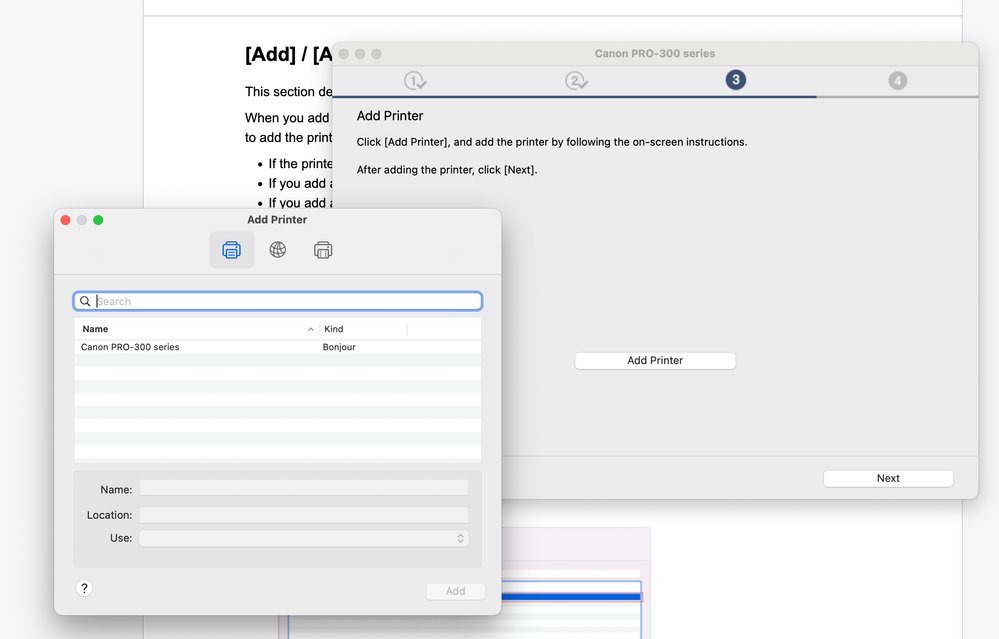
It is supposed to appear in this window? Or are you referring to Canon's website?

Announcements
07/22/2026: New firmware updates are available.
EOS R6 Mark III - Version 1.1.0
05/13/2026: New firmware updates are available.
EOS R5 Mark II - Version 1.3.0
EOS R6 Mark II - Version 1.7.0
04/28/2026: Service Notice: Caution Concerning use of Lithium Batteries
03/17/2026: New firmware updates are available.
SELPHY CP1500 - Version 1.0.7.0
02/23/2026: New firmware update is available for EOS C50- Version 1.0.3.1
01/23/2026: New firmware update is available for RF 24-105mm F4 IS USM- Version 2.0.7
01/20/2026: New firmware updates are available.
10/21/2025: Service Notice: To Users of the Compact Digital Camera PowerShot V1
10/15/2025: New firmware updates are available.
Speedlite EL-5 - Version 1.2.0
Speedlite EL-1 - Version 1.1.0
Speedlite Transmitter ST-E10 - Version 1.2.0
07/28/2025: Notice of Free Repair Service for the Mirrorless Camera EOS R50 (Black)
05/21/2025: New firmware update available for EOS C500 Mark II - Version 1.1.5.1
Related Content
- Seeking PIXMA MX920/MX922 driver for MacBook Air running MacOS Tahoe 26+ in Printer Software & Networking
- HELP! My PIXMA G6020 won't scan in Desktop Inkjet Printers
- Bug Report: macOS Driver Conflict – Booklet Printing on Legal Paper (iR ADV DX C5840i / Finisher-AB1 in Production Printing
- imageCLASS MF642Cdw - Scanner function not working with MacOS Tahoe 26.6 in Office Printers
- Driver PIXMA G5010 & G6010 for macOS 26 in Desktop Inkjet Printers

Ⓒ 2026
Canon U.S.A Inc. All Rights Reserved. Reproduction in whole or part without permission is prohibited.
