Turn on suggestions
Auto-suggest helps you quickly narrow down your search results by suggesting possible matches as you type.
- Canon Community
- Discussions & Help
- Printer
- Professional Photo Printers
- Re: Pixma Pro-100 printing very dark
Options
- Subscribe to RSS Feed
- Mark Topic as New
- Mark Topic as Read
- Float this Topic for Current User
- Bookmark
- Subscribe
- Mute
- Printer Friendly Page

Options
- Mark as New
- Bookmark
- Subscribe
- Mute
- Subscribe to RSS Feed
- Permalink
- Report Inappropriate Content
10-30-2014 03:22 PM
Hi All,
I just purchased my Pro-100 and installed last night. I upgraded from an HP that was strictly CMYK (only 4 ink). I installed according to the instructions, but my prints seem to be coming out noticably darker than they should be. The lime greens are printing a darker kelly green. The bright blues are printing a darker royal blue. The bright reds are printing a very dark red. The pinks are printing a dark shade of pink. Skin tones are much, much darker than they should be.
I am printing from Adobe programs (Illustrator, Photoshop, and Pro - all CS6). Am I missing a setting somewhere? On my previous printer, I would choose "preserve CMYK primaries" and it printed perfectly. Now, I can't seem to get my prints a normal shade. I'm not attempting to "match my monitor", just simply trying to get the colors closer to their true color. I've unchecked preserve CMYK primaries and checked to have the printer decide the colors, but neither of those options seem to be helping.
I called Canon support, but they were unable to help me. He had me put my settings all back to default and test print. When that didn't work he stated "well printers vary per brand so theres really nothing we can do to fix it". I can't imagine that this great of a printer prints that far off on colors.
Any help is very greatly appreciated!
Solved! Go to Solution.
115 REPLIES 115
Options
- Mark as New
- Bookmark
- Subscribe
- Mute
- Subscribe to RSS Feed
- Permalink
- Report Inappropriate Content
11-29-2021 01:08 PM
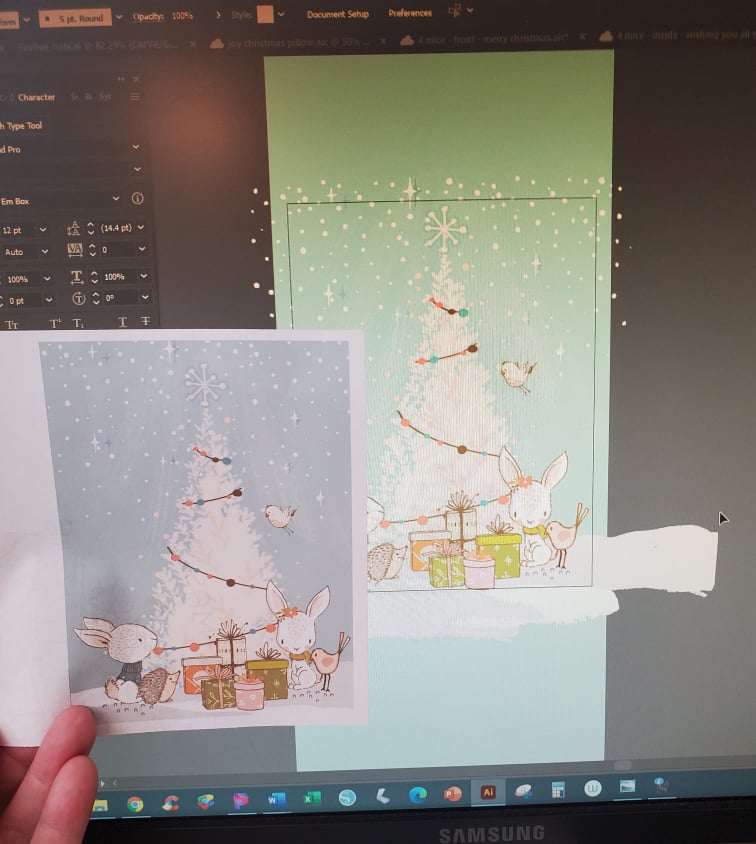
New printer vs what is on the screen. Sooooo different.


Options
- Mark as New
- Bookmark
- Subscribe
- Mute
- Subscribe to RSS Feed
- Permalink
- Report Inappropriate Content
11-29-2021 01:28 PM - edited 11-29-2021 01:36 PM
@Toby_K wrote:prints from the web site.
old on the left, new printer on the right.
new printer is more precise/crisper, which is good. But its just printing too dark. 😞 The photo doesn't really show how much difference there really is.
Toby
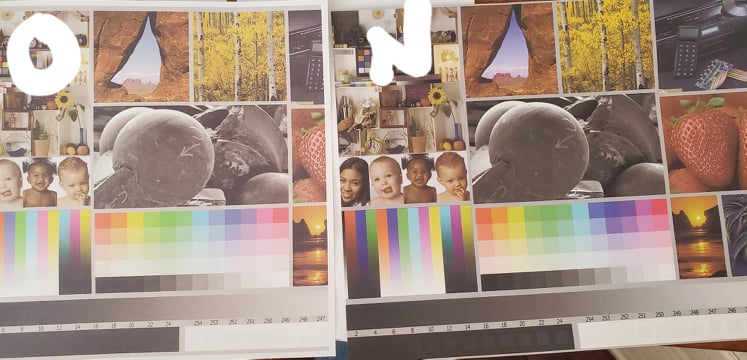
The print on the right is closer to what the test image should look like. The one on the left is too light/washed out.
Did you make any adjustments to the image before printing (if you didn't that is good. If you did reset the adjustments to original download.)
A property of the test image is that it has a number of "memory colors" - items that everyone knows what they should look like. The red strawberries, yellow aspen leaves and Monument Valley red rocks look reasonable, but a little too red/magenta; black doesn't look true black. Are you using the ICC profile that applies to the paper you are using?
Have you run a nozzle check/cleaning?
The test image is digitally correct and should pass the digital data directly to the printer; that is why you don't want to make any adjustments in the application software. - just select the correct media type and corresponding ICC profile.
If the image doesn't come out looking good on its own - don't compare to the monitor - then you need to address a printer issue. I am assuming you are using Canon OEM inks and Canon paper. Is that correct?
Once the printer issue is addressed (and it is not unheard of to have a defective printer) then you make sure the monitor reflects a close approximation of the print. They will never be exact because one is reflected light an the other transmitted backlight.
Does you monitor/display have different settings, like Internet sRGB, Adobe RGB, like that?
John Hoffman
Conway, NH
R6 Mark III, M200 (converted to infrared), RF lenses, Pixma PRO-100, Pixma TR8620a, Lr Classic
Conway, NH
R6 Mark III, M200 (converted to infrared), RF lenses, Pixma PRO-100, Pixma TR8620a, Lr Classic

Options
- Mark as New
- Bookmark
- Subscribe
- Mute
- Subscribe to RSS Feed
- Permalink
- Report Inappropriate Content
11-29-2021 03:18 PM
Pay very careful to what John said.
However, "I don't want to adjust my screen, as I have hundreds of cards bult with specific color pallets that would take thousands of hours to change." dose not mean your settings and monitor were correct then. If true that is unfortunate. But form where I sit and look at your art your old prints looks washed out. The is probably do to the fact the Canon is a high end "photo" and the old one is not.
This is paramount especially the ink, "I am assuming you are using Canon OEM inks and Canon paper. Is that correct?"
EB
EOS 1DX and many lenses.
EOS 1DX and many lenses.

Options
- Mark as New
- Bookmark
- Subscribe
- Mute
- Subscribe to RSS Feed
- Permalink
- Report Inappropriate Content
04-19-2025 04:35 AM - edited 04-19-2025 04:44 AM
Hi Guys,
It's been a few years since the last reply, but I am at a loss to an answer.
I have a Canon Pixma G3501 and it used to print great. Actually it does print great except it suddenly started to print very dark in the last few days. I have read many of the threads above, including the screen brightness (which I have at 0/100) and the many setting for PS (which I use) etc.
But I know it's NOT PS or MS Paint which I have both printed off, including emails where the colours are just dark. So I know its the machine settings somewhere and not the software I'm printing from.
I have manually set the printer to Main / Manual / Matching / None, but this has not helped. I've printed out the TEST image with the strawberries and that too is dark.
I am using generic paper at the moment but his should not dramatically change the colours. I use this paper to get it lined up then use gloss paper (changing the setting) and it usually comes out perfectly.
I've updated the driver and cleaned the heads too.
As I said..... at a loss.
Two images, one I downloaded as I know the colours should be bold, but the printout is dark.


Options
- Mark as New
- Bookmark
- Subscribe
- Mute
- Subscribe to RSS Feed
- Permalink
- Report Inappropriate Content
04-19-2025 05:58 AM
Hi John,
As I've said, I use generic paper, so I've not got any ICC profiles installed, I just use the "Standard" and "Plain" settings. Printing the test image, no adjustments (that I am aware of).
KR
Options
- Mark as New
- Bookmark
- Subscribe
- Mute
- Subscribe to RSS Feed
- Permalink
- Report Inappropriate Content
04-19-2025 06:45 AM

If you select "None" in the driver then a profile needs to be selected somewhere else. What software are you printing from?
Try selecting "Auto" instead of "None". Then the driver should automatically pick an appropriate profile for the media type you select.
I am assuming that the nozzle check prints correctly.
If you print a webpage does it print correctly?
John Hoffman
Conway, NH
R6 Mark III, M200 (converted to infrared), RF lenses, Pixma PRO-100, Pixma TR8620a, Lr Classic
Conway, NH
R6 Mark III, M200 (converted to infrared), RF lenses, Pixma PRO-100, Pixma TR8620a, Lr Classic

- « Previous
- Next »
- « Previous
- Next »
Announcements
07/22/2026: New firmware updates are available.
EOS R6 Mark III - Version 1.1.0
05/13/2026: New firmware updates are available.
EOS R5 Mark II - Version 1.3.0
EOS R6 Mark II - Version 1.7.0
04/28/2026: Service Notice: Caution Concerning use of Lithium Batteries
03/17/2026: New firmware updates are available.
SELPHY CP1500 - Version 1.0.7.0
02/23/2026: New firmware update is available for EOS C50- Version 1.0.3.1
01/23/2026: New firmware update is available for RF 24-105mm F4 IS USM- Version 2.0.7
01/20/2026: New firmware updates are available.
10/21/2025: Service Notice: To Users of the Compact Digital Camera PowerShot V1
10/15/2025: New firmware updates are available.
Speedlite EL-5 - Version 1.2.0
Speedlite EL-1 - Version 1.1.0
Speedlite Transmitter ST-E10 - Version 1.2.0
07/28/2025: Notice of Free Repair Service for the Mirrorless Camera EOS R50 (Black)
05/21/2025: New firmware update available for EOS C500 Mark II - Version 1.1.5.1
Related Content
- printer not responding in Printer Software & Networking
- Latest Photo Printer Software for TR8620 Printer, or 3rd party suggestions in Desktop Inkjet Printers
- PIXMA MX922 printing with pink hue? in Desktop Inkjet Printers
- PIXMA TS9521Ca-Can't upload most Problematic Receipt to Register AND Scan print white paper as gray in Desktop Inkjet Printers
- PIXMA TS5350a black ink streaky when printing from PC, copies are OK in Desktop Inkjet Printers

Ⓒ 2026
Canon U.S.A Inc. All Rights Reserved. Reproduction in whole or part without permission is prohibited.
