Turn on suggestions
Auto-suggest helps you quickly narrow down your search results by suggesting possible matches as you type.
- Canon Community
- Discussions & Help
- Printer
- Professional Photo Printers
- Re: Pixma Pro-100 Leaving Smudges/Streaks
Options
- Subscribe to RSS Feed
- Mark Topic as New
- Mark Topic as Read
- Float this Topic for Current User
- Bookmark
- Subscribe
- Mute
- Printer Friendly Page
Pixma Pro-100 Leaving Smudges/Streaks

Options
- Mark as New
- Bookmark
- Subscribe
- Mute
- Subscribe to RSS Feed
- Permalink
- Report Inappropriate Content
10-31-2019 07:39 PM
Hello!
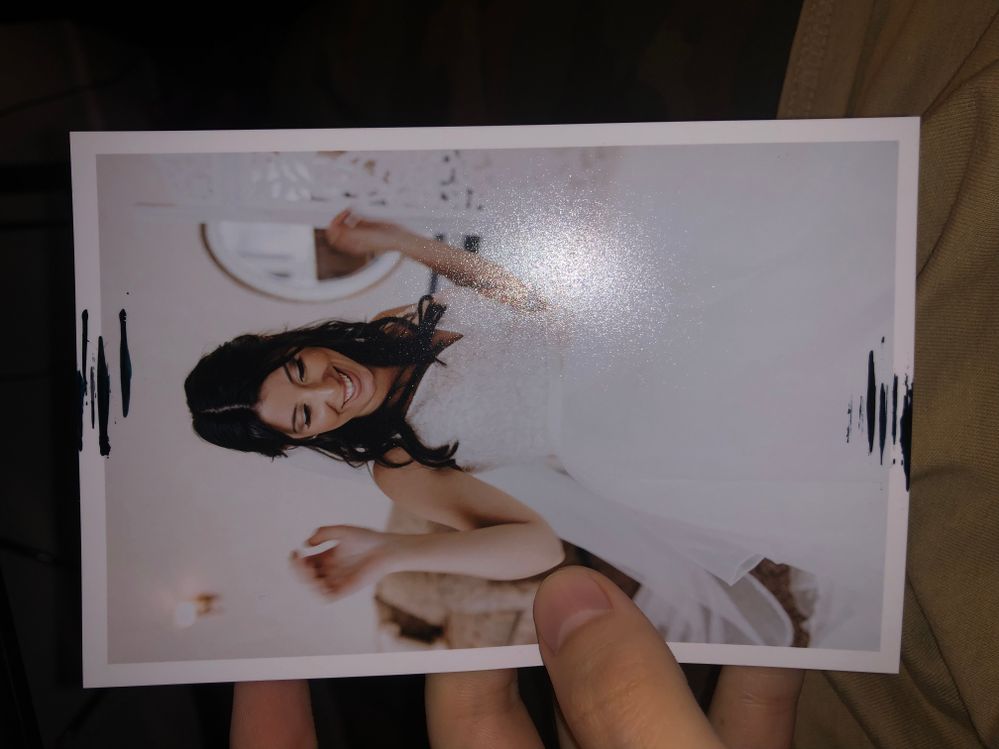
My Canon Pixma Pro-100 Leaving Smudges/Streaks!
I have done Cleaning (I think after this cleaning it got even worst), Bottom plate cleaning (7-8 times, every time I had smudges/streaks on the paper), Roller Cleaning (2 times(clean paper)).
And after all the cleaning I still have the same issue.
3 REPLIES 3
Options
- Mark as New
- Bookmark
- Subscribe
- Mute
- Subscribe to RSS Feed
- Permalink
- Report Inappropriate Content
11-06-2019 02:30 PM
Hi glebfreeman.
It is recommended that you enable the Prevent Paper Abrasion setting. If you are using a Windows computer, please follow the instructions at the link below to enable the setting:
Set Prevent Paper Abrasion (Windows)
If you are using a macOS computer, follow the instructions at the link below:
Set Prevent Paper Abrasion ( Mac OS)
If the issue persists, please call us at 1-800-OK-CANON (652-2666), Monday - Friday 8:00 a.m. to 8:00 p.m. ET (excluding holidays).
Did this answer your question? Please click the Accept as Solution button so that others may find the answer as well.
Options
- Mark as New
- Bookmark
- Subscribe
- Mute
- Subscribe to RSS Feed
- Permalink
- Report Inappropriate Content
12-02-2019 07:50 PM
Thank you!
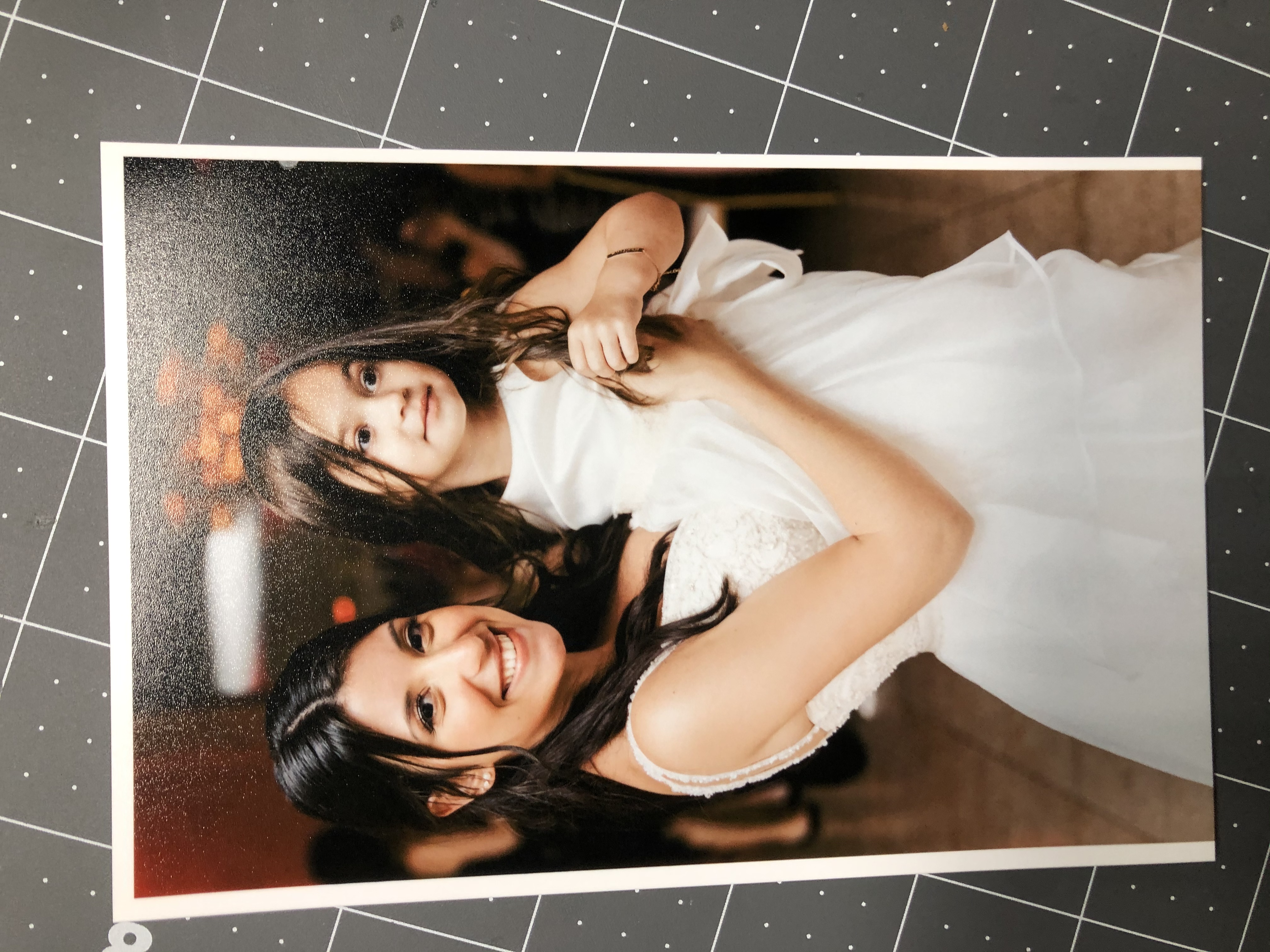
But now I got a new issue!
The bottom side of all the pictures is cut off.


Options
- Mark as New
- Bookmark
- Subscribe
- Mute
- Subscribe to RSS Feed
- Permalink
- Report Inappropriate Content
12-04-2019 09:47 AM
CAn you post a screen shot of your printer settings? Is the cell size correct for the paper size and margins?
John Hoffman
Conway, NH
R6 Mark III, M200 (converted to infrared), RF lenses, Pixma PRO-100, Pixma TR8620a, Lr Classic
Conway, NH
R6 Mark III, M200 (converted to infrared), RF lenses, Pixma PRO-100, Pixma TR8620a, Lr Classic

Announcements
07/22/2026: New firmware updates are available.
EOS R6 Mark III - Version 1.1.0
05/13/2026: New firmware updates are available.
EOS R5 Mark II - Version 1.3.0
EOS R6 Mark II - Version 1.7.0
04/28/2026: Service Notice: Caution Concerning use of Lithium Batteries
03/17/2026: New firmware updates are available.
SELPHY CP1500 - Version 1.0.7.0
02/23/2026: New firmware update is available for EOS C50- Version 1.0.3.1
01/23/2026: New firmware update is available for RF 24-105mm F4 IS USM- Version 2.0.7
01/20/2026: New firmware updates are available.
10/21/2025: Service Notice: To Users of the Compact Digital Camera PowerShot V1
10/15/2025: New firmware updates are available.
Speedlite EL-5 - Version 1.2.0
Speedlite EL-1 - Version 1.1.0
Speedlite Transmitter ST-E10 - Version 1.2.0
07/28/2025: Notice of Free Repair Service for the Mirrorless Camera EOS R50 (Black)
05/21/2025: New firmware update available for EOS C500 Mark II - Version 1.1.5.1
Related Content
- pixma tr4722 - Won't Leave "scan mode" in Printer Software & Networking
- Bug Report: macOS Driver Conflict – Booklet Printing on Legal Paper (iR ADV DX C5840i / Finisher-AB1 in Production Printing
- PIXMA iP8750 won't print via mobile hotspot connection in Printer Software & Networking
- Also Scammed: $199 charge from Drivrhelp Solutions in Desktop Inkjet Printers
- Imageprograf PRO-1100 leaving ink spots on prints? in Professional Photo Printers

Ⓒ 2026
Canon U.S.A Inc. All Rights Reserved. Reproduction in whole or part without permission is prohibited.
