Turn on suggestions
Auto-suggest helps you quickly narrow down your search results by suggesting possible matches as you type.
- Canon Community
- Discussions & Help
- Printer
- Professional Photo Printers
- Re: Pixma Pro-100 Gray Hazy Prints
Options
- Subscribe to RSS Feed
- Mark Topic as New
- Mark Topic as Read
- Float this Topic for Current User
- Bookmark
- Subscribe
- Mute
- Printer Friendly Page
Pixma Pro-100 Gray Hazy Prints

Options
- Mark as New
- Bookmark
- Subscribe
- Mute
- Subscribe to RSS Feed
- Permalink
- Report Inappropriate Content
09-29-2017 04:06 PM
I just purchased the Pixma Pro-100 to replace my i9900. I loved the i9900 and always had amazing photo prints that were crisp and vibrant, but it starting getting very streaky and cleaning wouldn't resolve it. I am so disappointed with the prints off the Pro-100. They are horribly gray and hazy. I've done everything I can think of and nothing is helping. Any suggestions before I return it?
9 REPLIES 9


Options
- Mark as New
- Bookmark
- Subscribe
- Mute
- Subscribe to RSS Feed
- Permalink
- Report Inappropriate Content
09-30-2017 04:26 PM
1. what operating system
2. did you run a nozzle check
3. can you post a screen shot of what you are getting
John Hoffman
Conway, NH
R6 Mark III, M200 (converted to infrared), RF lenses, Pixma PRO-100, Pixma TR8620a, Lr Classic
Conway, NH
R6 Mark III, M200 (converted to infrared), RF lenses, Pixma PRO-100, Pixma TR8620a, Lr Classic
Options
- Mark as New
- Bookmark
- Subscribe
- Mute
- Subscribe to RSS Feed
- Permalink
- Report Inappropriate Content
10-01-2017 11:40 AM
Windows 7.
Yes, did a nozzle check. Looks fine.
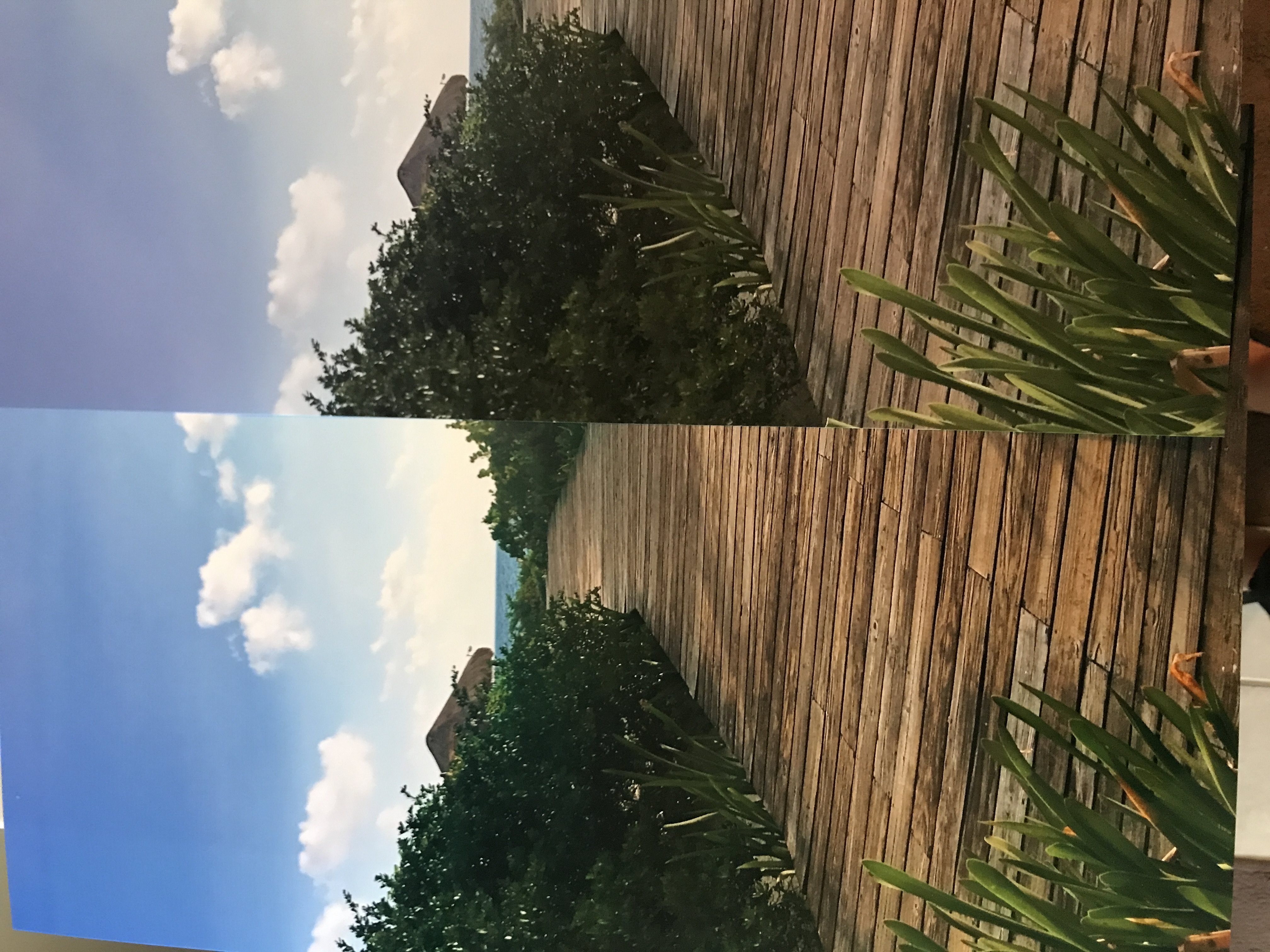
I don't know how to add a pic. I took a side by side of the print from the i9900 and the Pro-100.
Yes, did a nozzle check. Looks fine.
I don't know how to add a pic. I took a side by side of the print from the i9900 and the Pro-100.
Options
- Mark as New
- Bookmark
- Subscribe
- Mute
- Subscribe to RSS Feed
- Permalink
- Report Inappropriate Content
10-01-2017 11:45 AM
Options
- Mark as New
- Bookmark
- Subscribe
- Mute
- Subscribe to RSS Feed
- Permalink
- Report Inappropriate Content
10-01-2017 11:47 AM
Ok, figured it out, I just couldn't do it from my phone. The pic isn't the greatest, but the left is from the i9900, colors are sharper and more vibrant. The right is the Pro-100, the greens seem very gray, colors are just dull.
Options
- Mark as New
- Bookmark
- Subscribe
- Mute
- Subscribe to RSS Feed
- Permalink
- Report Inappropriate Content
10-01-2017 11:59 AM
What paper are you printing on?
What operating system macOS or Windows?
What operating system macOS or Windows?
John Hoffman
Conway, NH
R6 Mark III, M200 (converted to infrared), RF lenses, Pixma PRO-100, Pixma TR8620a, Lr Classic
Conway, NH
R6 Mark III, M200 (converted to infrared), RF lenses, Pixma PRO-100, Pixma TR8620a, Lr Classic
Options
- Mark as New
- Bookmark
- Subscribe
- Mute
- Subscribe to RSS Feed
- Permalink
- Report Inappropriate Content
10-01-2017 02:46 PM
Windows 7
Canon premium glossy photo paper
Canon premium glossy photo paper
Options
- Mark as New
- Bookmark
- Subscribe
- Mute
- Subscribe to RSS Feed
- Permalink
- Report Inappropriate Content
10-01-2017 05:26 PM
I don't see a media type for that paper in my Pro-100 driver. Maybe its a profile mismatch.
Can you try a different paper that has a profile in the Pro-100 driver?
John Hoffman
Conway, NH
R6 Mark III, M200 (converted to infrared), RF lenses, Pixma PRO-100, Pixma TR8620a, Lr Classic
Conway, NH
R6 Mark III, M200 (converted to infrared), RF lenses, Pixma PRO-100, Pixma TR8620a, Lr Classic
Options
- Mark as New
- Bookmark
- Subscribe
- Mute
- Subscribe to RSS Feed
- Permalink
- Report Inappropriate Content
10-01-2017 11:19 PM
I've used 3 different types of photo paper and the results have been the same.
Options
- Mark as New
- Bookmark
- Subscribe
- Mute
- Subscribe to RSS Feed
- Permalink
- Report Inappropriate Content
10-01-2017 11:27 PM
Give Canon a call at 1-800-OK-CANON.
John Hoffman
Conway, NH
R6 Mark III, M200 (converted to infrared), RF lenses, Pixma PRO-100, Pixma TR8620a, Lr Classic
Conway, NH
R6 Mark III, M200 (converted to infrared), RF lenses, Pixma PRO-100, Pixma TR8620a, Lr Classic

Announcements
07/22/2026: New firmware updates are available.
EOS R6 Mark III - Version 1.1.0
05/13/2026: New firmware updates are available.
EOS R5 Mark II - Version 1.3.0
EOS R6 Mark II - Version 1.7.0
04/28/2026: Service Notice: Caution Concerning use of Lithium Batteries
03/17/2026: New firmware updates are available.
SELPHY CP1500 - Version 1.0.7.0
02/23/2026: New firmware update is available for EOS C50- Version 1.0.3.1
01/23/2026: New firmware update is available for RF 24-105mm F4 IS USM- Version 2.0.7
01/20/2026: New firmware updates are available.
10/21/2025: Service Notice: To Users of the Compact Digital Camera PowerShot V1
10/15/2025: New firmware updates are available.
Speedlite EL-5 - Version 1.2.0
Speedlite EL-1 - Version 1.1.0
Speedlite Transmitter ST-E10 - Version 1.2.0
07/28/2025: Notice of Free Repair Service for the Mirrorless Camera EOS R50 (Black)
05/21/2025: New firmware update available for EOS C500 Mark II - Version 1.1.5.1
Related Content
- PIXMA TS9521Ca-Can't upload most Problematic Receipt to Register AND Scan print white paper as gray in Desktop Inkjet Printers
- PIXMA TS5350a black ink streaky when printing from PC, copies are OK in Desktop Inkjet Printers
- PIXMA G620 - Prints partial page then starts job over in Desktop Inkjet Printers
- PIXMA iP2600 won't print, Ink absorber is full error in Desktop Inkjet Printers
- PIXMA G6020 Not Printing Dark Cyan in Desktop Inkjet Printers

Ⓒ 2026
Canon U.S.A Inc. All Rights Reserved. Reproduction in whole or part without permission is prohibited.
