Turn on suggestions
Auto-suggest helps you quickly narrow down your search results by suggesting possible matches as you type.
- Canon Community
- Discussions & Help
- Printer
- Professional Photo Printers
- PIXMA PRO-200S won't print using custom print size
Options
- Subscribe to RSS Feed
- Mark Topic as New
- Mark Topic as Read
- Float this Topic for Current User
- Bookmark
- Subscribe
- Mute
- Printer Friendly Page
PIXMA PRO-200S won't print using custom print size

Options
- Mark as New
- Bookmark
- Subscribe
- Mute
- Subscribe to RSS Feed
- Permalink
- Report Inappropriate Content
06-11-2026
12:08 AM
- last edited on
06-11-2026
08:15 AM
by
 Danny
Danny
Hi!
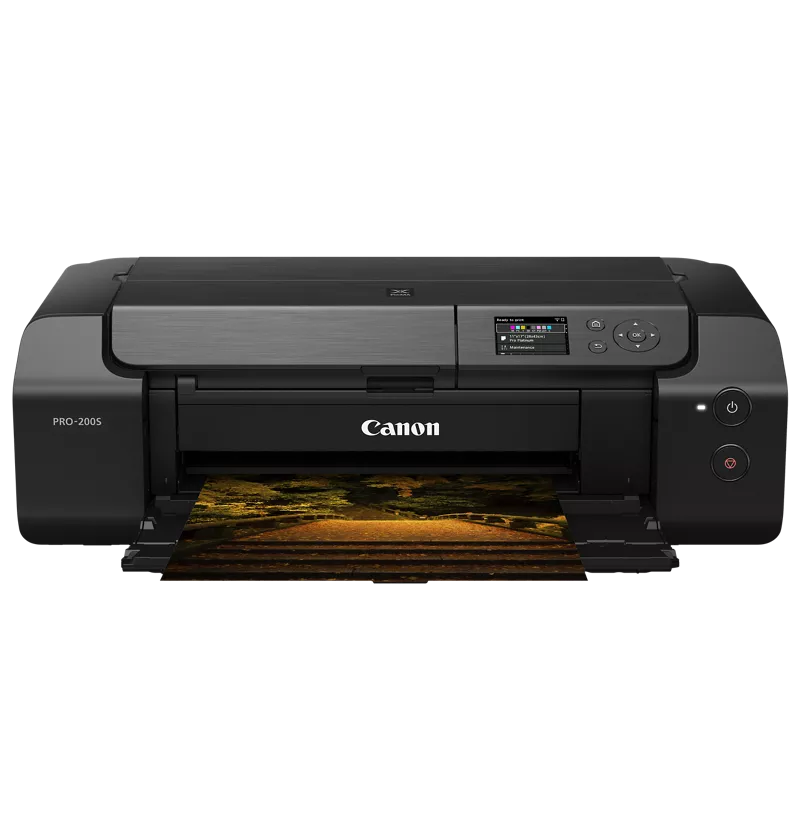
I am attempting to print on a custom sized envelope on my Canon Pro 200S, but I cannot get it to print. It's a 5 x 5.75 area that I would like to print on. I made sure that the design I saved from my design software is a 5x5.75 and I've added it as a custom print size on my computer (Mac). I also set my printer to the "Other" paper size setting. Digitally, everything seems fine when I click print. My printer fully runs through the printing process without sharing any error messages but the envelope comes out blank every single time. I've had this issue with other sizes too. Does anyone know how to fix this or if this a mechanical issue?
Thanks!
6 REPLIES 6
Options
- Mark as New
- Bookmark
- Subscribe
- Mute
- Subscribe to RSS Feed
- Permalink
- Report Inappropriate Content
06-11-2026 12:10 AM
I also forgot to mention I am not using AirPrint. I have a cord running directly from my printer to my computer. 🙂


Options
- Mark as New
- Bookmark
- Subscribe
- Mute
- Subscribe to RSS Feed
- Permalink
- Report Inappropriate Content
06-11-2026 08:22 AM
@SaraThomas wrote:
I also forgot to mention I am not using AirPrint. I have a cord running directly from my printer to my computer. 🙂
Which driver do you have installed?
AirPrint can be a wired connection and the Canon CUPS driver can be wired or wireless.
You can check in System Settings.

John Hoffman
Conway, NH
R6 Mark III, M200 (converted to infrared), RF lenses, Pixma PRO-100, Pixma TR8620a, Lr Classic
Conway, NH
R6 Mark III, M200 (converted to infrared), RF lenses, Pixma PRO-100, Pixma TR8620a, Lr Classic

Options
- Mark as New
- Bookmark
- Subscribe
- Mute
- Subscribe to RSS Feed
- Permalink
- Report Inappropriate Content
06-11-2026 08:37 AM - edited 06-11-2026 08:38 AM
I'm thinking this might be a paper and design software miscommunication. I suggest that you save off the file as a high-res jpg from your design software. Then open the file in Canon Professional Print & Layout. You can then ensure the printer and the paper are both set up with matching custom profiles to match your paper size (or you can print on oversized standard size paper and trim - that should absolutely work). Going down this path will add a step and time to your workflow, but perhaps it can be a workaround until you get your other issue (I'm guessing between your design software and the printer) resolved. What is your design software, by the way?
>> Owns/Owned both Canon EOS mirrorless full-frame and APS-C cameras and associated RF, RF-S and EF adapted lenses - inventory tends to change on short notice. Same for flashes, tripods, bags, straps, etc.
Plus>> Canon imagePROGRAF PRO-1100 Printer. My photos are edited using no Adobe products.
>>The opinions and assistance are my own. Please don't blame Canon for any mistakes on my part.
Options
- Mark as New
- Bookmark
- Subscribe
- Mute
- Subscribe to RSS Feed
- Permalink
- Report Inappropriate Content
06-11-2026 06:08 PM
In my settings, its says "Driver ---- 4.0"
Options
- Mark as New
- Bookmark
- Subscribe
- Mute
- Subscribe to RSS Feed
- Permalink
- Report Inappropriate Content
06-11-2026 06:31 PM
That is the AirPrint driver.
Have you downloaded and installed the Canon driver from the Canon support site?
When the Canon driver is installed repeat the add printer process. Wait until the IJ Series driver appears. Could take several minutes.
John Hoffman
Conway, NH
R6 Mark III, M200 (converted to infrared), RF lenses, Pixma PRO-100, Pixma TR8620a, Lr Classic
Conway, NH
R6 Mark III, M200 (converted to infrared), RF lenses, Pixma PRO-100, Pixma TR8620a, Lr Classic
Options
- Mark as New
- Bookmark
- Subscribe
- Mute
- Subscribe to RSS Feed
- Permalink
- Report Inappropriate Content
06-11-2026 08:58 PM
Thank you for letting me know! I am trying to download it now. Thanks again for the help!

Announcements
07/22/2026: New firmware updates are available.
EOS R6 Mark III - Version 1.1.0
05/13/2026: New firmware updates are available.
EOS R5 Mark II - Version 1.3.0
EOS R6 Mark II - Version 1.7.0
04/28/2026: Service Notice: Caution Concerning use of Lithium Batteries
03/17/2026: New firmware updates are available.
SELPHY CP1500 - Version 1.0.7.0
02/23/2026: New firmware update is available for EOS C50- Version 1.0.3.1
01/23/2026: New firmware update is available for RF 24-105mm F4 IS USM- Version 2.0.7
01/20/2026: New firmware updates are available.
10/21/2025: Service Notice: To Users of the Compact Digital Camera PowerShot V1
10/15/2025: New firmware updates are available.
Speedlite EL-5 - Version 1.2.0
Speedlite EL-1 - Version 1.1.0
Speedlite Transmitter ST-E10 - Version 1.2.0
07/28/2025: Notice of Free Repair Service for the Mirrorless Camera EOS R50 (Black)
05/21/2025: New firmware update available for EOS C500 Mark II - Version 1.1.5.1
Related Content
- PIXMA PRO-200S How to use ICC profiles in PP&L in Professional Photo Printers
- CanonTS5300 no custom size in Desktop Inkjet Printers
- Urgent help - PIXMA PRO-200S Intermittent buckling in Professional Photo Printers
- Problems with page orientation when booklet printing from indesign on a mac using MF753CDW II in Office Printers

Ⓒ 2026
Canon U.S.A Inc. All Rights Reserved. Reproduction in whole or part without permission is prohibited.
