Turn on suggestions
Auto-suggest helps you quickly narrow down your search results by suggesting possible matches as you type.
- Canon Community
- Discussions & Help
- Printer
- Professional Photo Printers
- Re: Horizontal lines on print Canon Pro 1000
Options
- Subscribe to RSS Feed
- Mark Topic as New
- Mark Topic as Read
- Float this Topic for Current User
- Bookmark
- Subscribe
- Mute
- Printer Friendly Page
Horizontal lines on print Canon Pro 1000

Options
- Mark as New
- Bookmark
- Subscribe
- Mute
- Subscribe to RSS Feed
- Permalink
- Report Inappropriate Content
08-12-2023 09:52 AM

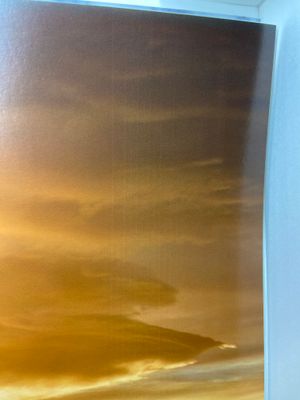
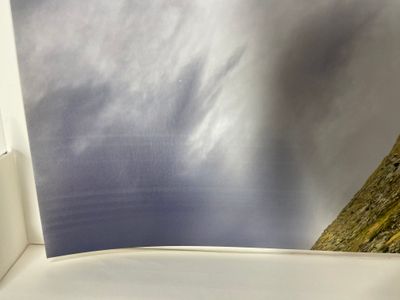
When I print on format A2 I get horizontal lines at the beginning and end of the print, the first and last 5 cm of the print, see photos. In between the print is perfect. The paper I use is Canson Baryta photographique II 310 g/m2 and totally flat before use. Nozzle check pattern is OK, prevent paper abrasion is on, vacuum by default is on.
Does anyone have an idea what it could be?
15 REPLIES 15
Options
- Mark as New
- Bookmark
- Subscribe
- Mute
- Subscribe to RSS Feed
- Permalink
- Report Inappropriate Content
05-23-2025 12:56 PM
themagiceight— –
Yes I recognized that after I posted my photo of my symptoms.
Mine is a sort of fading away of *some* of the inks,
in a soft-edged band running parallel to the movement of the print head,
starting about 8 cm from the edge of the A3+ sheet of semi-gloss paper.
I should perhaps start a new query thread for what i am seeing.
thank you
Options
- Mark as New
- Bookmark
- Subscribe
- Mute
- Subscribe to RSS Feed
- Permalink
- Report Inappropriate Content
08-10-2025 03:06 AM
How is the situation here?
I and many others experience very similar problems with pro 1100. Canon already replaced many units and all experience the same problems. I just got my replacement and I’m so devastated.
Options
- Mark as New
- Bookmark
- Subscribe
- Mute
- Subscribe to RSS Feed
- Permalink
- Report Inappropriate Content
08-10-2025 11:14 PM - edited 08-10-2025 11:14 PM
"Pause between scans" seems to be the relevant setting. At 5 seconds, I don't get horizontal lines. Of course, this is a disappointing fix since it massively increases print time.
My guess is there's a design flaw in the pro 1100 and all units are affected more or less to the same extent. I'm on printer #3 after two RMAs -- they all do it
Options
- Mark as New
- Bookmark
- Subscribe
- Mute
- Subscribe to RSS Feed
- Permalink
- Report Inappropriate Content
08-12-2025 01:52 AM
Thank you very much. Based on the description of this function I have no idea how this influences that type of banding but... I gave it a try and it actually worked. It was late, so I just tested 2 prints but I will test more today.
Fortunately I'm home/hobbyist photographer and I do not need to print some number of prints in specific period of time but it might really be a killer for professionals.
Options
- Mark as New
- Bookmark
- Subscribe
- Mute
- Subscribe to RSS Feed
- Permalink
- Report Inappropriate Content
08-21-2025 05:57 PM
Last night - while reviewing the service manual - I discovered the existence of the "timing slit disk"
Over the years, overspray of ink had gotten all over mine. Several cleanings with q-tips, pads and windex fixed it
Did a recalibration of line-feed (in the media config tool) and banding was GONE!
Options
- Mark as New
- Bookmark
- Subscribe
- Mute
- Subscribe to RSS Feed
- Permalink
- Report Inappropriate Content
08-21-2025 05:58 PM - edited 08-21-2025 06:00 PM
This celluloid-like calibration disk had huge clots of ink on it.
Which explained why the line feed banding was occurring in regular intervals - as the obscured portions passed under the sensor, the printer could not calibrate it's feed
Fortunately, I did not have to take the printer that much "apart" - Just the left side panel and I could access the disk via port holes with swabs (I used lens sensor swaps soaked in windex) on both sides of the disk

- « Previous
-
- 1
- 2
- Next »
- « Previous
-
- 1
- 2
- Next »
Announcements
07/22/2026: New firmware updates are available.
EOS R6 Mark III - Version 1.1.0
05/13/2026: New firmware updates are available.
EOS R5 Mark II - Version 1.3.0
EOS R6 Mark II - Version 1.7.0
04/28/2026: Service Notice: Caution Concerning use of Lithium Batteries
03/17/2026: New firmware updates are available.
SELPHY CP1500 - Version 1.0.7.0
02/23/2026: New firmware update is available for EOS C50- Version 1.0.3.1
01/23/2026: New firmware update is available for RF 24-105mm F4 IS USM- Version 2.0.7
01/20/2026: New firmware updates are available.
10/21/2025: Service Notice: To Users of the Compact Digital Camera PowerShot V1
10/15/2025: New firmware updates are available.
Speedlite EL-5 - Version 1.2.0
Speedlite EL-1 - Version 1.1.0
Speedlite Transmitter ST-E10 - Version 1.2.0
07/28/2025: Notice of Free Repair Service for the Mirrorless Camera EOS R50 (Black)
05/21/2025: New firmware update available for EOS C500 Mark II - Version 1.1.5.1
Related Content
- PIXMA TS3720 not responding in Desktop Inkjet Printers
- Pricing info needed for imageCLASS LBP646Cdw toner auto replenishment program in Office Printers
- Checking out a used MF731Cdw: prints wide horizontal color bars in Office Printers
- Can't get AirPrint to work on a new PIXMA TS6520 in Printer Software & Networking
- PIXMA iX6820 Ink dissolves from Waterslide Decals when underwater in Desktop Inkjet Printers

Ⓒ 2026
Canon U.S.A Inc. All Rights Reserved. Reproduction in whole or part without permission is prohibited.
