Turn on suggestions
Auto-suggest helps you quickly narrow down your search results by suggesting possible matches as you type.
- Canon Community
- Discussions & Help
- Printer
- Printer Software & Networking
- Re: imageCLASS MF751Cdw How to Upload Wildcard TLS...
Options
- Subscribe to RSS Feed
- Mark Topic as New
- Mark Topic as Read
- Float this Topic for Current User
- Bookmark
- Subscribe
- Mute
- Printer Friendly Page
imageCLASS MF751Cdw How to Upload Wildcard TLS Certificate in Remote UI?

Options
- Mark as New
- Bookmark
- Subscribe
- Mute
- Subscribe to RSS Feed
- Permalink
- Report Inappropriate Content
04-13-2024
12:16 AM
- last edited on
04-13-2024
08:36 AM
by
 Danny
Danny
Hello,
I recently purchased and setup an imageCLASS MF751Cdw. I'm pretty happy with the purchase, and I've already glazed over all the settings and made them my own. There is however 1 thing that is aggravatingly asinine and totally ridiculous and that is the Key and Certificate Settings section... Throughout my career I've dealt alot with using SSL/TLS certificates and using them to secure web applications and client-server connections. It's pretty straightforward once you've done it enough. But whoever built the certificate functionality in the Remote UI wins the award for all-time worst certificate functionality my colleagues and I have ever seen.
I have a wildcard SSL/TLS certificate. It works seamless on many other systems I've deployed it with. It meets all of Canon's requirements, except that it's a .crt file. Ok, not a big deal, I'll just convert it right? I convert it to a .cer and when you upload it, it takes you to this ridiculous screen asking for a key name and password? What in the world is anyone supposed to do with this?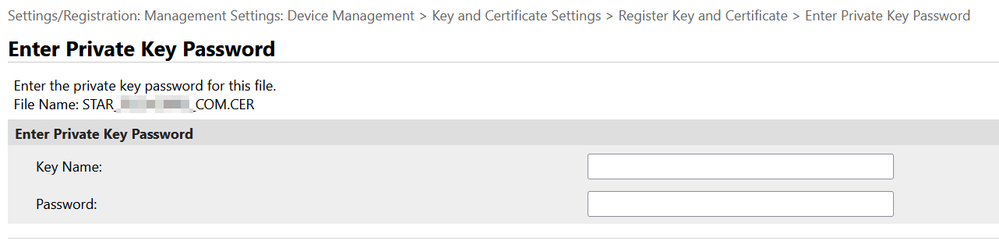
Why can't I just upload my certificate's private key just like every other practical web server out there? There is literally no option that I can see or figure out which allows me to just upload my key for my certificate. I'd like to start using some of the features which require TLS connectivity.
Is anyone aware of a workaround to just force the certificate in? Is there a command-line shell to access for this printer's web server? How can I just upload my certificate since Canon's absolutely insane certificate implementation doesn't even work in any practical way?
Thanks and let me know!
2 REPLIES 2


Options
- Mark as New
- Bookmark
- Subscribe
- Mute
- Subscribe to RSS Feed
- Permalink
- Report Inappropriate Content
04-13-2024 08:51 AM - edited 04-13-2024 08:52 AM
Greetings ,
I ran into something similar to this while configuring Netsuite - sFTP for ACH transactions at one of my clients. It was a little different as I used PuTTy to generate the key pair. I later switched to a command line and generated my key pair that way. I have not reviewed Canon's requirements for certificates. Let me grab a cup of coffee and I'll take a look.
~Rick
Bay Area - CA
~R5 C (1.1.3.1), ~RF Trinity, ~RF 100 Macro, ~RF 100~400, ~RF 100~500, ~RF 200-800, ~RF 1.4x TC, BG-R10, 430EX III-RT ~DxO PhotoLab Elite ~DaVinci Resolve Studio ~ImageClass MF644Cdw MF656Cdw ~Pixel 10 ~CarePaks Are Worth It
Options
- Mark as New
- Bookmark
- Subscribe
- Mute
- Subscribe to RSS Feed
- Permalink
- Report Inappropriate Content
04-13-2024 09:26 AM - edited 04-13-2024 09:27 AM
It looks like you have to generate the certificate (.CSR) from the machine in order to request the .cer.
I don't think it will take a converted .crt to .cer. I don't know this for sure as I've never tried.
See reference:
I would reach out to support and ask them.
Start by registering in the MyCanon Portal.
Open a case. You will then be able to email or speak with a tech.
~Rick
Bay Area - CA
~R5 C (1.1.3.1), ~RF Trinity, ~RF 100 Macro, ~RF 100~400, ~RF 100~500, ~RF 200-800, ~RF 1.4x TC, BG-R10, 430EX III-RT ~DxO PhotoLab Elite ~DaVinci Resolve Studio ~ImageClass MF644Cdw MF656Cdw ~Pixel 10 ~CarePaks Are Worth It

Announcements
07/22/2026: New firmware updates are available.
EOS R6 Mark III - Version 1.1.0
05/13/2026: New firmware updates are available.
EOS R5 Mark II - Version 1.3.0
EOS R6 Mark II - Version 1.7.0
04/28/2026: Service Notice: Caution Concerning use of Lithium Batteries
03/17/2026: New firmware updates are available.
SELPHY CP1500 - Version 1.0.7.0
02/23/2026: New firmware update is available for EOS C50- Version 1.0.3.1
01/23/2026: New firmware update is available for RF 24-105mm F4 IS USM- Version 2.0.7
01/20/2026: New firmware updates are available.
10/21/2025: Service Notice: To Users of the Compact Digital Camera PowerShot V1
10/15/2025: New firmware updates are available.
Speedlite EL-5 - Version 1.2.0
Speedlite EL-1 - Version 1.1.0
Speedlite Transmitter ST-E10 - Version 1.2.0
07/28/2025: Notice of Free Repair Service for the Mirrorless Camera EOS R50 (Black)
05/21/2025: New firmware update available for EOS C500 Mark II - Version 1.1.5.1
Related Content
- imageCLASS MF751Cdw How to Upload Wildcard TLS Certificate in Remote UI? in Printer Software & Networking
- imageCLASS MF743Cdw Email Setup in Office Printers
- Canon MF232W ImageCLASS will no longer print due to OLD Drivers - All Certificates are out of DATE! in Printer Software & Networking
- Color ImageCLASS MF642CDW scan to e-mail issue in Office Printers
- Blank strips when scanning death certificate in Office Printers

Ⓒ 2026
Canon U.S.A Inc. All Rights Reserved. Reproduction in whole or part without permission is prohibited.
