Turn on suggestions
Auto-suggest helps you quickly narrow down your search results by suggesting possible matches as you type.
- Canon Community
- Discussions & Help
- Printer
- Printer Software & Networking
- Unable to install CANON PIXMA TS3522
Options
- Subscribe to RSS Feed
- Mark Topic as New
- Mark Topic as Read
- Float this Topic for Current User
- Bookmark
- Subscribe
- Mute
- Printer Friendly Page
Unable to install CANON PIXMA TS3522

Options
- Mark as New
- Bookmark
- Subscribe
- Mute
- Subscribe to RSS Feed
- Permalink
- Report Inappropriate Content
10-18-2023 01:41 PM
Hi,
I'm trying to install CANON PIXMA TS3522 but getting error:
To install the software, you must be logged in to an administrator account. Click (OK) to cancel the installation. If you are using the CD-ROM, remove it after clicking [OK]. Log in to an administrator account, then install the software
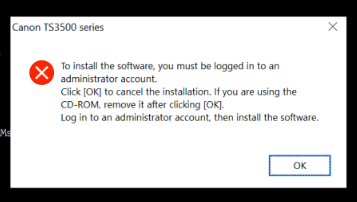
Already logged in as an administrator.
Below resolution will not work. Not found in Pixma TS3522 installer.
1. Unpack the driver's .exe into a folder
2. Locate msetup4.ini file and open it in Notepad
3. Search for [CHECKADMIN] section
4. Change IFNE=%ADMIN%,0 to IFNE=%ADMIN%,1
5. Save, and run Setup (M4SETUP.EXE)
Please help. Thank you!
5 REPLIES 5


Options
- Mark as New
- Bookmark
- Subscribe
- Mute
- Subscribe to RSS Feed
- Permalink
- Report Inappropriate Content
10-18-2023 01:51 PM
Hey there! I'm not a tech, but I've installed several printers in my time! Try the software HERE. Once you download it, right-click it and install it as an administrator.
If that doesn't work, let us know!
Options
- Mark as New
- Bookmark
- Subscribe
- Mute
- Subscribe to RSS Feed
- Permalink
- Report Inappropriate Content
10-18-2023 02:36 PM
Hi Stephen,
Thanks for the response. Already tried this one but it's not working either.


Options
- Mark as New
- Bookmark
- Subscribe
- Mute
- Subscribe to RSS Feed
- Permalink
- Report Inappropriate Content
10-18-2023 03:09 PM
Try this: When you go to run the installation file, right-click on it and select "Run as Administrator".
Options
- Mark as New
- Bookmark
- Subscribe
- Mute
- Subscribe to RSS Feed
- Permalink
- Report Inappropriate Content
10-18-2023 05:08 PM
It's not working either. Also tried running the exe file via CMD (admin). Same error.

Options
- Mark as New
- Bookmark
- Subscribe
- Mute
- Subscribe to RSS Feed
- Permalink
- Report Inappropriate Content
10-18-2023 07:11 PM - edited 10-18-2023 07:26 PM
Greetings,
A couple of suggestions for you to try.
First. Right-click on the file, Select Properties >Security tab > Advanced button. Who is the owner? If the admin user you are logged in as is not, Take Ownership. Ensure this user has Full Control. Delete any unzipped directories or folder and unzip again, then run.
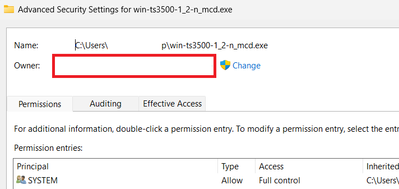
The file is a self extracting .Zip
Start by deleting all copies of the file, and any folders or directories where you unpacked it and attempted to run it from.
Using Stephen's link above, download a fresh copy of the installer to your downloads folder or desktop. Right-Click on it and select Properties.
Check the "Unblock" checkbox box and press OK. Now unzip and attempt to run it again.

If that doesn't work. Delete the folder where it unzipped to again.
Right-Click on the self-extracting executable and this time select "Rename".
Change the extension from .exe to .zip
Now unzip and attempt to run the installer again.
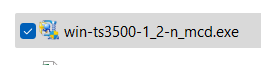

Note you must have file extensions set to display to rename properly. Otherwise you'll wind up with this.

Hope this helps.
~Rick
Bay Area - CA
~R5 C (1.1.3.1), ~RF Trinity, ~RF 100 Macro, ~RF 100~400, ~RF 100~500, ~RF 200-800, ~RF 1.4x TC, BG-R10, 430EX III-RT ~DxO PhotoLab Elite ~DaVinci Resolve Studio ~ImageClass MF644Cdw MF656Cdw ~Pixel 10 ~CarePaks Are Worth It


Announcements
07/22/2026: New firmware updates are available.
EOS R6 Mark III - Version 1.1.0
05/13/2026: New firmware updates are available.
EOS R5 Mark II - Version 1.3.0
EOS R6 Mark II - Version 1.7.0
04/28/2026: Service Notice: Caution Concerning use of Lithium Batteries
03/17/2026: New firmware updates are available.
SELPHY CP1500 - Version 1.0.7.0
02/23/2026: New firmware update is available for EOS C50- Version 1.0.3.1
01/23/2026: New firmware update is available for RF 24-105mm F4 IS USM- Version 2.0.7
01/20/2026: New firmware updates are available.
10/21/2025: Service Notice: To Users of the Compact Digital Camera PowerShot V1
10/15/2025: New firmware updates are available.
Speedlite EL-5 - Version 1.2.0
Speedlite EL-1 - Version 1.1.0
Speedlite Transmitter ST-E10 - Version 1.2.0
07/28/2025: Notice of Free Repair Service for the Mirrorless Camera EOS R50 (Black)
05/21/2025: New firmware update available for EOS C500 Mark II - Version 1.1.5.1
Related Content
- PIXMA G3670 Printer pausing and unable to delete queue in Desktop Inkjet Printers
- PIXMA TS3522 unable to responding in Desktop Inkjet Printers
- Unable to install CanoScan LiDE 50 on Windows 10 in Scanners
- imageCLASS MF462dw II duplex printing not enabled in Office Printers
- CanoScan LiDE 300 Unable to install driver and software on Windows 11 in Scanners

Ⓒ 2026
Canon U.S.A Inc. All Rights Reserved. Reproduction in whole or part without permission is prohibited.
