Turn on suggestions
Auto-suggest helps you quickly narrow down your search results by suggesting possible matches as you type.
- Canon Community
- Discussions & Help
- Printer
- Printer Software & Networking
- Unable to connect new laptop to MX472
Options
- Subscribe to RSS Feed
- Mark Topic as New
- Mark Topic as Read
- Float this Topic for Current User
- Bookmark
- Subscribe
- Mute
- Printer Friendly Page
Unable to connect new laptop to MX472

Options
- Mark as New
- Bookmark
- Subscribe
- Mute
- Subscribe to RSS Feed
- Permalink
- Report Inappropriate Content
10-23-2020 08:10 PM
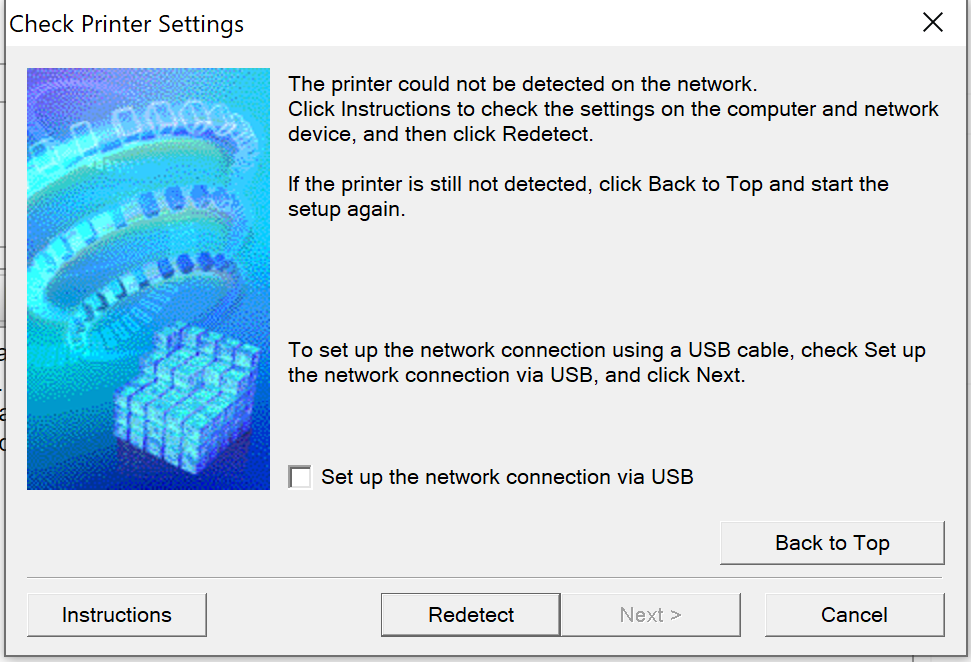
I have a new Lenovo Windows 10 laptop and an existing MX472 printer/scanner. I downloaded the MX470 series Full Driver & Software Package (Windows 10/10 x64/8.1/8.1 x64/8/8 x64/7/7 x64/Vista/Vista64/XP) and it the installation cannot complete because it cannot detect the printer. The laptop and the printer are on the same network. I can print from my iPhone using Airprint. I have uninstalled and re-installed the drivers/software package several times. I have restarted the printer and the laptop. How do I get the software to finish installing on my computer if it cannot get through the last step, detecting the printer?
5 REPLIES 5


Options
- Mark as New
- Bookmark
- Subscribe
- Mute
- Subscribe to RSS Feed
- Permalink
- Report Inappropriate Content
10-25-2020 11:21 AM
Greetings,
See if this helps:
~Rick
Bay Area - CA
~R5 C (1.1.3.1), ~RF Trinity, ~RF 100 Macro, ~RF 100~400, ~RF 100~500, ~RF 200-800, ~RF 1.4x TC, BG-R10, 430EX III-RT ~DxO PhotoLab Elite ~DaVinci Resolve Studio ~ImageClass MF644Cdw MF656Cdw ~Pixel 10 ~CarePaks Are Worth It
Options
- Mark as New
- Bookmark
- Subscribe
- Mute
- Subscribe to RSS Feed
- Permalink
- Report Inappropriate Content
10-27-2020 12:30 PM
I figured my firewall wasn't permitting the computer to recognize the printer, so I turned it off. I am now able to print from my computer. However, I cannot scan! The driver download still didn't complete - says it doesnt recognize the printer, but since I can print, it must recognize it somehow. I also don't have a desktop icon for the printer/scanner. HELLLPPPP!!!!


Options
- Mark as New
- Bookmark
- Subscribe
- Mute
- Subscribe to RSS Feed
- Permalink
- Report Inappropriate Content
11-23-2020 02:04 PM
Hello Karezz,
If you can print but you can't scan and you can use the MX472 from your phone, it will usually mean that something prevented the scanner driver from installing on the computer. Firewall settings can block the MX472 from being detected and anti-virus/spyware settings can prevent the scanner driver from installing. In this situation, I would suggest turning off the firewall and all other security programs on the computer and then reinstalling the full driver and software package from our website again.
Once the install is complete, click on the Windows icon in the lower left and let me know if you see a folder for Canon Utilities in your list of programs. In Canon Utilities, you should find the IJ scan utility and that is the program that allows you to scan.
If the IJ scan utility did not show up after the install, I would need some additional information to assist further, If you could reply to this message with the information below, we can continue to troubleshoot.
- What security software are you using on the computer?
- After the printer is selected, do you get any errors in the install or where does the install stop?

Options
- Mark as New
- Bookmark
- Subscribe
- Mute
- Subscribe to RSS Feed
- Permalink
- Report Inappropriate Content
08-29-2022 06:55 PM
how do i install mx472 to another laptop without CD?

Options
- Mark as New
- Bookmark
- Subscribe
- Mute
- Subscribe to RSS Feed
- Permalink
- Report Inappropriate Content
08-29-2022 06:59 PM
Download all the necessary drivers and software form the Canon support site.
Canon Support for PIXMA MX472 | Canon U.S.A., Inc.
John Hoffman
Conway, NH
R6 Mark III, M200 (converted to infrared), RF lenses, Pixma PRO-100, Pixma TR8620a, Lr Classic
Conway, NH
R6 Mark III, M200 (converted to infrared), RF lenses, Pixma PRO-100, Pixma TR8620a, Lr Classic

Announcements
07/22/2026: New firmware updates are available.
EOS R6 Mark III - Version 1.1.0
05/13/2026: New firmware updates are available.
EOS R5 Mark II - Version 1.3.0
EOS R6 Mark II - Version 1.7.0
04/28/2026: Service Notice: Caution Concerning use of Lithium Batteries
03/17/2026: New firmware updates are available.
SELPHY CP1500 - Version 1.0.7.0
02/23/2026: New firmware update is available for EOS C50- Version 1.0.3.1
01/23/2026: New firmware update is available for RF 24-105mm F4 IS USM- Version 2.0.7
01/20/2026: New firmware updates are available.
10/21/2025: Service Notice: To Users of the Compact Digital Camera PowerShot V1
10/15/2025: New firmware updates are available.
Speedlite EL-5 - Version 1.2.0
Speedlite EL-1 - Version 1.1.0
Speedlite Transmitter ST-E10 - Version 1.2.0
07/28/2025: Notice of Free Repair Service for the Mirrorless Camera EOS R50 (Black)
05/21/2025: New firmware update available for EOS C500 Mark II - Version 1.1.5.1
Related Content
- imageCLASS D570 - Won't Connect Via App in Office Printers
- Laptop not connecting with PIXMA g3202 in Desktop Inkjet Printers
- imageCLASS MF273dw won't connect, unable to print test page, no paper error in Printer Software & Networking
- Canon PIXMA E470 unable connect smartphone in Printer Software & Networking
- Canon PIXIMA TR4520 how to connect my printer wireless. in Printer Software & Networking

Ⓒ 2026
Canon U.S.A Inc. All Rights Reserved. Reproduction in whole or part without permission is prohibited.
