Turn on suggestions
Auto-suggest helps you quickly narrow down your search results by suggesting possible matches as you type.
- Canon Community
- Discussions & Help
- Printer
- Printer Software & Networking
- Re: Print Studio Pro plug-in for Lightroom version...
Options
- Subscribe to RSS Feed
- Mark Topic as New
- Mark Topic as Read
- Float this Topic for Current User
- Bookmark
- Subscribe
- Mute
- Printer Friendly Page

Options
- Mark as New
- Bookmark
- Subscribe
- Mute
- Subscribe to RSS Feed
- Permalink
- Report Inappropriate Content
05-01-2023
07:00 AM
- last edited on
05-02-2023
09:59 AM
by
 Danny
Danny
Print Studio Pro plug-in for Lightroom version 2.2.6 for Mac OS 13
I get the pop up message below when trying to print to my Pro-10S using PSP. .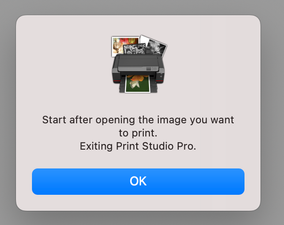
Clicking on the ok button shuts down PSP. Very frustrating.
Has anyone else struck this problem? I'm running OS 13.01 on a 2018 MacBook Pro and Lightroom Classic 2023. Any help would be much appreciated.
Solved! Go to Solution.
1 ACCEPTED SOLUTION
Accepted Solutions
Options
- Mark as New
- Bookmark
- Subscribe
- Mute
- Subscribe to RSS Feed
- Permalink
- Report Inappropriate Content
05-01-2023 06:44 PM
9 REPLIES 9


Options
- Mark as New
- Bookmark
- Subscribe
- Mute
- Subscribe to RSS Feed
- Permalink
- Report Inappropriate Content
05-01-2023 08:53 AM
To confirm - this message pops up after you have an image opened in Lightroom?
Is your LrC version 12.3? LrC doesn't use year designations - Ps does.
John Hoffman
Conway, NH
R6 Mark III, M200 (converted to infrared), RF lenses, Pixma PRO-100, Pixma TR8620a, Lr Classic
Conway, NH
R6 Mark III, M200 (converted to infrared), RF lenses, Pixma PRO-100, Pixma TR8620a, Lr Classic
Options
- Mark as New
- Bookmark
- Subscribe
- Mute
- Subscribe to RSS Feed
- Permalink
- Report Inappropriate Content
05-01-2023 05:39 PM
Hi John, thanks for responding and thanks for your Youtube channel. In answer to your questions:
Yes, I have an image open in LrC that I want to print. I invoke the plus-in and this message pops up. I can confirm the LrC version is 12.3.
Chris de Silva
Options
- Mark as New
- Bookmark
- Subscribe
- Mute
- Subscribe to RSS Feed
- Permalink
- Report Inappropriate Content
05-01-2023 06:30 PM
Hi Chris - I do not get that error. PSP opens for me .
I have MacBook Air M2, macOS 13.3.1, LrC 12.3, PSP 2.2.6.
You could give Canon a call at 1-800-OK-CANON.
John Hoffman
Conway, NH
R6 Mark III, M200 (converted to infrared), RF lenses, Pixma PRO-100, Pixma TR8620a, Lr Classic
Conway, NH
R6 Mark III, M200 (converted to infrared), RF lenses, Pixma PRO-100, Pixma TR8620a, Lr Classic
Options
- Mark as New
- Bookmark
- Subscribe
- Mute
- Subscribe to RSS Feed
- Permalink
- Report Inappropriate Content
05-01-2023 06:44 PM
Thanks John. I'll reach out to Canon.
Options
- Mark as New
- Bookmark
- Subscribe
- Mute
- Subscribe to RSS Feed
- Permalink
- Report Inappropriate Content
05-10-2023 06:36 PM
Hi John, after talking with Canon, I re-installed the printer drivers and PSP. LrC plug-in still gives me the same error but the Ps plug-in now works so I guess I have a workaround.
Options
- Mark as New
- Bookmark
- Subscribe
- Mute
- Subscribe to RSS Feed
- Permalink
- Report Inappropriate Content
05-24-2023 04:11 AM
Further to this topic, I upgraded my main computer, an M1 Mac Studio to OS13.4 and the LrC PSP plug-in works perfectly. This issue may be confined to Intel based Macs. Regards, Chris

Options
- Mark as New
- Bookmark
- Subscribe
- Mute
- Subscribe to RSS Feed
- Permalink
- Report Inappropriate Content
08-02-2023 04:34 PM
Using Mac os13 Ventura, Print Studio Pro won't recognise, keep getting error message, Canon Tech support said try My image Garden Software, unfortunately this hasn't solved the problem.
Options
- Mark as New
- Bookmark
- Subscribe
- Mute
- Subscribe to RSS Feed
- Permalink
- Report Inappropriate Content
08-03-2023 03:10 AM
I'm on Ventura and PSP 2.2.6 works fine in LrC on my M1 Studio. It doesn't work on my i7 MacBookPro. The Ps plug-in doesn't work on my Studio however. I've tried running under Rosetta but that slows down Ps to the point where it's pretty near unusable. Doesn't bother me particularly as I tend to print from LrC anyway. If your Mac is intel based, that may be the issue.
Options
- Mark as New
- Bookmark
- Subscribe
- Mute
- Subscribe to RSS Feed
- Permalink
- Report Inappropriate Content
08-03-2023 07:12 AM
What actual error message. Have you tried the plug-in installer and manually selected the Lightroom plug-in folder?
John Hoffman
Conway, NH
R6 Mark III, M200 (converted to infrared), RF lenses, Pixma PRO-100, Pixma TR8620a, Lr Classic
Conway, NH
R6 Mark III, M200 (converted to infrared), RF lenses, Pixma PRO-100, Pixma TR8620a, Lr Classic

Announcements
07/22/2026: New firmware updates are available.
EOS R6 Mark III - Version 1.1.0
05/13/2026: New firmware updates are available.
EOS R5 Mark II - Version 1.3.0
EOS R6 Mark II - Version 1.7.0
04/28/2026: Service Notice: Caution Concerning use of Lithium Batteries
03/17/2026: New firmware updates are available.
SELPHY CP1500 - Version 1.0.7.0
02/23/2026: New firmware update is available for EOS C50- Version 1.0.3.1
01/23/2026: New firmware update is available for RF 24-105mm F4 IS USM- Version 2.0.7
01/20/2026: New firmware updates are available.
10/21/2025: Service Notice: To Users of the Compact Digital Camera PowerShot V1
10/15/2025: New firmware updates are available.
Speedlite EL-5 - Version 1.2.0
Speedlite EL-1 - Version 1.1.0
Speedlite Transmitter ST-E10 - Version 1.2.0
07/28/2025: Notice of Free Repair Service for the Mirrorless Camera EOS R50 (Black)
05/21/2025: New firmware update available for EOS C500 Mark II - Version 1.1.5.1
Related Content
- Professional Print & Layout crashes when attempting to read bit depth information in Printer Software & Networking
- PRO-1100 is suddenly printing very slowly and color is off in Professional Photo Printers
- imageCLASS MF642Cdw - Scanner function not working with MacOS Tahoe 26.6 in Office Printers
- Can't print from Pro Print & Layout, no problems from Lightroom and Photoshop in Printer Software & Networking
- Canon Professional Print and Layout not working with Photoshop on Windows 11 in Printer Software & Networking

Ⓒ 2026
Canon U.S.A Inc. All Rights Reserved. Reproduction in whole or part without permission is prohibited.
